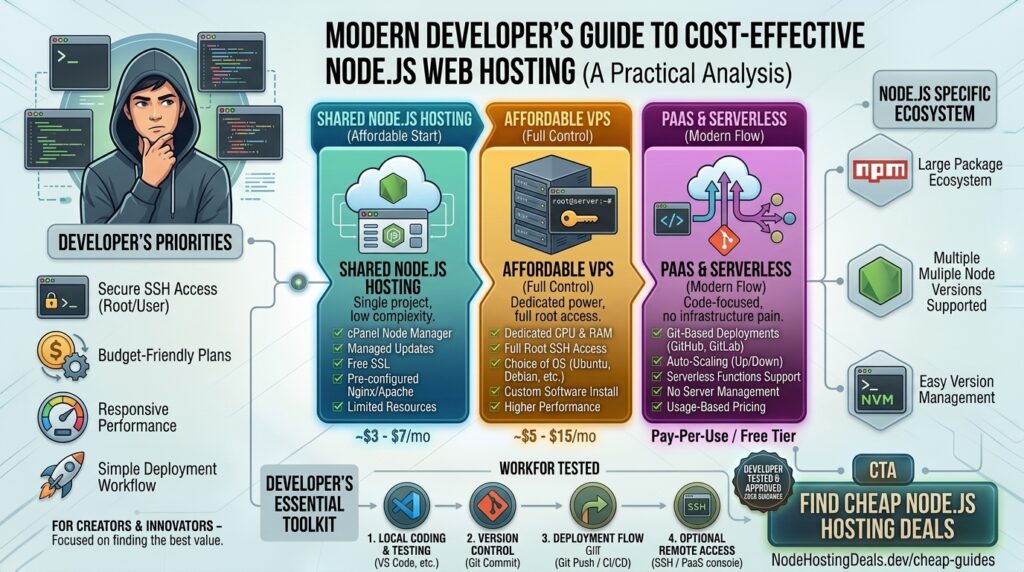
What is the cheap Node.js web hosting for developers? Node.js has transformed modern web development, giving engineers the power to run JavaScript on the server side with non-blocking, asynchronous event-driven architecture. Whether you are building real-time APIs, chat applications, lightweight microservices, or custom frontend integrations, finding affordable and reliable hosting is a top priority for developers.
Traditional shared cPanel hosting is notoriously hostile to Node.js applications, frequently locking down terminal access or failing to support persistent background processes.
If your development team or digital agency is based around major innovation corridors like San Francisco, New York, Seattle, Austin, or Los Angeles, you need hosting that pairs low-cost entry pricing with elite developer tools, unhindered terminal access, and optimal Google Core Web Vitals.
This comprehensive guide breaks down the best cheap Node.js web hosting providers for developers, modern deployment patterns, optimization tips, and 10 detailed FAQs.
Why Standard Shared Hosting Fails for Node.js Applications
Unlike traditional PHP applications (like standard WordPress or Drupal installations) that execute a script and close upon user request, a Node.js app runs as a persistent background server process (listening on a specific port, e.g., 3000 or 8080).
Attempting to run Node.js on cheap shared hosting usually results in:
- No Persistent Process Managers: Inability to run tools like
PM2orforeverto keep your app alive automatically after crashes or system reboots. - Missing Root/Terminal Permissions: Restricted SSH access that blocks you from installing custom npm modules or executing global command-line utilities.
- Port Blocking & Reverse Proxy Issues: Inability to bind applications to external ports without proper Nginx/Apache reverse-proxy configurations.
Developers building lightweight Node.js projects on a budget should instead look toward Cloud VPS infrastructure, Developer-centric PaaS (Platform-as-a-Service), or AI-managed KVM environments.
Top Cheap Node.js Hosting Providers for Developers
To keep infrastructure overhead low while maintaining full developer control, these providers offer the best balance of cost, performance, and flexibility:
1. DigitalOcean (Best Value Developer Cloud & Droplets)
DigitalOcean is a staple in the developer community, offering raw Linux virtual private servers (known as Droplets) optimized for raw speed and terminal control.
- Why it shines for Node.js: Basic Droplets start around $4 to $5 per month. You receive full root SSH access to install Node.js via NVM, manage dependencies with
npmorpnpm, and configure Nginx as a reverse proxy. They also offer a 1-click Node.js marketplace app. - Pros: Predictable pricing, complete root control, massive technical documentation libraries, and robust global data center locations (including US East and West Coast regions).
- Cons: Unmanaged infrastructure; you are entirely responsible for security updates and firewall configurations.
2. Kamatera (Best for Ultra-Cheap Scalable Cloud Resources)
Kamatera delivers high-performance cloud infrastructure with fully customizable resource allocations, making it ideal for budget-conscious developers who need raw computing power.
- Why it shines for Node.js: Entry-level cloud servers start at around $4/month, featuring powerful vCPUs and ultra-fast NVMe storage drives. You can spin up custom Ubuntu or Debian environments tailored precisely for JavaScript runtimes.
- Pros: Highly elastic scaling, blistering NVMe speeds, and flexible hourly or monthly billing.
- Cons: Entirely unmanaged platform requiring manual system administration.
3. Render (Best Free-to-Paid Modern PaaS Alternative)
Render has emerged as a premier Platform-as-a-Service (PaaS) alternative to Heroku, making deployment effortless for modern developers.
- Why it shines for Node.js: You can connect your GitHub or GitLab repository directly to Render. It automatically detects your Node.js project, builds it, and deploys it with zero DevOps configuration. It also includes managed PostgreSQL databases and Redis instances.
- Pros: Automatic SSL, zero-downtime Git deployments, preview environments, and a functional free tier for hobby projects.
- Cons: Free tier instances spin down after 15 minutes of inactivity, leading to brief “cold start” delays.
4. Railway (Best Container-Based PaaS for Prototyping)
Railway provides an exceptionally slick, container-based developer experience designed to spin up full-stack Node.js applications and backend databases within seconds.
- Why it shines for Node.js: It abstracts away complex server management while giving you direct visibility into container logs, environment variables, and network traffic metrics.
- Pros: Incredible developer experience, seamless database integrations (Postgres, MySQL, Redis), and usage-based pricing models.
- Cons: Can become more expensive than a traditional VPS if your application consumes heavy, continuous compute resources.
5. Hostinger VPS (Best Budget KVM Hosting with Full Root Access)
For developers seeking the cost efficiency of shared hosting combined with the technical freedom of a VPS, Hostinger delivers competitive entry-level packages.
- Why it shines for Node.js: Their KVM VPS plans provide full root privileges, dedicated IPv4/IPv6 addresses, and ample NVMe storage at a very low monthly cost.
- Pros: Generous bandwidth allocations, clean custom control panels, and budget-friendly introductory rates.
- Cons: Steep price increases upon renewal after the initial term expires.
Actionable Tips to Optimize Node.js Apps on Budget Hosting
When running Node.js on economical infrastructure, optimizing resource utilization is crucial to maintaining speed and preventing memory leaks:
- Always Use a Process Manager (PM2): Never start your app using a simple
node server.jscommand in production. Use PM2 (pm2 start server.js --name "my-app") to ensure your app automatically restarts if it crashes and leverages multi-core clustering. - Configure Nginx as a Reverse Proxy: Route incoming HTTP traffic through Nginx on port 80/443, proxying requests locally to your Node.js application running on an internal port (like
3000). This secures your server and handles static asset caching efficiently. - Monitor Memory Leaks: Node.js runs on the V8 engine, which has strict garbage collection behaviors. Use monitoring tools or built-in flags (
--max-old-space-size) to cap memory consumption on budget servers with limited RAM. - Leverage Environment Variables Securely: Never hardcode API keys, database URLs, or JWT secrets inside your codebase. Use a
.envfile managed viadotenvand protect it with strict file permissions. - Minimise Docker Image Sizes: If you deploy via container platforms like Render or Railway, keep your production Dockerfile lean by utilizing multi-stage builds and excluding
devDependenciesvianpm ci --only=production.
10 Frequently Asked Questions (FAQs)
1. Can I host a Node.js application on cheap shared hosting?
Generally, no. Traditional cheap shared hosting runs customized Apache/PHP stacks that lack persistent background processes, Node runtimes, and necessary port-binding capabilities. Developers should opt for a cheap VPS or a PaaS platform instead.
2. What is the difference between a VPS and a PaaS for Node.js?
A VPS (like DigitalOcean or Kamatera) gives you a raw virtual machine with root access where you configure everything manually. A PaaS (like Render or Railway) manages the underlying server infrastructure for you, allowing you to deploy straight from Git with minimal configuration.
3. Are there free hosting options for Node.js development?
Yes. Platforms like Render, Railway, and Vercel offer generous free or hobby tiers that are perfect for testing APIs, hosting Discord bots, or launching minimum viable products (MVPs).
4. How do I keep my Node.js app running after I close my SSH terminal?
You must use a process manager like PM2 or systemd service files. Running your app with PM2 ensures it continues executing in the background even after your SSH session disconnects.
5. How much RAM does a basic production Node.js server need?
A lightweight Node.js API or web server with modest traffic can run smoothly on a server with just 512MB to 1GB of RAM. Applications handling heavy WebSockets or intensive data processing require 2GB or more.
6. Does my choice of web host impact my Google SEO rankings?
Yes. Google evaluates Core Web Vitals (including Time to First Byte and server response latency). Fast cloud VPS hosting with NVMe storage ensures your backend APIs and server-rendered pages respond instantly, improving organic search visibility.
7. How do I handle SSL certificates (HTTPS) on a cheap Node.js VPS?
You can easily install a free, auto-renewing Let’s Encrypt SSL certificate using Certbot on your Nginx reverse proxy configuration via SSH. Most modern PaaS platforms handle SSL automation out of the box.
8. What database pairs best with a cheap Node.js web hosting stack?
MongoDB (NoSQL) and PostgreSQL/MySQL (Relational) are the most popular choices. Many budget developers host lightweight SQLite databases locally on the server for small apps to avoid extra database hosting costs.
9. How do I scale a Node.js app when traffic surges?
If you use a cloud VPS, you can scale your server vertically (adding more CPU and RAM) or horizontally load-balance multiple instances behind a reverse proxy. PaaS platforms often handle auto-scaling based on incoming request loads.
10. Why is PM2 recommended over standard node execution?
PM2 provides automatic app restarts on failure, load balancing via cluster mode, built-in log management, and seamless startup script generation for Linux environments.
Conclusion
Deploying Node.js applications on a budget no longer means compromising on developer freedom or performance. By leveraging low-cost developer clouds like DigitalOcean and Kamatera, or streamlined container platforms like Render and Railway, you can build, scale, and host robust JavaScript backends efficiently without draining your financial resources.