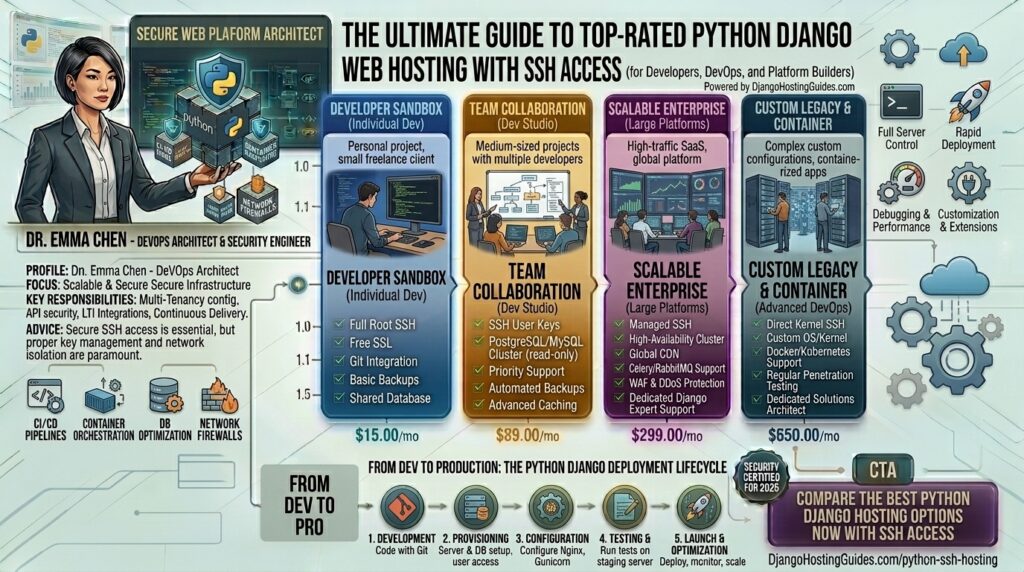
What is the best Python Django web hosting with SSH access? Django is one of the most powerful, secure, and flexible high-level Python web frameworks available. Built on the “batteries-included” philosophy, it powers massive platforms like Instagram, Spotify, and Disqus. However, unlike traditional PHP platforms that rely on drag-and-drop shared hosting files, deploying and maintaining a production-grade Django application requires robust terminal control—specifically, Secure Shell (SSH) access.
Without SSH access, managing virtual environments (venv), running database migrations (python manage.py migrate), compiling static files (collectstatic), and configuring WSGI/ASGI servers (like Gunicorn or Uvicorn behind Nginx) becomes virtually impossible.
If your web applications or digital business operations target major commercial hubs across Texas, New York, California, Washington, or San Francisco, choosing the right hosting environment with seamless SSH permissions is mandatory for engineering performance and top Google SEO visibility.
This comprehensive guide explores the best Python Django web hosting providers equipped with full SSH access, critical deployment tips, optimization strategies, and 10 detailed FAQs.
Why Django Web Hosting Strictly Requires SSH Access
Unlike standard content management systems, Django applications are dynamic Python projects that run continuously via process managers. SSH access is your direct lifeline to the server command line.
With full SSH terminal access, developers can:
- Manage Virtual Environments: Isolate Python packages (
pip install -r requirements.txt) safely without conflicting with system-wide python installations. - Execute Management Commands: Run critical Django administrative utilities directly, including database migrations, fixture loading, and cache clearing.
- Configure Reverse Proxies and Web Servers: Fine-tune Nginx, Apache, or OpenLiteSpeed configurations and manage Gunicorn/Uvicorn systemd service files.
- Implement Secure Git Deployments: Pull code repositories directly from GitHub or GitLab straight into your server production environment.
Top Web Hosting Providers for Python Django with SSH Access
Evaluating hosting for Django requires looking at infrastructure that provides unhindered command-line execution, reliable RAM allocation, and robust speed. These top platforms deliver exceptional environments:
1. DigitalOcean (Best Developer-First Cloud VPS with Root SSH)
DigitalOcean is widely considered the gold standard for deploying Python and Django applications using scalable Virtual Private Servers known as “Droplets”.
- Why it shines for Django: You receive complete root-level SSH access over a clean Ubuntu or Debian Linux canvas. You have total freedom to configure your Python runtime, PostgreSQL or MySQL databases, and Nginx stack precisely how you want.
- Pros: Highly predictable hourly/monthly pricing, exceptional scalability, extensive technical documentation, and global data centers (including robust US East and West Coast nodes).
- Cons: Unmanaged by default; requires comfortable command-line experience to secure and maintain the server.
2. Cloudways (Best Managed Cloud with Custom Application Deployment)
If you love the raw power of cloud servers like DigitalOcean, Vultr, or AWS but prefer not to handle manual server security hardening via the terminal, Cloudways bridges the gap.
- Why it shines for Django: Cloudways provides full master SSH and SFTP access to your server instances, allowing you to deploy custom Python/Django apps using Git integration while they handle automated backups and OS-level security patches.
- Pros: User-friendly dashboard, built-in Redis object caching, vertical scaling on demand, and 24/7 real-time monitoring.
- Cons: Requires manual configuration for WSGI/ASGI application runners since Cloudways natively optimizes primarily for PHP/WordPress architectures.
3. Kamatera (Best for High-Performance Scalable Cloud Infrastructure)
Kamatera delivers enterprise-grade cloud computing with fully customizable CPU, RAM, and ultra-fast NVMe storage tiers.
- Why it shines for Django: Provides immediate, unrestricted root SSH access on raw cloud servers. You can provision a specialized Python environment optimized for heavy transactional database loads within minutes.
- Pros: Blistering fast NVMe storage, instant resource adjustments, cost-effective base pricing, and powerful global data center placement.
- Cons: Completely unmanaged infrastructure; requires system administration skills.
4. Hostinger VPS (Best Budget-Friendly Linux Terminal Access)
For developers operating on tighter capital, Hostinger’s high-performance VPS plans offer an impressive balance of low cost and robust hardware specifications.
- Why it shines for Django: Hostinger VPS plans include full root SSH access and pre-built OS templates (including configurations optimized for OpenLiteSpeed and Python environments).
- Pros: Very affordable introductory pricing, intuitive control panels, and dedicated IPv4/IPv6 addresses.
- Cons: High renewal rates after the initial contract period concludes.
Actionable Tips for Deploying Django via SSH
Running Django in a production environment via the terminal requires adherence to strict deployment best practices:
- Always Use a Python Virtual Environment: Never install Python packages globally. Always create an isolated virtual environment (
python3 -m venv venv && source venv/bin/activate) inside your project directory. - Lock Down SSH Security: Change your default SSH port, disable root password logins, and enforce SSH key-based authentication (
authorized_keys) to protect your server from automated brute-force bot attacks. - Separate Settings Files for Production: Keep your development settings separate from production settings by utilizing environment variables (
os.environ.get) loaded via a secure.envfile. Never commit secret keys or database passwords to public Git repositories. - Configure Gunicorn/Uvicorn with Systemd: Ensure your Django WSGI/ASGI application runs as a background system service via Systemd so that it automatically restarts if the server reboots or crashes.
- Optimize Static Asset Collection: Run
python manage.py collectstaticto bundle static files into a dedicated directory, and configure Nginx to serve these assets directly rather than routing them through your Python application server.
10 Frequently Asked Questions (FAQs)
1. Why is SSH access critical for Django hosting?
SSH access allows you to open a secure terminal session on your remote server, giving you the ability to install dependencies via pip, run database migrations, execute management commands, and manage application servers.
2. Can I host Django on cheap shared hosting with cPanel?
Most traditional shared hosting accounts run heavily restricted PHP environments that do not support Python WSGI/ASGI applications. Even if a shared host claims Python support, lack of root SSH access makes configuring custom Django requirements nearly impossible.
3. What is the difference between unmanaged VPS and managed cloud hosting for Django?
Unmanaged VPS (like DigitalOcean or Kamatera) gives you raw root access with zero pre-installed management layers, meaning you must handle security updates and configurations yourself. Managed cloud hosting handles server-level maintenance while still granting you SSH access.
4. Do I need root access to run a Django app?
While you don’t strictly need root privileges if you have a specialized user shell with proper permissions, having full root access gives you the freedom to install system-level packages, configure firewalls, and fine-tune web servers.
5. How does web hosting performance impact my Google SEO rankings?
Google’s Core Web Vitals evaluate page speed, Time to First Byte (TTFB), and visual stability. Fast cloud VPS hosting with NVMe storage ensures your Django views render and respond instantly, boosting search visibility.
6. How do I handle database migrations on a remote Django server?
Once logged into your server via SSH and with your virtual environment activated, you simply navigate to your project directory and run python manage.py migrate.
7. What web server should I pair with Django over SSH?
Production Django apps are typically served by combining Nginx (as a reverse proxy handling incoming traffic and static files) with Gunicorn or Uvicorn (as the application server executing Python code).
8. Are free SSL certificates available on Django hosting servers?
Yes. Using SSH, you can easily install and configure auto-renewing Let’s Encrypt SSL certificates (Certbot) on any Linux VPS to secure data transmission via HTTPS.
9. How much RAM does a basic production Django server need?
A small production Django app with low-to-moderate traffic generally requires at least 1GB to 2GB of RAM. If you run heavy background tasks with Celery and Redis, 4GB of RAM is recommended.
10. How do I protect my server against brute-force SSH attacks?
You can install and configure Fail2ban via SSH, which monitors your server log files for repeated failed login attempts and automatically bans malicious IP addresses.
Conclusion
Deploying a Python Django application requires infrastructure that grants you absolute command-line control, exceptional processing speed, and robust reliability. By pairing your project with a high-performance cloud host featuring unhindered SSH access—such as DigitalOcean, Cloudways, or Kamatera—you can engineer a lightning-fast, secure, and scalable web architecture built for long-term organic search success.