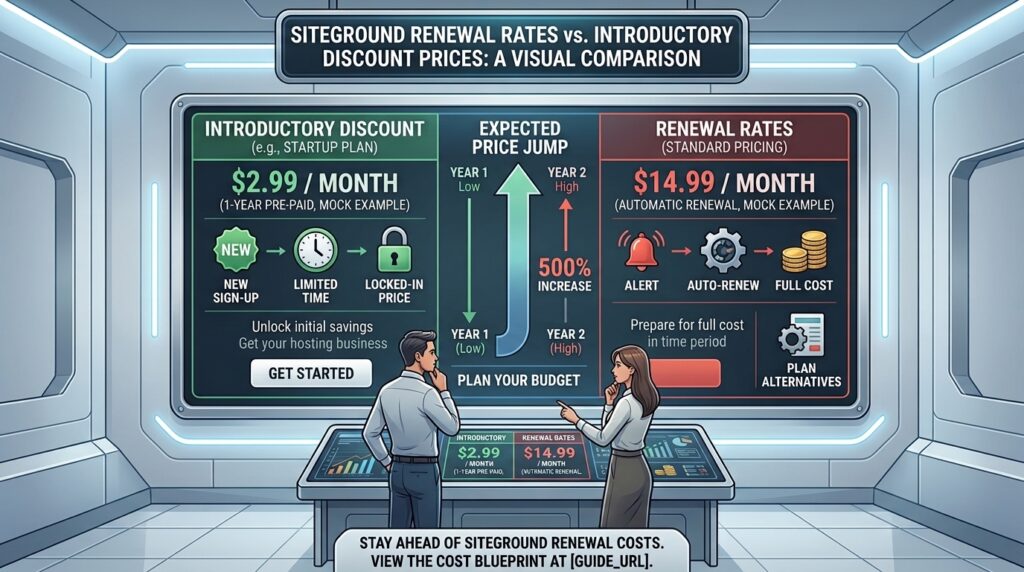
Siteground renewal rates vs introductory discount prices: When scaling a digital brand or launching an enterprise blog across competitive metropolitan markets like New York, San Francisco, Los Angeles (California), Seattle (Washington), or Austin (Texas), web hosting performance can make or break your digital footprint.
Among the high-performance platforms frequently recommended by developers, SiteGround stands out for its lightning-fast Google Cloud infrastructure, stellar customer support, and robust custom tools. However, thousands of website owners encounter a jarring financial surprise when their initial billing cycle lapses. The gap between SiteGround’s introductory discount prices and its standard renewal rates is one of the sharpest in the web hosting industry.
This comprehensive guide analyzes SiteGround’s pricing architecture, evaluates the financial reality of its renewal hikes, and provides actionable strategies to protect your operational budget.
1. The Anatomy of SiteGround’s Two-Tier Pricing Model
Like most major commercial web hosts, SiteGround utilizes an aggressive acquisition strategy designed to lower the barrier to entry.
- Introductory Promotional Rates: Advertised heavily on their homepage, these rates offer massive discounts (often up to 80% to 83% off) to entice new users. To secure this price, you must prepurchase your initial billing term (typically 12 months) upfront.
- Standard Renewal Rates: Once your promotional term expires, your account automatically shifts to the standard, non-discounted rate. Because these renewal figures are rarely highlighted on marketing landing pages, they catch unprepared business owners off guard.
2. Breaking Down the Numbers: Siteground renewal rates vs introductory discount prices
To understand why webmasters experience “renewal shock,” you must look at how SiteGround’s core shared and WordPress hosting tiers scale after year one:
+-------------------+-----------------------+-----------------------+-----------------------+
|   PLAN TIER       |   INTRODUCTORY RATE   |    STANDARD RENEWAL   |   PERCENTAGE INCREASE |
+-------------------+-----------------------+-----------------------+-----------------------+
| • StartUp         |   $2.99 / month |   $17.99 / month |   ~501% increase   |
| • GrowBig         |   $4.99 / month |   $29.99 / month |   ~501% increase   |
| • GoGeek          |   $7.99 / month |   $44.99 / month |   ~463% increase   |
+-------------------+-----------------------+-----------------------+-----------------------+
The Real Financial Impact (StartUp Plan Example)
- Year 1 (Promotional): At $2.99/mo billed annually, your first year costs approximately $35.88 (plus applicable domain fees).
- Year 2+ (Renewal): At the standard renewal rate of $17.99/mo, your annual bill jumps to $215.88 for the exact same single-website package.
While SiteGround’s performance, custom Site Tools dashboard, and daily automated backups justify a premium for many commercial users, a 500+ percent cost spike requires careful long-term financial planning.
3. Why Does SiteGround Use This Pricing Model?
Understanding the business mechanics behind hosting renewals helps contextualize why prices increase so dramatically:
- Customer Acquisition Costs (CAC): Web hosting is a hyper-competitive space. Companies spend heavily on digital advertising to acquire new customers, often taking a loss on the first year’s promotional pricing.
- Migration Friction: By the time your renewal notice arrives, your website is fully built, configured, indexed on Google, and generating traffic. The technical effort, potential downtime, and risk involved in migrating to a new host (known as switching costs) cause many users to simply pay the higher rate rather than move.
4. Is the Renewal Price Worth It? (Pros vs. Cons)
Before deciding whether to swallow the renewal increase or migrate away, weigh SiteGround’s architectural strengths against its premium cost:
Why Users Pay SiteGround Renewal Rates:
- Google Cloud Infrastructure: Superior server reliability, lightning-fast response times, and built-in Cloudflare CDN integration.
- Exceptional Support: Consistently rated among the best customer support teams in the shared hosting ecosystem, with real experts resolving complex database or plugin conflicts via live chat 24/7.
- Advanced Developer Tools: Features like staging environments, Git integration (on GoGeek), and automated daily backups with a 30-day retention window provide immense peace of mind.
Why Users Migrate Away at Renewal:
- Strict Resource Limits: The entry-level StartUp plan restricts you to just 1 website and roughly 10,000 monthly visits. Hitting those caps forces an expensive upgrade to GrowBig.
- Aggressive Cost Escalation: Paying nearly $360 a year for the GrowBig shared tier prompts budget-conscious small businesses to look for fixed-price or more affordable alternatives.
5. Strategic Tips to Manage or Avoid SiteGround Renewal Hikes
+-----------------------------------------------------------------------+
|                      NAVIGATING SITEGROUND RENEWALS                   |
+-----------------------------------------------------------------------+
| 1. Pre-pay for maximum initial duration if available.                 |
| 2. Monitor expiration timelines with strict calendar alerts.          |
| 3. Optimize your storage footprint to avoid mandatory plan upgrades.  |
| 4. Prepare a seamless exit strategy or migration plan.                |
+-----------------------------------------------------------------------+
Tip 1: Maximize Your Initial Term Length
When signing up for SiteGround, evaluate whether multi-year introductory options are available for your region to lock in promotional rates for a longer baseline window before renewals trigger.
Tip 2: Set Early Calendar Alerts
Never rely on automated billing surprises. Set a calendar reminder 60 days before your SiteGround renewal date to evaluate your traffic stats, review alternative hosting options, and decide if the site still warrants premium hosting fees.
Tip 3: Audit Resource Usage Regularly
SiteGround tracks server storage and visit counts strictly. If your media library balloons with uncompressed high-resolution images, you may be forced to upgrade tiers. Regularly optimize your database and compress media assets to stay comfortably within plan limits.
Tip 4: Leverage the Staging Environment to Stage Migrations
If you decide that the renewal rate no longer fits your business model, use SiteGround’s GrowBig staging features to build a clean clone of your site, test it, and smoothly execute a migration to a flat-rate hosting provider before your renewal invoice processes.
6. Frequently Asked Questions (FAQ)
1. Does SiteGround hide its renewal prices?
No. SiteGround lists its standard renewal rates clearly on its pricing pages and knowledge base articles, though they are presented in smaller text beneath large promotional discount banners.
2. Can I negotiate a lower renewal rate with SiteGround support?
Unlike some competitors whose retention departments readily hand out deep discounts, SiteGround generally maintains strict pricing policies. While billing agents may occasionally offer minor promotional credits, they rarely match initial introductory rates.
3. Are refunds available if I am accidentally charged a renewal rate?
SiteGround offers a 30-day money-back guarantee for initial new sign-ups, but regular automated renewal payments are typically non-refundable once the billing cycle has begun. You must disable auto-renewal prior to your billing date if you intend to cancel.
4. Does SiteGround charge for domain renewals separately?
Yes. If you registered a free domain name with SiteGround for your first year, that domain will begin renewing at standard domain registry rates (typically around $15.95/year) starting in year two.
5. What happens if my hosting plan expires and I don’t pay?
Your account will be suspended, and your website and emails will go offline. SiteGround typically retains server backups for a short grace period after expiration, but failing to renew or migrate will eventually result in permanent file deletion.
6. Can I downgrade my plan to save money on renewal?
Yes. If you are currently on the GoGeek or GrowBig plans and your traffic or multi-site needs have decreased, you can request a downgrade to a lower tier through your client area to reduce renewal overhead.
7. Does SiteGround offer monthly billing after the first year?
Monthly billing options exist, but they generally forfeit introductory discounts and carry higher setup or baseline fees. Most users stick to annual prepaid billing cycles to manage cash flow.
8. How do SiteGround’s renewal rates compare to competitors like Bluehost?
Both providers utilize aggressive introductory discounting followed by sharp renewal hikes. SiteGround’s renewal rates tend to reflect its higher-tier Google Cloud performance and management tools, whereas budget hosts like Bluehost or Hostinger scale differently.
9. Is it difficult to migrate away from SiteGround?
Not at all. Because SiteGround runs on standard cPanel-alternative architecture (Site Tools) and standard WordPress databases, using free migration plugins or utilizing free migration services offered by alternative hosts makes moving straightforward.
10. Are there alternative hosts with fixed, non-increasing renewal prices?
Yes. Several emerging cloud and shared hosting providers maintain flat-rate pricing models where your renewal price matches your initial sign-up price, appealing directly to budget-conscious webmasters.
7. Conclusion
The contrast between SiteGround renewal rates and introductory discount prices highlights a fundamental reality of the web hosting industry: premium performance commands a premium price.
While SiteGround’s introductory rates make it deceptively affordable to launch a new site, transitioning into year two requires budgeting for a 500% rate increase. If your business relies on rapid load times, elite customer support, and robust automated safeguards, the renewal investment is often well justified. However, if you operate on thin margins, accounting for these long-term costs upfront—or preparing a timely migration strategy—will safeguard your small business profitability.