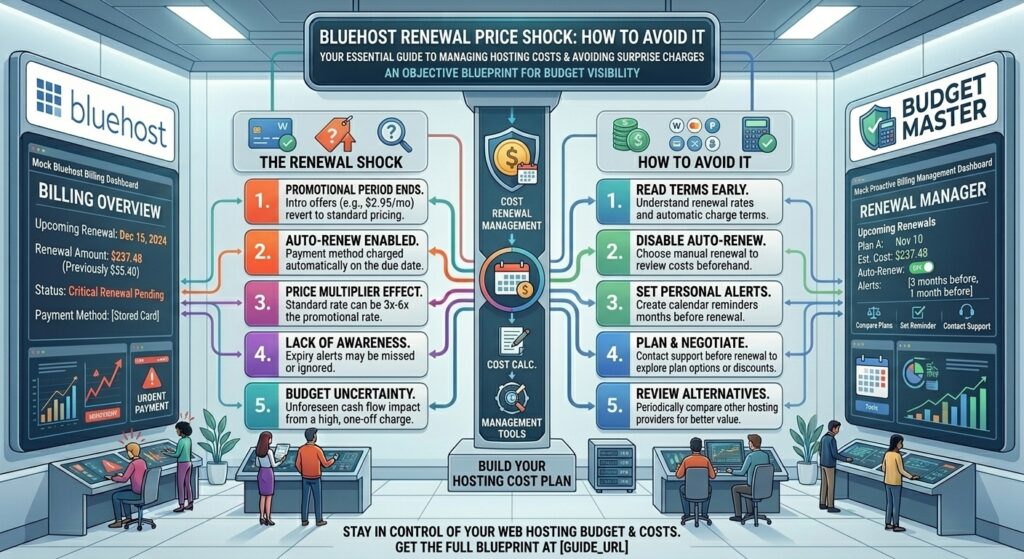
Bluehost renewal price shock how to avoid it: Few moments in website management cause as much sudden panic as opening an email statement from your web host and realizing your bill has doubled or tripled overnight. For thousands of small business owners, freelancers, and bloggers operating across commercial hubs like New York, San Francisco, Los Angeles, Seattle (Washington), and Austin (Texas), the Bluehost renewal price shock is a harsh rite of passage.
You signed up for a web hosting plan advertising rates as low as $1.99 to $3.99 per month, only to discover that your automatic renewal invoice has jumped to standard regular rates ($9.99 to $24.99+ per month).
This comprehensive, highly detailed guide explores why this pricing model exists, how much you can actually expect to pay, and actionable strategies to dodge, minimize, or navigate around the Bluehost renewal price shock entirely.
1. Understanding the Anatomy of the Bluehost Renewal Shock
To combat a problem, you must first understand its mechanics. Web hosting companies like Bluehost rely heavily on acquisition marketing models to grow their massive market share.
+-----------------------------------+-----------------------------------+
|       INTRODUCTORY TERM (1-3 YRS) |         RENEWAL RATE (STANDARD)   |
+-----------------------------------+-----------------------------------+
| • Heavily discounted promotional  | • Standard, non-discounted rate   |
|   rates ($1.99 - $3.99 / mo)      |   ($9.99 - $24.99+ / mo)          |
| • Billed upfront for the full     | • Billed on your chosen recurring |
|   term commitment                 |   term cycle                      |
| • Designed for customer acquisition| • Reflects true baseline cost     |
+-----------------------------------+-----------------------------------+
The Introductory Trap
When you first land on Bluehost’s sales page, you are greeted by striking promotional banners offering deep discounts (often advertised up to 75% or 82% off).
- The Catch: These headline prices require you to prepurchase a multi-year term upfront (typically 12 or 36 months).
- The Illusion: It is easy to mentally process the cost as a small monthly coffee expense ($2.99/mo). However, when you check out, you pay for 36 months in a single lump sum.
When those 36 months lapse, automatic renewal kicks in. Because the introductory discount has expired, your account is billed at the regular published rate. For a basic Starter shared hosting plan, a monthly rate that once cost $3.99 can easily jump to $9.99 or $15.99+ per month upon renewal.
2. Breaking Down the Numbers: Intro vs. Renewal Rates
Let’s look closely at how standard Bluehost plans scale when the promotional grace period ends:
- Starter / Basic Plan:
- Introductory Rate: Starts around $1.99 to $3.99 per month (billed upfront for 36 months).
- Renewal Rate: Jumps to approximately $9.99 to $15.99 per month.
- Business / Plus Plan:
- Introductory Rate: Starts around $5.99 to $7.99 per month.
- Renewal Rate: Jumps to approximately $13.99 to $15.99+ per month.
- eCommerce Essentials / WooCommerce Plan:
- Introductory Rate: Starts around $6.99 to $15.99 per month.
- Renewal Rate: Jumps to $21.99 to $24.99+ per month.
3. The Hidden Culprits: Add-Ons That Renew Separately
The renewal shock is frequently worsened by auxiliary add-ons that were checked by default during your initial checkout. Many users forget they even purchased these extras until they appear on their yearly invoice:
- Domain Privacy & Protection: Often bundled free for the first year, domain privacy prevents your personal phone number, home address, and email from appearing on public WHOIS registries. Upon renewal, this feature costs a separate yearly fee.
- Automated Site Backups (Codeguard / Jetpack): Daily backup subscriptions often renew on separate annual billing cycles independent of your core web hosting plan.
- Security Add-Ons (SiteLock): Automated malware scanners and firewall features frequently auto-renew at high annual price points unless manually uninstalled.
- Professional Email (Microsoft 365 / Titan): Standalone business email packages carry independent recurring renewal fees.
4. Actionable Strategies to Avoid or Minimize Renewal Shock
You do not have to accept an inflated hosting bill. Smart webmasters use several tactical maneuvers to protect their budgets.
+-----------------------------------------------------------------------+
|                       FIGHTING RENEWAL SHOCK                          |
+-----------------------------------------------------------------------+
| 1. Lock in the longest upfront term initially (36 months).            |
| 2. Audit and purge unnecessary checkout add-ons immediately.          |
| 3. Negotiate directly with retention support before your bill hits.   |
| 4. Migrate your assets to a predictable alternative host.             |
+-----------------------------------------------------------------------+
Strategy 1: Lock in the Longest Term Upfront
If you are confident in your website’s longevity, always select the longest billing term available (36 months) during your initial purchase. While your upfront lump sum will be higher, it locks in the lowest possible blended monthly rate for the maximum duration, delaying your exposure to renewal shock by three full years.
Strategy 2: Clean Your Cart Before Checkout
Never click “Checkout” blindly. During the initial payment screen, Bluehost pre-checks several optional marketing, SEO, and security add-ons. Carefully uncheck anything you do not explicitly need. You can always install free WordPress plugins (like Wordfence for security or UpdraftPlus for backups) later.
Strategy 3: Negotiate with Retention Support
Web hosting companies hate losing long-term customers. If your renewal notice arrives and you are shocked by the bill, do not pay it immediately.
- Log into your dashboard or call customer support.
- Inform the billing representative that the renewal price exceeds your small business budget and that you are preparing to migrate your site to a competitor.
- In many cases, retention agents are authorized to apply a loyalty discount, match a lower promotional rate, or roll back part of the increase to keep your business.
Strategy 4: Turn Off Auto-Renewals and Shop Around
Navigate to your Bluehost Billing / Renewal Center and inspect your auto-renewal settings. If your contract is expiring and you want leverage, turning off auto-renew prompts automated system emails offering discount coupons to entice you back. Alternatively, use this expiration window to migrate your site to a transparent, flat-rate provider.
5. Strategic Alternatives with Transparent Pricing
If you decide that Bluehost’s renewal structure no longer aligns with your financial planning, several alternative hosts offer predictable pricing without aggressive introductory spikes:
- Hostinger: Renowned for exceptionally low introductory rates and transparent, modest renewal structures paired with fast hPanel management.
- FastComet: Provides clear pricing terms, free domain renewals for life (with active hosting), and a wide global data center footprint.
- Linode (Akamai Connected Cloud): For technical users and small businesses ready to move away from shared hosting, Linode offers flat hourly and monthly pricing with zero hidden fees.
6. Expert Optimization Tips for US Webmasters
Whether you stay with Bluehost or migrate to a new provider, protect your business operations across markets like New York, San Francisco, or Austin with these tips:
- Set Calendar Reminders: Do not rely on memory. Set a calendar alert 45 days before your hosting contract expires to review your billing profile and avoid surprise auto-charges.
- Audit Your Plugins Yearly: Drop unused plugins that inflate your storage requirements, as larger hosting tiers cost significantly more upon renewal.
- Maintain Independent Backups: Never rely solely on your host’s internal backup add-ons. Keep automated off-site backups stored securely in independent cloud storage.
- Monitor Renewal Dates vs. Domain Expirations: Keep your domain registration expiration date synchronized with your hosting renewal so your site never experiences accidental downtime due to staggered billing.
7. Frequently Asked Questions (FAQ)
1. Why does Bluehost increase prices so dramatically upon renewal?
The low prices advertised on Bluehost’s website are introductory promotional rates designed to attract new customers. Once your initial prepaid billing term (e.g., 1 to 3 years) expires, your account automatically shifts to standard, non-discounted rates.
2. Can I get a refund if I accidentally get hit with an auto-renewal charge?
Bluehost maintains a strict 30-day money-back guarantee for initial sign-ups, but recurring renewal charges are generally non-refundable once processed. However, if you contact customer support immediately after an auto-renewal occurs, support agents may issue a courtesy refund or credit if the service hasn’t been utilized.
3. How can I find out exactly how much my renewal will cost?
Log into your Bluehost Portal, navigate to the Billing section, and open the Renewal Center. Here, you can view transparent line-item breakdowns of what each service (hosting, domain, privacy, security) will cost when it next renews.
4. If I cancel my renewal, will I lose my website files?
If your hosting plan expires and is not renewed, your account will eventually be deactivated and your files purged from the server. Always complete a full website migration or backup before your cancellation date.
5. Does Bluehost offer discounts if I call customer support?
Yes. Bluehost’s retention department frequently has access to unadvertised loyalty discounts or coupon codes that they can apply to your account if you express hesitation about high renewal rates.
6. Are domain names included in the renewal price?
Usually, a free domain registration is included only for the first year of your hosting plan. After that, your domain name renews annually at standard market rates (typically $12 to $20/year depending on the TLD).
7. How do I turn off automatic renewals on Bluehost?
Log into your Bluehost account, go to the Billing tab, select the Renewal Center, find the specific product, and use the toggle switch under the Auto-Renew column to disable it.
8. Is it easy to migrate away from Bluehost if renewal prices are too high?
Yes. Most modern web hosts offer free professional migration services. They will transfer your WordPress files, databases, and emails over to their platform with zero downtime.
9. Do longer initial terms prevent renewal shock?
Longer initial terms (like 3-year plans) do not prevent renewal shock entirely, but they delay it significantly, allowing your small business website time to generate revenue before higher overhead kicks in.
10. What are the best hosting alternatives with no price jumps?
Providers that utilize transparent, flat-rate billing (such as cloud VPS providers like Vultr, DigitalOcean, or Linode) do not rely on introductory discount gimmicks, ensuring your monthly bill remains steady over time.
8. Conclusion
The Bluehost renewal price shock can catch any webmaster off guard, but it doesn’t have to derail your financial planning. By understanding how promotional introductory terms operate, auditing your account for unnecessary add-ons, and proactively negotiating with retention support or migrating your assets, you maintain total control over your digital overhead.