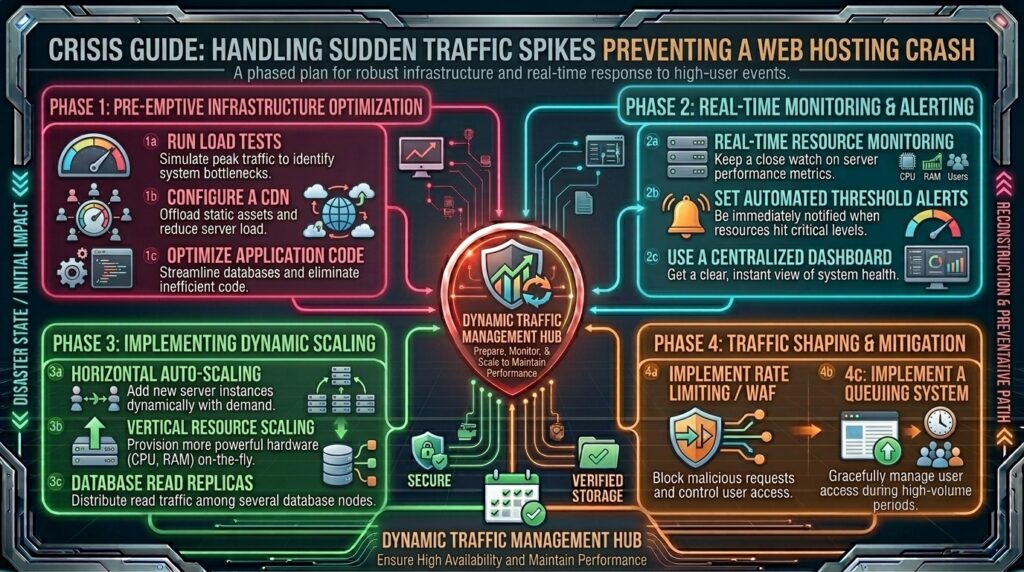
How to handle sudden traffic spikes without crashing web hosting? Welcome to thehostreviews.com—your premier authoritative destination for server performance optimization, traffic scalability engineering, and high-availability web hosting evaluations spanning major technology hubs from New York and San Francisco to Texas, California, and Washington.
Introduction: The Thrill and Terror of Going Viral
Imagine waking up, checking your analytics dashboard, and seeing a vertical surge in active visitors. Your content has just hit the front page of Reddit, been shared by an industry influencer, or been featured on a major national news outlet. For any business owner, creator, or digital marketer, this is the ultimate moment of validation.
Within minutes, however, that thrill turns into sheer terror. Your website suddenly slows to a crawl, images fail to load, database connection errors flash on the screen, and finally, the server collapses completely under the weight of incoming requests. You check your hosting dashboard, only to see your CPU utilization spiked to 100% and your RAM limits exhausted.
For webmasters operating across competitive tech markets like San Francisco, New York, and Austin, sudden traffic spikes are a double-edged sword. Without a robust architectural infrastructure and proactive scaling strategy, an influx of traffic translates directly into lost revenue, broken user experiences, and wasted marketing dollars.
This comprehensive, step-by-step masterclass breaks down the mechanics of server load, explores how different hosting tiers handle traffic surges, and provides an advanced, actionable engineering playbook to bulletproof your website against sudden traffic explosions.
Part 1: Anatomy of a Server Crash During Traffic Surges
Before implementing fixes, it is vital to understand why websites crash when traffic spikes. When thousands of concurrent visitors flood your server simultaneously, several cascading bottlenecks occur:
- CPU Saturation: Every dynamic page request forces your server’s CPU to execute PHP scripts, query databases, render HTML templates, and process security rules. When requests exceed processor threads, the CPU queue backs up.
- RAM Exhaustion and Out-of-Memory (OOM) Crashes: Dynamic content creation consumes server memory. If your MySQL database or PHP-FPM workers exhaust available RAM, the Linux operating system steps in and aggressively kills server processes to prevent total system panic.
- Database Connection Lockdowns: Most content management systems (like WordPress or Magento) query the database on every single page load. When concurrent visitors spike, your database reaches its maximum connection limit (
max_connections), rejecting all subsequent requests with database timeout errors. - Bandwidth and I/O Bottlenecks: If your server’s hard disk drives (HDDs or standard SSDs) cannot read file blocks fast enough to serve images, scripts, and stylesheets, network input/output (I/O) stalls out.
Part 2: Step-by-Step Scalability Preparation Playbook
To ensure your web hosting environment handles sudden traffic surges without breaking a sweat, execute this comprehensive 5-step optimization framework:
Step 1: Implement Enterprise-Grade Caching (The First Line of Defense)
The absolute fastest way to survive a traffic spike is to stop serving dynamic pages. If your server has to generate every page from scratch for every single visitor, it will crash instantly.
- Page Caching: Install a robust caching plugin (such as WP Rocket, LiteSpeed Cache, or Redis Object Cache) or enable server-level caching via your host. Page caching saves a fully rendered HTML snapshot of your web pages. When a visitor arrives, the server instantly delivers the static HTML file without touching PHP or querying the database.
- Browser Caching: Configure long expiration headers for static assets (
.jpg,.png,.css,.js) so that returning visitors load files directly from their local browser cache rather than re-downloading them from your server.
Step 2: Deploy a Content Delivery Network (CDN)
Even the most powerful VPS or dedicated server has physical bandwidth limitations and geographic distance constraints. If your server is hosted in New York, a user visiting from San Francisco or Tokyo experiences network latency.
- How a CDN Helps: A Content Delivery Network like Cloudflare, AWS CloudFront, or Fastly caches your static website assets across hundreds of edge data centers worldwide.
- Offloading Traffic: When a traffic spike hits, the CDN absorbs 80% to 90% of the incoming requests at the edge network level, serving images, styles, and cached pages instantly while keeping your origin web hosting server completely safe and unburdened.
Step 3: Optimize and Index Your Database
During a traffic surge, your database is the most fragile component. Unoptimized queries will bring your site down instantly.
- Clean Up Transients and Bloat: Delete old post revisions, spam comments, transient cache residues, and expired user sessions from your database tables.
- Add Missing Indexes: Ensure high-traffic tables have proper indexing on frequently searched columns (
meta_key,post_date,user_id). - Upgrade to Object Caching: Implement Redis or Memcached on your server. Object caching stores database query results in lightning-fast server RAM, preventing repetitive, heavy database lookups during traffic surges.
Step 4: Choose the Right Hosting Infrastructure Tier
Shared hosting is fundamentally unequipped to handle massive, sudden traffic spikes because you share CPU and RAM resources with hundreds of other noisy neighbor accounts. If you expect surges:
- Upgrade to Cloud Hosting or VPS: Virtual Private Servers (VPS) and Cloud hosting environments give you dedicated, isolated computing resources (vCPUs and guaranteed RAM) that you can scale vertically (adding more RAM/CPU with a single click) when traffic surges.
- Auto-Scaling Cloud Clusters: For enterprise applications expecting unpredictable viral spikes, utilize auto-scaling cloud architectures (like AWS EC2 with Elastic Load Balancing) that automatically spin up additional server instances when CPU thresholds cross 70%.
Step 5: Conduct Stress Testing Before the Spike Hits
Do not wait for a viral surge to test your server’s limits. Proactively simulate high traffic to find weak points:
- Use open-source load-testing tools like Apache JMeter, K6, or cloud-based services like Loader.io.
- Simulate 500 to 2,000 concurrent virtual users hitting your homepage simultaneously.
- Monitor your server CPU, RAM, and error logs during the test to identify exactly where bottlenecks begin to form.
Part 3: Emergency Checklist: What to Do During an Active Traffic Spike
If a traffic surge hits right now and your website is already slowing down or crashing, execute these emergency triage steps immediately:
- Purge and Enable CDN “Under Attack” Mode: If you use Cloudflare, log into your dashboard immediately and toggle I’m Under Attack Mode. This challenges incoming visitors with an interactive JavaScript verification screen, filtering out malicious botnets and scraping tools while letting real human visitors through.
- Disable Heavy, Non-Essential Plugins: Deactivate resource-heavy plugins temporarily—such as live chat widgets, complex related-post plugins, social sharing counters, and heavy page builders that inject massive JavaScript libraries into your DOM.
- Switch to a Lightweight Emergency Theme: If your site is completely unresponsive due to heavy theme execution, temporarily switch to a lightweight default framework (like Twenty Twenty-Four) to maintain basic content delivery.
- Contact Your Web Hosting Support Team: Open an emergency priority support ticket with your host. Ask them to check for server resource throttling, clear system caches, and temporarily allocate additional CPU cores or worker threads if your hosting tier supports burstable resources.
Part 4: Frequently Asked Questions (FAQ)
1. Why do websites crash when sudden traffic spikes occur?
Websites crash because high concurrent traffic saturates server CPU threads, exhausts RAM limits, and maxes out database connections, causing requests to time out.
2. Can shared hosting handle a viral traffic spike?
No. Shared hosting allocates pooled resources across hundreds of accounts. A sudden traffic surge will quickly trigger resource throttling or crash the server node.
3. What is the difference between page caching and object caching?
Page caching stores fully rendered HTML static pages to serve visitors instantly, while object caching stores database query results in server RAM to minimize repetitive database lookups.
4. How does a CDN protect my server during traffic surges?
A CDN caches your static content across global edge servers, absorbing the vast majority of incoming traffic requests before they ever reach your origin web host.
5. What should I do immediately if my site crashes during a traffic spike?
Enable “Under Attack” mode on your CDN, deactivate non-essential resource-heavy plugins, purge all system caches, and contact your web hosting support team for emergency resource allocation.
6. How do I simulate high traffic to test my server’s capacity?
You can use load-testing tools like Loader.io, K6, or Apache JMeter to simulate concurrent user traffic and identify performance bottlenecks before a real surge occurs.
7. What hosting type is best for handling unpredictable traffic surges?
Cloud hosting and Virtual Private Servers (VPS) with auto-scaling capabilities are ideal because they allow you to scale CPU and RAM resources dynamically on demand.
8. Do bots contribute to website crashes during traffic surges?
Yes. Web scrapers, vulnerability scanners, and automated botnets often mimic human traffic during viral events, consuming up to 50% of server resources unless filtered out by a firewall.
9. How does database optimization prevent traffic crashes?
Optimizing database tables, removing bloat, and implementing Redis object caching ensures that high-frequency read/write operations execute instantly without locking up server threads.
10. Who should I contact if my server fails to handle traffic despite caching?
If caching and CDNs are active and your server still collapses, reach out to your hosting provider’s senior architecture team to discuss upgrading to a high-availability cloud cluster.
Conclusion
Handling sudden traffic spikes without crashing your web hosting environment requires a blend of proactive caching, CDN offloading, database optimization, and scalable cloud infrastructure. By preparing your site with enterprise-grade caching layers and knowing how to triage server resources during active surges, you can transform high-traffic moments into seamless, revenue-generating successes.