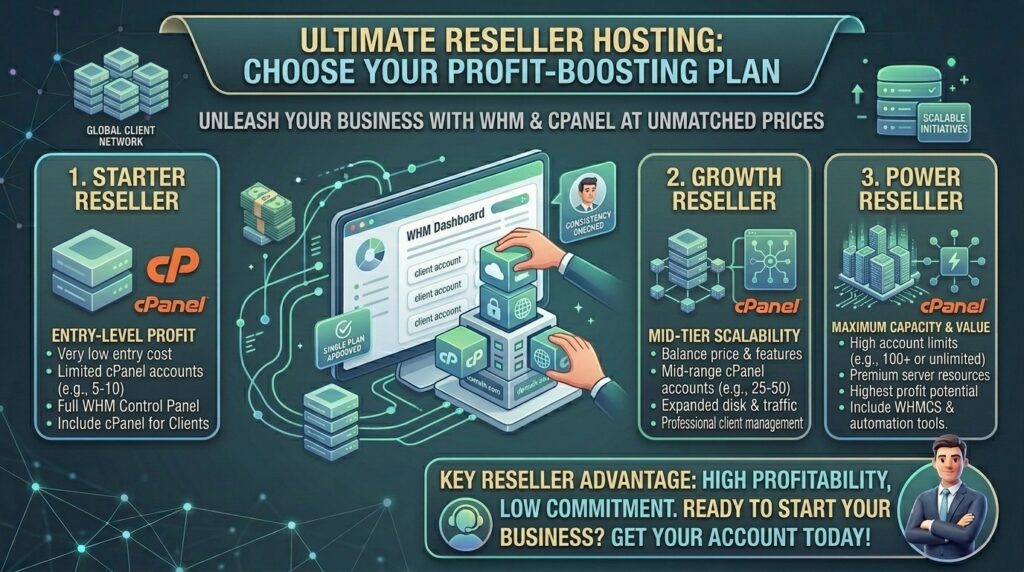
Cheap Reseller Hosting Accounts with WHM and cPanel: The Ultimate Business Scaling Guide
Introduction: Launch Your Own Web Hosting Brand on a Budget
Whether you are scaling a digital agency in New York, running freelance developer operations in San Francisco, managing web properties across Texas, or building a tech startup presence in Washington and California, efficiency and profit margins are everything.
Instead of buying separate, expensive individual hosting plans for every client or internal project you manage, reseller hosting offers a smarter financial model. By renting a slice of a master server equipped with WHM (Web Host Manager) and cPanel, you can partition your resources, create isolated hosting accounts for multiple clients, apply your own brand name (white-labeling), and even bill clients directly.
However, finding reliable, high-performance reseller hosting that remains genuinely cheap without compromising uptime, speed, or security can be challenging. In this comprehensive guide, we explore how WHM/cPanel reseller accounts operate, review top budget-friendly providers, highlight critical performance factors, and provide a strategic roadmap to maximize your profit margins.
What is Reseller Hosting with WHM and cPanel?
Reseller hosting is a form of web hosting where you (the reseller) purchase a resource pool (disk space, RAM, bandwidth, and cPanel accounts) from a major infrastructure provider and partition it to resell to your own downstream clients.
+-------------------------------------------------------------+
|               The Reseller Hierarchy Flow                   |
+-------------------------------------------------------------+
|  [Root Server / Infrastructure Provider]                    |
|       │                                                     |
|       └──> [Your WHM Master Dashboard]                      |
|                 ├── Client 1 cPanel (Isolated Site A)       |
|                 ├── Client 2 cPanel (Isolated Site B)       |
|                 └── Client 3 cPanel (Isolated Site C)       |
+-------------------------------------------------------------+
1. The Role of WHM (Web Host Manager)
WHM is your master control panel. It acts as the command center for your entire reseller business. From WHM, you can:
- Create, suspend, or terminate individual cPanel accounts.
- Design custom hosting packages (e.g., allocating 10GB SSD and 2GB RAM to a specific client tier).
- Configure custom private nameservers (e.g.,
ns1.yourbrand.com) for complete white-label branding. - Manage global SSL certificates, PHP versions, and security rules.
2. The Role of cPanel
Every individual account you create inside WHM receives its own independent cPanel dashboard. Your clients log into their own secure cPanel to upload files, manage MySQL databases, create corporate email addresses, and install WordPress via Softaculous. They never see the parent infrastructure provider.
Top Budget-Friendly Reseller Hosting Providers with WHM/cPanel
Review how top-tier affordable reseller hosting platforms compare based on entry pricing, allocated accounts, and features:
| Provider | Starting Promo Price | cPanel Accounts | Storage Allocation | Bandwidth | Key Highlight |
| Verpex | ~$18.00 / mo | 15 – 50 cPanels | 50GB+ SSD | Unlimited | Cloud-backed infrastructure, white-label options |
| Namecheap | ~$19.88 / mo | 25 – 150 cPanels | 30GB+ SSD | Unmetered | Free SSL, robust support, reliable entry pricing |
| ChemiCloud | ~$17.95 / mo | 30 – 100 cPanels | 60GB+ SSD | 3TB+ | LiteSpeed servers, fully managed performance |
| NameHero | ~$18.80 / mo | 40 – 150 cPanels | 60GB+ NVMe | Scaled tiers | High-speed cloud architecture |
| ResellerClub | ~$19.99 / mo | Scalable tiers | SSD storage pools | High data transfer | WHMCS billing integration options |
Step-by-Step Guide: Setting Up Your Reseller Hosting Business
Configuring your reseller account and onboarding your first clients involves a structured technical workflow:
- Secure Your Reseller Plan: Purchase a budget-friendly reseller tier (such as Verpex, Namecheap, or ChemiCloud) with enough cPanel allotments for your immediate project needs.
- Configure Private Nameservers: In your host’s billing area, register custom nameservers using your own domain name (e.g.,
ns1.youragencydomain.compointing to your server’s IP addresses). This removes all traces of the parent host. - Build Hosting Packages in WHM: Group your resource offerings inside WHM. Create tiered plans such as Starter (5GB storage, 1 cPanel) and Business (25GB storage, email support).
- Provision Your First Client cPanel: Use WHM’s “Create a New Account” wizard to spin up a dedicated login for your first website or client project.
- Brand and Automate (Optional): Integrate billing suites like WHMCS or Blesta if you plan to automatically invoice clients, or manually manage accounts directly through WHM for smaller freelance portfolios.
SEO Impact: How Reseller Hosting Affects Google Rankings
Managing multiple client websites from a single cheap reseller account introduces unique search engine optimization considerations:
- Server Response Time (TTFB): Cheap reseller plans share server hardware among multiple accounts. If your provider overloads the server, high Time to First Byte (TTFB) can hurt Core Web Vitals and slow down indexation for your client sites. Always look for providers utilizing NVMe SSD storage and LiteSpeed web servers.
- IP Neighborhood Management: While cPanel accounts isolate files and permissions, they often share the same server IP address. For standard local business sites, blogs, and corporate pages across New York or San Francisco, a shared IP has zero negative ranking impact. However, avoid spammy link-building practices between sites hosted on your reseller node.
- Uptime Stability: Googlebot expects 24/7 accessibility. Frequent 503 errors resulting from unstable budget servers will quickly drain your crawl budget and harm search rankings.
Pros and Cons of Cheap Reseller Hosting
The Pros 👍
- High Profit Margins: Pay a flat monthly fee (e.g., $18–$20) and host 15 to 50 separate client websites, billing each client $15–$30/mo independently.
- Complete White-Label Control: Clients access cPanel under your brand name, logos, and custom nameservers.
- Centralized Management: Control backups, SSL generation, resource upgrades, and security firewalls from a single WHM login.
The Cons 👎
- Shared Resource Limits: Your entire reseller pool draws from a parent server container; heavy traffic spikes on one client site can impact neighboring accounts.
- Technical Support Responsibility: You become the first line of support for your clients; if their site breaks due to a plugin error, they call you before the hosting provider.
Step-by-Step Guide: Securing Your Reseller Server Against Bad Actors
Because a compromised client account can jeopardize your entire reseller reputation, enforce these security protocols immediately:
- Enforce Two-Factor Authentication (2FA): Require 2FA on your master WHM login and encourage all downstream cPanel users to secure their dashboards.
- Enable ModSecurity and Imunify360: Utilize server-level firewalls provided by your host to block malicious bot injections and brute-force login attempts automatically.
- Configure Automated Backups: Set up daily or weekly automated cPanel backups to remote storage buckets so you can restore corrupted databases instantly.
- Isolate PHP Selector Limits: Restrict individual cPanel resource ceilings (CPU and RAM caps) in WHM so a single runaway script cannot consume the entire server pool.
10 Essential Tips to Succeed with Cheap Reseller Hosting
- Verify WHM/cPanel License Inclusion: Ensure the advertised cheap price explicitly includes free WHM and cPanel license fees, as licensing costs can occasionally be billed separately.
- Prioritize NVMe SSD over Traditional HDDs: Speed is a direct ranking factor; choose providers utilizing fast NVMe drives to keep database query times minimal.
- Test Support Response Times: Open a pre-sales ticket to evaluate how quickly the parent host answers technical questions, as their backend support is your ultimate safety net.
- Start on a Modest Tier: Don’t buy a massive 150-account reseller plan on day one; start with a 15 to 25 account tier and scale up as your client base grows.
- Set Up Automated Client Invoicing: Implement billing software to automate credit card renewals and prevent unpaid client accounts from draining your resources.
- Brand Your Error Pages: Customize standard 404 and 500 error pages in WHM to feature your agency’s logo and contact info.
- Monitor Inode and Storage Caps: Track resource utilization across your cPanel partitions to prevent unexpected suspensions.
- Provide Free Let’s Encrypt SSLs: Ensure your hosting environment enables automated free SSL certificate provisioning for every new client account you create.
- Draft Clear Terms of Service (ToS): Establish clear guidelines for your downstream clients regarding prohibited content, spam, and resource abuse.
- Plan for Future VPS Scalability: Choose a host that allows smooth, seamless upgrades from shared reseller plans to dedicated VPS reseller environments as your agency expands.
Frequently Asked Questions (FAQ)
1. What is the difference between WHM and cPanel in reseller hosting?
WHM (Web Host Manager) is your master control panel used to manage server settings and create separate cPanel accounts, while cPanel is the individual user dashboard given to each client to manage their specific website.
2. Can I truly brand reseller hosting with my own company name?
Yes. By configuring custom private nameservers (e.g., ns1.yourbrand.com) and branding the cPanel login interface, your service is 100% white-labeled.
3. How many client websites can I host on a cheap reseller plan?
Entry-level cheap reseller plans typically allow you to create between 15 to 50 distinct cPanel accounts, depending on your chosen provider and storage limits.
4. Do cheap reseller hosting plans include free SSL certificates?
Yes. Most modern budget reseller hosts include automated free Let’s Encrypt SSL certificates that can be deployed instantly for every client domain.
5. Am I responsible for technical server maintenance?
No. The parent hosting company handles physical hardware upkeep, network uptime, and core server security. You are only responsible for managing your WHM partitions and client accounts.
6. Can I install WordPress easily for my clients?
Yes. All cPanel accounts provisioned through WHM include automated script installers like Softaculous, allowing 1-click WordPress deployments.
7. What happens if one of my clients exceeds their storage limit?
You can set strict storage and bandwidth caps for each cPanel account inside WHM. If a client hits their limit, you can easily upgrade their package or ask them to clean up files.
8. Will cheap reseller hosting hurt my clients’ Google SEO?
Not if you select a reputable budget provider utilizing fast LiteSpeed servers and NVMe storage. High-performance infrastructure ensures fast load times and strong Core Web Vitals.
9. Can I integrate billing software like WHMCS with my reseller account?
Yes. Many budget reseller plans support WHMCS or Blesta integration so you can automate client invoicing, service provisioning, and domain registrations.
10. When should I upgrade from shared reseller hosting to a VPS reseller plan?
You should upgrade to a Virtual Private Server (VPS) reseller plan when your total active client count grows large, or when resource demands trigger frequent CPU throttling on shared infrastructure.
Conclusion
Investing in a cheap reseller hosting account with WHM and cPanel is one of the most profitable business models for developers, agencies, and digital entrepreneurs. By consolidating multiple client sites under a single white-labeled control center, you drastically reduce your overhead costs while maintaining professional isolation and performance.