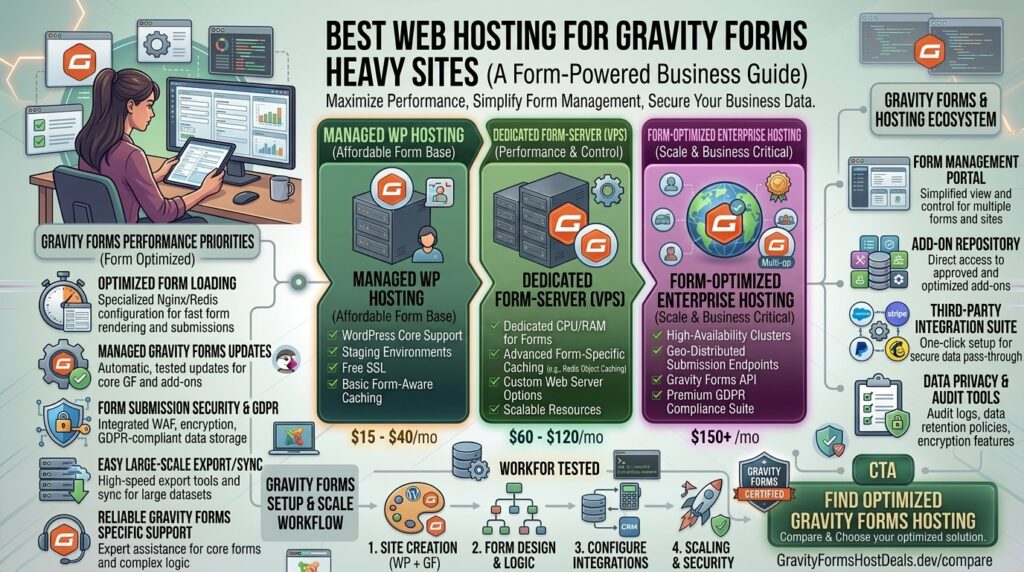
Best web hosting for gravity forms heavy sites. Gravity Forms is widely considered the gold standard for form builders in the WordPress ecosystem. Far more than a simple contact form, it acts as a complex data application framework. Developers and enterprises rely on Gravity Forms to handle multi-page application flows, heavy conditional logic, dynamic calculations, file uploads, user registration portals, and real-time payment gateway integrations (Stripe, PayPal).
However, running a “gravity-forms-heavy” site—where thousands of users submit data, trigger webhooks, update database rows, and execute background tasks daily—places immense strain on underlying web architecture. If your digital properties operate across high-stakes commercial zones like New York, San Francisco, Texas, Washington, or Los Angeles, standard budget shared hosting will cause form submissions to time out, database locks to occur, and critical leads to vanish.
This comprehensive guide explores everything you need to know about choosing the best web hosting for Gravity Forms heavy sites, architectural bottlenecks, optimization strategies, and 10 detailed FAQs.
Why Heavy Gravity Forms Usage Cripples Standard Web Hosting
Many site owners mistakenly believe that because Gravity Forms runs inside WordPress, any standard $3/month shared hosting plan will suffice. This is a costly misconception.
When a user submits a complex Gravity Forms entry, the server handles a rigorous sequence of background events:
- Validation Filters: Evaluating multi-conditional logic strings, calculations, and field requirements across multiple pages.
- Database Write Operations: Writing form data, metadata, and tracking strings across multiple custom MySQL tables (
wp_rg_lead,wp_rg_lead_detail, etc.). - Third-Party API Handshakes: Triggering webhooks, syncing CRM data (Salesforce, HubSpot), executing email notifications via SMTP, and processing real-time payment tokens.
On overcrowded shared hosting, these sequential database and script demands quickly exhaust available PHP workers, leading to dropped connections, 504 Gateway Timeouts, and frustrated users abandoning applications.
Essential Requirements for Heavy Gravity Forms Hosting
To maintain sub-second submission processing and flawless reliability under heavy operational loads, your hosting environment must provide:
- Generous PHP Worker Allocation: Dedicated background processing lanes so multiple simultaneous form submissions never have to wait in a queue.
- High-Performance MySQL/MariaDB Infrastructure: Optimized database servers running on fast NVMe drives to handle rapid row creation and frequent entry lookups.
- Object Caching (Redis or Memcached): Essential for minimizing redundant database queries and accelerating form rendering speeds.
- Robust Inode and Storage Limits: Heavy form ecosystems—especially those accepting multi-megabyte file uploads—accumulate data rapidly, requiring massive storage pools and high inode thresholds.
Top 5 Web Hosting Providers for Gravity Forms Heavy Sites: Best web hosting for gravity forms heavy sites.
To guarantee absolute uptime, robust database handling, and lightning-fast execution speeds for heavy form architectures, these top hosting providers lead the industry:
1. Liquid Web (Best Fully Managed Enterprise WordPress Hosting)
Liquid Web specializes in high-performance, mission-critical WordPress infrastructure, making it the premier choice for enterprise sites processing heavy form data.
- Why it shines for Gravity Forms: Liquid Web does not artificially throttle PHP workers or put restrictive visitor caps on its enterprise tiers. Their high-end VPS and dedicated environments easily absorb intensive database transactions and file uploads.
- Pros: Heroic 24/7 technical support, automated daily backups, robust server security, and zero pageview overage penalties.
- Cons: Premium price point tailored specifically for established business operations.
2. Cloudways (Best Managed Cloud Flexibility with Custom Scaling)
Cloudways places an intuitive, managed application layer on top of elite cloud providers like DigitalOcean, Vultr, and AWS.
- Why it shines for Gravity Forms: You can scale your server vertically (adding more RAM and CPU cores) instantly when form submission volumes spike. It comes pre-configured with Redis object caching and advanced PHP settings.
- Pros: Pay-as-you-go pricing, isolated server resources, staging environments, and complete freedom from noisy neighbors.
- Cons: Requires basic configuration familiarity for advanced server-level fine-tuning.
3. Kinsta (Best Premium Google Cloud Platform Architecture)
Powered entirely by the premium tier of the Google Cloud Platform, Kinsta is engineered for speed-obsessed brands that cannot afford a single dropped form entry.
- Why it shines for Gravity Forms: Utilizes isolated software containers for every site paired with Cloudflare Enterprise security, edge caching, and automated database optimizations.
- Pros: Blistering speed, exceptional security hardening, uptime monitoring, and automatic performance tweaks.
- Cons: Strict limits on PHP worker allocations based on plan tiers; higher entry costs.
4. Hosting.com / A2 Hosting (Best Turbo-Boosted Database Speeds)
Formerly known as A2 Hosting, Hosting.com is celebrated for its performance-engineered NVMe infrastructure and customized Turbo servers.
- Why it shines for Gravity Forms: Their Turbo plans feature up to 20x faster resource delivery, specialized caching modules, and optimized database configurations designed to accelerate data-heavy form submissions.
- Pros: High-speed server hardware, anytime money-back guarantee, and developer-friendly controls.
- Cons: Maximum speed features require upgrading to higher-tier pricing plans.
5. WP Engine (Best Managed Environment with Advanced Security)
WP Engine is a legendary name in managed WordPress hosting, renowned for its enterprise stability and automated threat detection layers.
- Why it shines for Gravity Forms: Features proprietary EverCache technology and automated security rules that block malicious bot spam attempts targeting form submission endpoints.
- Pros: Outstanding developer workflows, global CDN integration, and proactive security monitoring.
- Cons: Strict plugin restrictions (certain caching or heavy logging plugins are banned because server-side systems handle them).
Actionable Tips to Optimize Gravity Forms Performance
Choosing a powerful host is only half the battle. To keep heavy form systems running smoothly, execute these optimization techniques:
- Clean Up Database Entry Tables Regularly: Gravity Forms stores every single submission in your WordPress database. Over time, thousands of entries cause database bloat. Export old entries to CSV, delete them from the database, and optimize tables regularly using WP-Optimize.
- Offload File Uploads to Cloud Storage: If your forms accept heavy document or image uploads, configure plugins to offload files directly to Amazon S3 or Google Cloud Storage, keeping your primary server disk space light.
- Implement Redis Object Caching: Ensure your host has Redis enabled. This prevents repetitive database lookups when forms load complex conditional rules and user data.
- Use AJAX Form Submissions Wisely: While AJAX keeps users on the page during submission, it can consume more server resources under heavy concurrency. Test whether standard or AJAX submission mode yields better performance on your specific server stack.
- Protect Form Endpoints Against Spam Bots: Automated bots hammering your form submission endpoints can crash your database. Implement Cloudflare Turnstile or Google reCAPTCHA v3 to intercept spam before it hits your server scripts.
10 Frequently Asked Questions (FAQs)
1. Why do heavy Gravity Forms sites require specialized web hosting?
Gravity Forms executes complex database writes, conditional logic validations, and third-party API webhooks upon submission. Standard shared hosting lacks the PHP workers and database performance required to handle multiple concurrent submissions without timing out.
2. Can cheap shared hosting handle a site with thousands of form submissions?
No. Cheap shared hosting caps your database queries, memory limits, and PHP workers. High submission volumes will quickly trigger server errors or cause your hosting provider to throttle your account.
3. What role do PHP workers play in form submission performance?
PHP workers handle dynamic requests, such as validating and saving form entries. If 20 users submit complex forms simultaneously, but your server only has 2 active PHP workers, 18 users will experience severe delays or connection errors.
4. How does database bloat affect Gravity Forms speed?
As form entries accumulate into the tens of thousands, MySQL tables grow massive. Searching through unindexed, bloated tables slows down backend management and submission speeds. Regular database maintenance is vital.
5. Does my choice of web host impact my Google SEO rankings?
Yes. Google’s Core Value Metrics evaluate page load speeds, Time to First Byte (TTFB), and site stability. Fast hosting ensures form-heavy landing pages render instantly, lowering bounce rates and protecting search rankings.
6. Are automated backups critical for form-heavy websites?
Yes. If a database error corrupts your tables or an accidental deletion wipes out customer entries, automated daily backups ensure you can restore critical lead data without business interruption.
7. How do file uploads impact form hosting performance?
Large file uploads (PDFs, high-res images) consume heavy bandwidth and server memory during transmission. Offloading these files to cloud storage (like Amazon S3) prevents your web server from choking.
8. What is the difference between Managed WordPress Hosting and Cloud VPS?
Managed WordPress hosting (like Liquid Web or Kinsta) handles server optimization, security updates, and backups for you. Cloud VPS (like Cloudways) gives you scalable cloud hardware control, requiring some administrative setup.
9. How can I stop spam bots from crashing my form server?
Integrate advanced anti-spam tools like Cloudflare Turnstile, reCAPTCHA v3, or Akismet. These filters block malicious bot traffic before it reaches your PHP backend scripts.
10. How much RAM does a high-traffic form website need?
Websites processing thousands of daily form submissions and complex user actions generally require a minimum of 2GB to 4GB of dedicated RAM to operate smoothly without memory bottlenecks.
Conclusion
Running a website heavily dependent on complex Gravity Forms workflows demands infrastructure engineered for dynamic data processing, database integrity, and high concurrency. By pairing your WordPress ecosystem with a high-performance, robust hosting environment—such as Liquid Web, Cloudways, or Kinsta—alongside disciplined database maintenance, you ensure lightning-fast form submissions, zero data loss, and an optimized platform primed for peak digital performance.