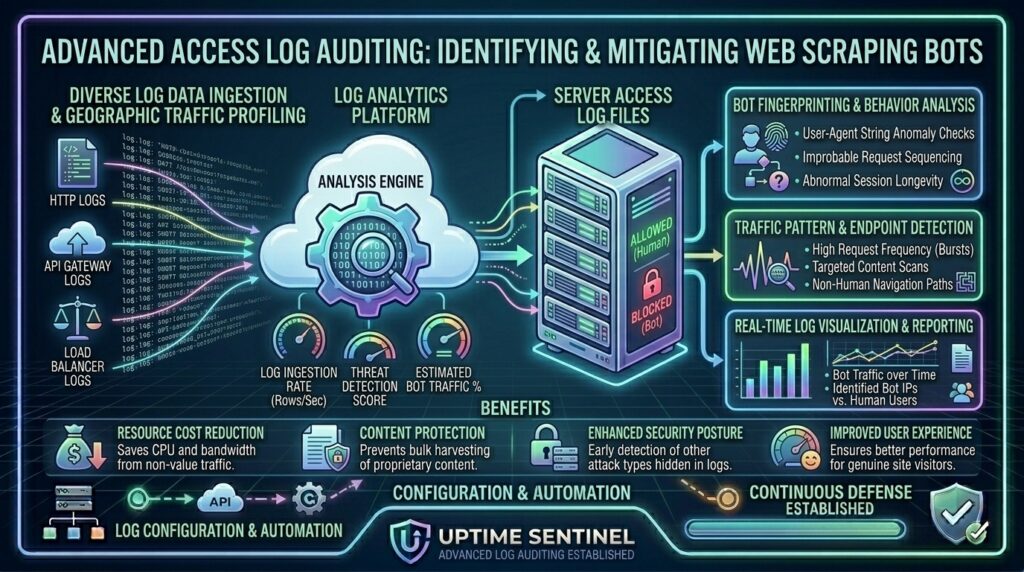
Analyzing Access Logs to Find Web Scraping Bots on Your Server: The Ultimate Security and Performance Guide
Welcome to thehostreviews.com—your premier authoritative destination for server infrastructure optimization, threat intelligence analysis, and advanced log forensics spanning tech hubs from New York and San Francisco to Texas, California, and Washington.
Introduction: The Hidden Threat Lurking in Your Server Logs
Every second, your web server records a detailed chronological history of every interaction it experiences. Every page view, asset load, image request, and API call is meticulously archived into plaintext files known as Access Logs. For many website owners, these logs sit quietly in the background, ignored until a major crash occurs.
However, your access logs represent a goldmine of intelligence. Hidden within those rows of IP addresses, timestamps, user-agent strings, and HTTP status codes is a silent epidemic affecting modern websites: Web Scraping Bots.
Unwanted scraping bots—ranging from aggressive content scrapers and e-commerce price monitors to malicious vulnerability scanners and automated LLM data collectors—can silently drain your server resources, steal your proprietary data, bloat your bandwidth bills, and degrade user experience for legitimate human visitors.
This comprehensive, expert-level guide will teach you how to read, dissect, and analyze Nginx and Apache access logs using command-line forensic tools to identify, isolate, and block automated scrapers from crippling your server infrastructure.
Part 1: Anatomy of a Web Access Log
Before you can hunt down scraping bots, you must understand the structure of the data you are investigating. Whether running Nginx or Apache, standard web servers output access logs in the Combined Log Format.
Examining a Standard Log Line:
Plaintext
192.0.2.45 - - [18/Aug/2026:12:42:15 +0000] "GET /products/item-123 HTTP/1.1" 200 4521 "https://thehostreviews.com/" "Mozilla/5.0 (Windows NT 10.0; Win64; x64) AppleWebKit/537.36..."
Let’s break down each component of this forensic record:
192.0.2.45: The remote IP address of the client making the request.[18/Aug/2026:12:42:15 +0000]: Exact timestamp of the request down to the second."GET /products/item-123 HTTP/1.1": The HTTP request method (GET,POST), target URI path, and protocol version.200: The HTTP status code returned by the server (200Success,404Not Found,403Forbidden,500Server Error).4521: The size of the response payload delivered in bytes."[https://thehostreviews.com/](https://thehostreviews.com/)": The HTTP Referer header indicating where the user navigated from."Mozilla/5.0...": The User-Agent string identifying the client’s browser, operating system, or bot signature.
Part 2: Behavioral Signatures — How to Spot a Scraper in the Logs
Human visitors browse websites randomly, pause to read text, click menus, and load pages at human speeds. Scraping bots do none of this. They execute programmatic, mechanical patterns that leave unmistakable forensic footprints in your logs.
1. Inhuman Request Velocity
A human visitor rarely requests 50 distinct product pages within two seconds. If your access logs reveal a single IP address requesting hundreds or thousands of URI paths within a fraction of a minute, you are looking at an aggressive automated scraper.
2. Complete Disregard for Static Assets
When a human loads a webpage, their browser automatically downloads supporting CSS files, JavaScript scripts, logos, and images. Scrapers, however, are usually written in Python (using Requests or BeautifulSoup) or Node.js (Axios). They request only the raw HTML pages or API endpoints and never load images or CSS assets.
3. Fake or Missing User-Agent Strings
Many primitive bots leave their User-Agent blank, or use generic script signatures like python-requests/2.31.0 or curl/8.4.0. More sophisticated scrapers attempt to spoof legitimate browsers by using outdated Chrome or Firefox user-agent strings while exhibiting unnatural request patterns.
4. Systematic Sequential Traversals
Scrapers often crawl sites systematically—looping through numerical product IDs (/item/1, /item/2, /item/3) or alphabetical catalog listings at a rigid, machine-paced interval.
Part 3: Command-Line Forensic Toolkit (Terminal Log Analysis)
You do not need expensive software to analyze server logs. Linux command-line utilities (awk, grep, sort, uniq, wc) provide blazing-fast forensic power directly via SSH.
1. Finding the Top 10 Most Active IP Addresses
Run this command on your VPS to instantly reveal which IP addresses are hammering your server the hardest:
Bash
awk '{print $1}' /var/log/nginx/access.log | sort | uniq -c | sort -nr | head -n 10
- Explanation: Extracts the IP column (
$1), sorts them, counts unique occurrences (uniq -c), sorts them numerically in reverse order (sort -nr), and prints the top 10 offenders.
2. Identifying Requests with Suspicious User-Agents
Search your access logs for known scraping libraries, headless browsers, or empty user-agents:
Bash
grep -iE "python|curl|wget|scrapy|bot|spider|crawl" /var/log/nginx/access.log | head -n 20
3. Pinpointing High-Frequency Page Scrapers (GET Requests)
Count which exact URI paths are being requested most frequently:
Bash
awk '($6 ~ /GET/) {print $7}' /var/log/nginx/access.log | sort | uniq -c | sort -nr | head -n 20
4. Analyzing Traffic by HTTP Status Codes
Check if scrapers are triggering excessive 404 errors by probing non-existent directories or vulnerability paths:
Bash
awk '{print $9}' /var/log/nginx/access.log | sort | uniq -c | sort -nr
Part 4: Case Study — Forensic Investigation Workflow
Imagine your website experiences sudden high CPU usage and bandwidth spikes. Here is how you investigate and neutralize the threat step-by-step:
Step 1: Isolate Today’s Log File
Navigate to your log directory (typically /var/log/nginx/ or /var/log/apache2/):
Bash
cd /var/log/nginx/
Step 2: Run a Frequency Count on IPs
You run the top IP command and discover a single IP address (203.0.113.88) has executed 42,000 requests in the last hour, while normal users average 15 requests per session.
Step 3: Inspect Specific IP Activity
Filter the log specifically for that IP address to see what they are targeting:
Bash
grep "203.0.113.88" access.log | tail -n 50
Result: You notice the IP is systematically scraping every single author profile page on your blog at a rate of 20 requests per second, with zero image requests. It is a content scraper.
Part 5: Actionable Countermeasures — Blocking Scrapers
Once you identify malicious scraping bots in your access logs, you must deploy defensive countermeasures to protect your server resources.
1. Blocking Offending IPs via UFW Firewall
Instantly ban a malicious scraper’s IP address from accessing your server entirely:
Bash
sudo ufw deny from 203.0.113.88 to any
2. Blocking Scraping Bots at the Nginx Level
You can configure Nginx to block requests based on malicious User-Agent strings or missing headers. Add this block inside your Nginx server block (/etc/nginx/sites-available/thehostreviews.conf):
Nginx
# Block bad bot user-agents
if ($http_user_agent ~* (Scrapy|AhrefsBot|SemrushBot|DotBot|MJ12bot|BLEXBot|python-requests)) {
    return 403;
}

# Block requests with empty user-agents
if ($http_user_agent = "") {
    return 403;
}
Test the configuration (nginx -t) and reload Nginx (systemctl reload nginx).
3. Implementing Rate Limiting in Nginx
Prevent scrapers from overwhelming your server by limiting how many requests a single IP address can make per second:
Nginx
# Define rate limiting zone (10MB memory zone, max 5 requests per second per IP)
limit_req_zone $binary_remote_addr zone=scraper_limit:10m rate=5r/s;

server {
    # Apply rate limiting to your application location block
    location / {
        limit_req zone=scraper_limit burst=10 nodelay;
        try_files $uri $uri/ @apache;
    }
}
Part 6: Best Practices for Ongoing Bot Management
- Maintain a Clean Robots.txt: Use your
robots.txtfile to politely instruct well-behaved search engine indexers (Google, Bing) which pages to avoid, though malicious scrapers will ignore it entirely. - Deploy Cloudflare or WAF Protection: Offload heavy bot filtering to edge cloud security networks like Cloudflare by enabling Bot Fight Mode or configuring custom WAF (Web Application Firewall) firewall rules.
- Rotate Log Files Daily: Ensure
logrotateis configured correctly on your Linux VPS so your access logs do not swell to gigabyte sizes and consume all your server disk storage.
Part 7: Frequently Asked Questions (FAQ)
1. What are web access logs?
Web access logs are plaintext files maintained by your web server (Nginx or Apache) that record every single HTTP request made to your server, including timestamps, client IPs, requested paths, and response codes.
2. How do I know if a visitor is a human or a scraping bot?
Human visitors exhibit erratic navigation, load static assets (images, CSS, JS), and browse at slow speeds, whereas bots request hundreds of pages per minute, skip static assets, and often use script signatures in their User-Agent strings.
3. Why do web scraping bots target websites?
Scrapers harvest data for various reasons, including competitor price monitoring, content theft, machine learning dataset collection, email address harvesting, and vulnerability scanning.
4. Can I use the Linux command line to analyze my access logs?
Yes! Utilities like awk, grep, sort, and uniq allow you to parse massive log files instantly via SSH without needing third-party software.
5. What is a User-Agent string?
A User-Agent string is a piece of text transmitted by an HTTP client (like Chrome, Firefox, or a Python script) that identifies the application, operating system, and software version making the request.
6. How do I block a malicious scraping IP address permanently?
You can block an offending IP address using the Linux firewall (sudo ufw deny from IP_ADDRESS) or by configuring deny rules directly inside your Nginx/Apache configuration files.
7. What is rate limiting and how does it stop scrapers?
Rate limiting restricts the number of HTTP requests an individual IP address can make within a specified time window, blocking or throttling scripts that attempt to pull data too rapidly.
8. Do good search engine bots get blocked by strict bot rules?
If configured incorrectly, strict user-agent blocking rules can accidentally block legitimate search engine crawlers like Googlebot. Always verify user-agent signatures or use verified IP ranges before blocking.
9. How do I prevent log files from filling up my VPS disk space?
Linux utilizes logrotate, a system utility that automatically compresses, archives, and deletes old access logs on a scheduled rotation to preserve disk storage.
10. Can Cloudflare protect my website against scrapers automatically?
Yes. Enabling Cloudflare’s Bot Fight Mode or configuring custom WAF challenge rules stops malicious scrapers at the edge before they ever hit your origin VPS IP address.
Conclusion
Analyzing your web server access logs is a vital security and performance discipline for any website owner. By mastering command-line forensics using awk and grep, recognizing behavioral patterns of malicious bots, and implementing robust Nginx rate limiting and IP blocking rules, you protect your server resources and keep your platform secure.