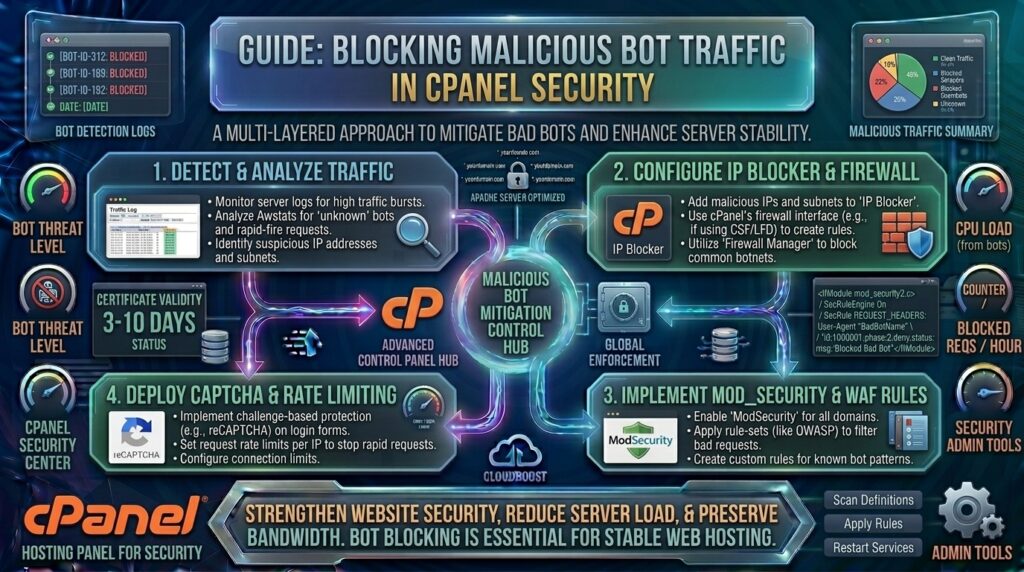
How to Block Malicious Bot Traffic in cPanel Security
Welcome to thehostreviews.com—your primary authority for web hosting evaluations, infrastructure hardening, and performance engineering, catering to tech ecosystems from New York and San Francisco to Texas, California, and Washington.
Introduction: The Rising Threat of Malicious Bot Traffic
If you look closely at your website’s raw server logs, analytics dashboards, or resource usage meters, you might notice something alarming: a massive percentage of your web traffic is not human.
While “good bots”—such as search engine indexers from Google, Bing, and verified utility crawlers—help your content rank and grow, bad bots pose a constant threat to your digital presence. Malicious bots scrape proprietary content, execute brute-force login attacks against your admin portals, spam contact forms, execute inventory hoarding on e-commerce carts, and drain server CPU and bandwidth resources. Left unchecked, bad bots can slow down your servers, distort analytics data, and degrade user experience for genuine customers across the United States and globally.
For millions of webmasters utilizing cPanel, built-in server security toolsets provide powerful defense mechanisms to detect, filter, and block malicious bot traffic before it damages your web applications.
This comprehensive, expert-level guide will walk you through everything you need to know to lock down your cPanel hosting environment against automated bot threats.
Part 1: How to Identify Malicious Bot Activity
Before deploying blocking rules, you need to understand how to spot malicious behavior within your hosting account.
Key Indicators of Bot Attacks:
- Abnormal Traffic Spikes: Sudden surges in page requests from specific user-agents or IP ranges without a corresponding increase in organic revenue or human engagement.
- Repeated Hits to Non-Existent Pages: Bots crawling broken paths or scanning for common vulnerability files (
wp-login.php,xmlrpc.php,/admin/,.env). - High Resource Utilization: Sudden spikes in CPU or RAM usage on your shared hosting or VPS plan, often accompanied by slow page loading speeds.
- Unusual User-Agent Strings: Blank, spoofed, or known malicious user-agent signatures appearing repeatedly in raw access logs.
Part 2: Step-by-Step Methods to Block Bots in cPanel
Depending on your hosting package tier (shared hosting, reseller, VPS, or dedicated server), cPanel offers several layered utilities to counter unwanted automated traffic.
Method 1: Using the cPanel “IP Blocker” Tool
If malicious bots or scrapers are originating from specific, persistent IP addresses or network ranges, you can block them instantly.
- Log into your cPanel dashboard.
- Scroll to the Security section and click on IP Blocker (or the Protection tab depending on your cPanel theme version).
- In the Block an IP Address field, enter the target IP address or network range in CIDR notation (e.g.,
192.168.1.50or192.168.1.0/24). - Click the + Block button.
The server will instantly write an Apache block rule, rejecting all subsequent requests originating from that address.
Method 2: Blocking Bad Bots via .htaccess User-Agent Rules
Most bad bots declare a specific identification string in their HTTP header known as a User-Agent. You can instruct your Apache web server to intercept and ban requests matching known malicious user-agent signatures by editing your website’s root .htaccess file.
- Open your cPanel File Manager and navigate to your website’s root directory (
public_html). - Ensure hidden files are visible, then open your
.htaccessfile for editing. - Add a rewrite block targeting known bad bot strings:
Apache
RewriteEngine On
RewriteCond %{HTTP_USER_AGENT} (BadBotName|ScraperBot|AgressiveCrawler|SpamBot) [NC]
RewriteRule .* - [F,L]
[NC]: Makes the match case-insensitive.[F,L]: Forces a 403 Forbidden response code and halts further rule processing.
Method 3: Enabling and Configuring ModSecurity (Web Application Firewall)
ModSecurity is an open-source Web Application Firewall (WAF) built directly into modern cPanel and WHM architectures. It monitors HTTP traffic in real time, comparing requests against comprehensive rule sets to block common bot exploit patterns, SQL injections, and malicious scraping attempts.
- In your cPanel dashboard, locate the Security hub and click on ModSecurity.
- Review your domain list and toggle the status switch to Enable for all domains or specific target websites.
- (For Server Administrators using WHM): System administrators can drill down into ModSecurity Tools to create custom rule sets, adjust rule sensitivity, or log blocked attack vectors automatically.
Method 4: Configuring Hotlink Protection
Many malicious scraper bots steal your server bandwidth by pulling heavy images, graphics, or media files directly from your URL to display on external third-party sites.
- Open your cPanel dashboard and click on Hotlink Protection under the Security block.
- Click Enable.
- Add your allowed domains and specify file extensions to protect (
jpg,png,gif,pdf). - Choose whether the server should return a 403 Forbidden error or redirect the unauthorized scraping request to an alternative URL.
Part 3: Advanced Bot Mitigation Tips and Best Practices
Layering native cPanel controls with broader architectural best practices ensures airtight security.
- Deploy an Edge CDN (like Cloudflare): Offloading your DNS and traffic routing to a content delivery network allows youaturas to leverage enterprise-grade JavaScript challenges, managed bot fight modes, and rate-limiting before traffic even reaches your cPanel hosting server.
- Implement CAPTCHA on Forms: Automated form-spam bots love targeting unprotected comment sections, user registration pages, and contact forms. Integrate Google reCAPTCHA or hCaptcha to stop programmatic form submissions.
- Regularly Audit Access Logs: Periodically download and review raw access logs via cPanel to spot emerging bot IP trends or aggressive scraping signatures.
Part 4: Troubleshooting Bot Blocking Mistakes
- Accidental Blocking of Legitimate Users: Overly broad user-agent or IP blocking rules can occasionally block valid customers or search engine crawlers. Always test your
.htaccessrules carefully and monitor error logs. - Server Performance Degradation: Having thousands of individual IP block lines inside an
.htaccessfile can bloat Apache parsing times. For large-scale blocks, utilize server-level firewalls (like CSF/Fail2ban) or edge CDNs.
Part 5: Frequently Asked Questions (FAQ)
1. Can I completely block all bad bots from my website?
While you can drastically reduce malicious traffic using cPanel tools, completely eliminating 100% of bad bots is nearly impossible because malicious actors frequently rotate IP addresses and spoof user-agent headers. Layering cPanel security with a Cloudflare WAF provides the highest level of mitigation.
2. Will blocking bad bots improve my website loading speed?
Yes! Malicious bots consume server CPU, memory, and database connection pools. Blocking them frees up server resources, resulting in faster response times for your genuine human visitors.
3. Does cPanel’s IP Blocker affect search engine crawlers like Googlebot?
No, unless you manually block Google’s official IP ranges. Verified search engine crawlers use legitimate user-agents and verified IP blocks. However, you should always double-check IP blocks before applying them to avoid blocking indexers.
4. What is ModSecurity and how does it stop bots?
ModSecurity is a Web Application Firewall (WAF) integrated into cPanel. It inspects incoming HTTP requests in real time and blocks traffic matching known malicious attack signatures, vulnerability scans, and aggressive scraping scripts.
5. How do I know if a bot is good or bad?
Good bots (like Googlebot or Bingbot) identify themselves honestly in their user-agent string and respect instructions outlined in your robots.txt file. Bad bots disguise their user-agents, ignore robots.txt, scrape content aggressively, and attempt brute-force logins.
6. Can I use cPanel to set up rate limiting for my website?
While cPanel provides basic firewall and IP blocking utilities, advanced request rate-limiting (restricting the number of hits a single IP can make per second) is typically configured at the server level via WHM/Apache configuration or managed through an external CDN.
7. What should I do if my .htaccess bot block breaks my website?
If a syntax error in your .htaccess file triggers a 500 Internal Server Error, log into your cPanel File Manager, open the file, remove the recent bot blocking lines, and save changes. Your site will restore immediately.
8. Are free SSL certificates affected by bot blocking?
No. Security certificates and bot filtering operate independently. Blocking bots has zero impact on your Let’s Encrypt or commercial SSL encryption status.
9. Why do bad bots target WordPress login pages?
WordPress is the world’s most popular CMS, making automated script bots target wp-login.php globally to execute credential stuffing and brute-force attacks. Protecting these directories with security plugins or server firewalls is critical.
10. Do I need root access to block bad bots in cPanel?
No. Standard shared hosting cPanel accounts give you access to IP Blocker, Hotlink Protection, ModSecurity toggles, and .htaccess file editors, allowing you to manage bot defenses without requiring root server permissions.
Conclusion
Defending your web hosting environment against malicious bot traffic is an ongoing administrative necessity. By leveraging cPanel’s built-in security features—such as IP Blocker, ModSecurity, Hotlink Protection, and custom .htaccess rules—you can successfully safeguard your server resources, protect proprietary content, and ensure a seamless experience for your human visitors.