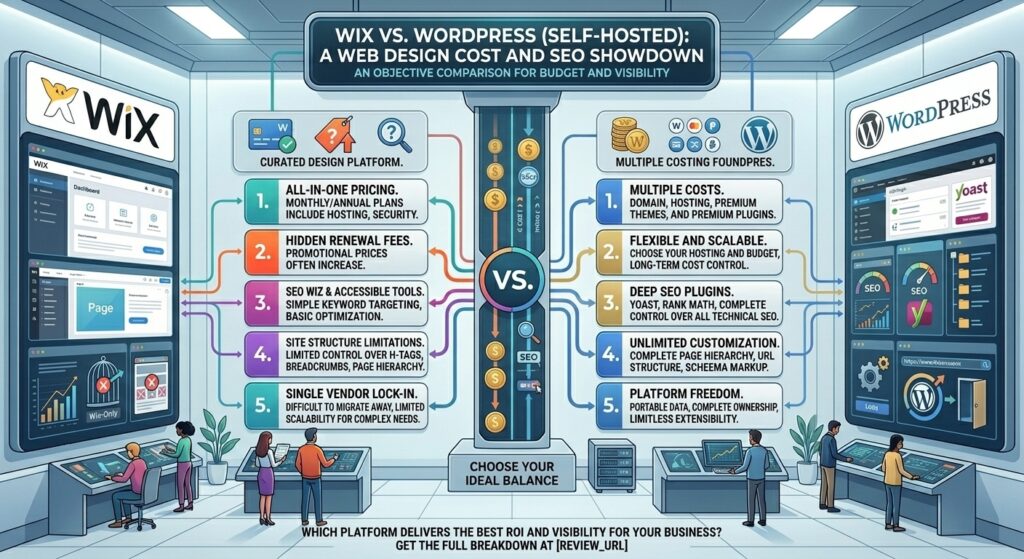
Choosing the right foundation for your website is a high-stakes decision. Whether you are scaling a digital agency in New York, launching a tech startup in San Francisco, running a local service business in Austin (Texas), managing media assets in Seattle (Washington), or expanding an e-commerce brand across California, your choice of Content Management System (CMS) dictates your ongoing operational costs, technical overhead, and organic search engine visibility.
Two titans dominate the website creation landscape: Wix, the fully managed, all-in-one visual website builder, and WordPress (Self-Hosted / WordPress.org), the open-source software powerhouse that drives over 40% of the internet.
This exhaustive, data-driven comparison evaluates Wix and Self-Hosted WordPress across total cost of ownership, technical SEO capabilities, performance, and long-term scalability.
1. Architectural Philosophy: Managed vs. Open-Source
To understand the cost and SEO differences between Wix and WordPress, you must first understand their core operating models.
- Wix: A closed-ecosystem, all-in-one platform. Wix bundles hosting, security certificates, software updates, drag-and-drop editing, and customer support into a single monthly subscription. You never touch a server configuration file or manage backend security patches.
- WordPress (Self-Hosted): An open-source software package that you download and install on a web hosting account (such as SiteGround, WP Engine, Bluehost, or Cloudways). You own your database, code files, and domain outright. While this grants absolute freedom, it also places the responsibility of security monitoring, backups, updates, and performance tuning entirely on your shoulders.
2. Total Cost of Ownership (TCO) Breakdown
Evaluating a platform based solely on its advertised entry price is a common mistake. True cost encompasses hosting, plugins, themes, maintenance, and future migration flexibility.
+-----------------------------------+-----------------------------------+
|               WIX                 |        WORDPRESS (SELF-HOSTED)    |
+-----------------------------------+-----------------------------------+
| • Predictable bundled pricing     | • Variable hosting tiers          |
| • All-inclusive security & upkeep | • Optional paid themes & plugins  |
| • Zero server maintenance costs   | • Potential developer/maintenance |
| • Fixed scaling tiers             |   costs over time                 |
+-----------------------------------+-----------------------------------+
Wix Total Cost Analysis
Wix operates on a predictable, tiered subscription model (typically ranging from $17 to $159+ per month billed annually).
- What is included: Hosting, SSL certificates, automated security, standard template frameworks, and customer support.
- Hidden/Extra Costs: Custom domain renewals after year one, premium third-party apps from the Wix App Market ($3 to $20+/month), and professional email hosting (often integrated via Google Workspace).
WordPress Total Cost Analysis
WordPress software itself is 100% free and open-source. However, operating a professional business site incurs variable expenses:
- Hosting: Ranges from $3 to $30+ per month for shared/managed hosting, scaling up to $100+/month for high-performance enterprise cloud environments.
- Domain & Email: $10 to $20/year for domain registration; email hosting costs vary.
- Themes & Plugins: While thousands of free options exist, professional business sites often rely on premium themes ($59–$100 one-time) and specialized plugins for advanced functionality, security, or caching.
- Maintenance & Developer Overhead: If your internal team lacks technical expertise, hiring a developer or paying for a managed maintenance plan introduces ongoing labor costs.
3. Wix vs. WordPress for Google SEO
For decades, WordPress held a definitive crown over closed builders like Wix in organic search. However, platform updates have drastically narrowed this gap.
+-----------------------------------+-----------------------------------+
|            WIX SEO                |         WORDPRESS SEO             |
+-----------------------------------+-----------------------------------+
| • Solid out-of-the-box metadata   | • Infinite schema & tag control   |
| • Native schema markup generation | • Elite plugin ecosystem (Rank Math)|
| • Automated sitemaps & robots.txt | • Full server-log and code access |
| • Clean server-side rendering     | • Unrestricted programmatic SEO   |
+-----------------------------------+-----------------------------------+
Wix SEO Capabilities
Wix has evolved into a robust environment for standard small-business SEO:
- Server-Side Rendering (SSR): Wix delivers fully rendered HTML to search engine bots, ensuring rapid indexing.
- Built-in Schema: Native support for Article, FAQ, and Product schema without requiring external plugins.
- URL & Redirect Management: Easily customizable URL slugs, canonical tags, 301 redirects, and robots.txt file editing straight from the dashboard.
- The Ceiling: Wix remains less flexible for massive, complex site architectures requiring programmatic SEO, multi-language scaling across hundreds of sub-directories, or deeply customized schema adjustments.
WordPress SEO Capabilities
WordPress remains the undisputed champion for advanced, enterprise-grade SEO campaigns:
- SEO Plugins: Industry-standard plugins like Rank Math and Yoast SEO provide unparalleled control over on-page optimization, content readability, XML sitemap generation, and advanced schema mapping.
- Code Control & Server Access: Full access to
.htaccess, server response headers, and raw PHP code allows developers to optimize Core Web Vitals at the hypervisor level. - Programmatic Scale: For websites managing tens of thousands of dynamic pages, custom post types and custom fields (via Advanced Custom Fields) make WordPress infinitely more scalable than Wix.
4. Performance, Speed, and Core Web Vitals
Google’s ranking algorithms heavily weigh page load speed, Largest Contentful Paint (LCP), and Cumulative Layout Shift (CLS).
- Wix Performance: Out of the box, Wix handles hosting optimization automatically. Because Wix controls the underlying infrastructure, servers are pre-configured with edge caching and CDN routing. For average small business sites, Wix achieves passing Core Web Vitals scores without manual tuning.
- WordPress Performance: WordPress speed is entirely dependent on your hosting provider and your build discipline. A cleanly coded WordPress site hosted on managed NVMe cloud servers (like Kinsta, SiteGround, or Cloudways) using a lightweight theme (such as Astra or GeneratePress) can easily outperform Wix. However, a bloated WordPress build loaded with twenty overlapping plugins and heavy page builders will suffer from sluggish response times.
5. Pros and Cons Summary
Wix
- Pros:
- Incomparable ease of use with intuitive visual drag-and-drop editing.
- All-in-one management eliminates the need to patch plugins or manage server updates.
- Solid out-of-the-box SEO tools that satisfy 80% of small business needs.
- Reliable, bundled customer support available 24/7.
- Cons:
- Higher monthly recurring cost structure for advanced plans.
- Closed ecosystem restricts deep backend code customization.
- Migration-out complexity: you cannot easily export your design structure to another host.
WordPress (Self-Hosted)
- Pros:
- Absolute ownership of your data, files, and database.
- Infinite design and functional customizability via thousands of themes and plugins.
- Superior ceiling for advanced, complex, and large-scale SEO strategies.
- Cost-effective hosting options for budget-conscious creators.
- Cons:
- Steeper learning curve requiring technical oversight.
- You are solely responsible for security hardening, updates, and backups.
- Poor plugin management can lead to site crashes or speed degradation.
6. Strategic Optimization Tips for US Webmasters
Whether you choose Wix or WordPress to target competitive markets across New York, San Francisco, Texas, or Washington, apply these expert tips:
- Compress Media Assets: High-resolution photography from local shoots will choke page speeds. Always compress images to WebP formats before uploading.
- Implement Local Business Schema: Embed precise NAP (Name, Address, Phone) structured data to capture high-intent “near me” map pack searches.
- Choose the Right Hosting Node: If building on WordPress, select a data center located on the US coast closest to your primary demographic to minimize Time to First Byte (TTFB).
- Audit App Bloat: Whether installing Wix apps or WordPress plugins, audit your third-party integrations quarterly to purge unused code.
7. Frequently Asked Questions (FAQ)
1. Is Wix more expensive than WordPress over the long term?
Wix often features a more predictable entry cost because hosting and security are bundled. WordPress software is free, but hosting, premium themes, plugins, and potential developer maintenance can equal or exceed Wix’s subscription costs over a 3-to-5-year lifecycle.
2. Can a Wix website rank #1 on Google against WordPress sites?
Yes. For local business terms, standard blogs, and e-commerce catalogs under 50 products, Wix is fully capable of ranking at the top of Google search results if on-page SEO and content quality are strong.
3. Which platform is better for large-scale content publishing?
Self-hosted WordPress is vastly superior for high-volume content sites, programmatic SEO, and multi-author editorial workflows due to its robust database structure and custom post types.
4. Can I easily migrate my Wix site to WordPress later?
Content exports cleanly via XML data, but design layouts cannot be directly ported over because the underlying code structures differ entirely. Rebuilding a Wix site on WordPress typically requires manual developer hours.
5. Do I need to know how to code to use either platform?
No. Both Wix and WordPress (when paired with a block editor or page builder like Elementor) allow you to build complete websites visually without writing code.
6. Who handles website security and backups?
Wix handles all security protocols, SSL encryption, and automated backups automatically behind the scenes. On self-hosted WordPress, you must configure security plugins (like Wordfence or Solid Security) and automated backup solutions yourself.
7. Which platform offers faster loading speeds out of the box?
Wix generally delivers faster performance right out of the box because its servers are pre-tuned. WordPress requires you to choose a quality host and configure caching plugins to achieve top-tier speed.
8. Are there transaction fees when selling products?
Neither Wix nor WordPress charges platform transaction fees on sales (though you will still pay standard payment gateway processing fees like Stripe or PayPal, typically around 2.9% + $0.30).
9. Which platform is better suited for digital marketing agencies?
Self-hosted WordPress is the industry standard for digital agencies managing complex client requirements, custom post types, and bespoke integrations. Wix Studio is increasingly popular for design-forward agency builds.
10. Which platform should I choose for my business?
Choose Wix if you want a frictionless, all-in-one website builder with zero technical maintenance where you can launch quickly and manage updates effortlessly. Choose Self-Hosted WordPress if you require absolute data ownership, infinite functional customization, and an uncompromised ceiling for advanced SEO.
8. Conclusion
The debate between Wix and WordPress self-hosted cost and SEO boils down to a fundamental trade-off between convenience and control.