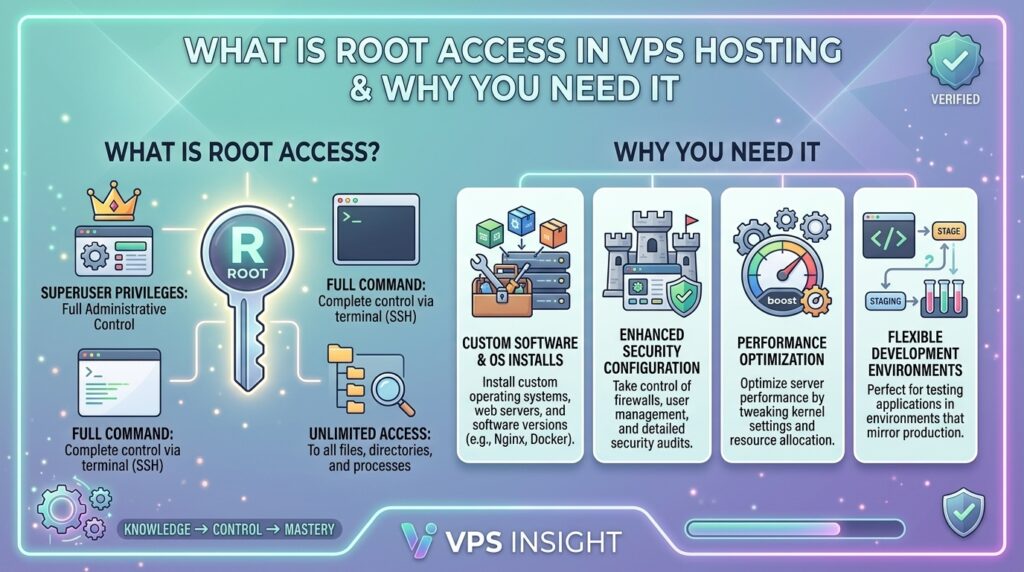
What is Root Access in VPS Hosting and Why You Need It
Welcome to thehostreviews.com—your premier authoritative destination for web hosting evaluations, infrastructure architecture guides, and advanced server administration tutorials spanning tech hubs from New York and San Francisco to Texas, California, and Washington.
Introduction: The Master Key to Your Digital Infrastructure
When you launch your first website, standard shared hosting acts like renting a small apartment in a massive multi-family building. You get a space to live, but you cannot repaint the walls, upgrade the plumbing, or modify the structural layout because the landlord maintains strict boundaries to protect everyone else.
Eventually, your website grows. Your business expands, traffic surges, and your applications demand custom configurations. That is when you upgrade to a Virtual Private Server (VPS). But the single most transformative feature you unlock during this transition is root access.
What is root access, why is it considered the ultimate administrative superpower in web hosting, and why do modern developers and businesses refuse to host without it? This comprehensive, expert-level guide breaks down everything you need to know about VPS root access, its technical capabilities, associated responsibilities, and why you need it to scale effectively.
Part 1: What Exactly is Root Access?
In Linux and Unix-based operating systems, root is the ultimate super-user account (equivalent to the Administrator account in Windows Server environments).
Think of root access as holding the master key to every room, vault, and system switch inside your virtual data center. While a standard user account is restricted to a sandboxed home directory with limited permissions, the root user has absolute, unrestricted authority.
- Root can read, modify, execute, or delete any file on the system.
- Root can install, update, or completely remove any software package or system library.
- Root can start, stop, or reconfigure core network daemons and system services.
- Root can open, close, or remap network communication ports.
When you purchase a VPS with “full root access,” the hosting provider hands over complete operational control of your virtual machine. The host manages the underlying physical hardware and hypervisor layer, but everything inside your virtual operating system is yours to command.
Part 2: Root Access vs. Standard User Permissions
To truly appreciate why root access changes the game, look at how permissions scale between standard hosting tiers and a root-enabled VPS:
| Administrative Task | Standard Shared Hosting User | VPS with Full Root Access |
| Install Software / Modules | Restricted to pre-approved control panel plugins. | Install any package, compiler, or dependency. |
| Modify Web Server Configs | Impossible (locked Apache/Nginx settings). | Full access to rewrite nginx.conf or httpd.conf. |
| Port & Protocol Binding | Locked to standard web ports (80/443). | Bind applications to any port (e.g., custom APIs, WebSockets, game servers). |
| Kernel Tweaks & Modules | None. Uses host’s shared kernel. | Full control over sysctl parameters and kernel modules (via KVM). |
| System User Management | Limited to cPanel sub-users. | Create, modify, or delete system-level shell accounts and groups. |
Part 3: Why Do You Need Root Access? (Top 5 Practical Use Cases)
Root access is not just a technical buzzword—it solves real-world bottlenecks that face growing websites and web applications.
1. Complete Freedom Over Your Software Stack
On shared hosting, you are stuck with whatever PHP version, database engine, or web server modules the host decides to provide. If your modern web application requires a specific version of Node.js, Python, a custom compiled Nginx module with HTTP/3 support, or a specialized database extension, shared hosting will block you.
With root access, there are no whitelists or approval queues. If it compiles or runs on Linux, you can install it instantly.
2. Advanced Performance Tuning and Caching
Speed is a primary ranking factor for Google SEO and user conversion. Root access allows you to optimize your server environment down to the bare metal:
- Install and configure Redis or Memcached object caching at the system level.
- Tune PHP-FPM worker pools and OPcache memory allocations to maximize throughput during high-traffic spikes.
- Replace standard Apache with high-performance LiteSpeed Web Server (LSWS) or fine-tuned Nginx reverse proxies.
3. Granular Security Configuration and Firewalls
Shared hosting forces you to share security vulnerabilities with every other noisy neighbor on the physical machine. With root access, you build an impenetrable fortress tailored to your traffic profile:
- Install and configure advanced packet filtering firewalls like UFW (Uncomplicated Firewall) or CSF (ConfigServer Security & Firewall).
- Deploy Fail2ban to automatically ban IP addresses after multiple failed login or brute-force attempts.
- Change default listening ports (such as moving SSH away from port 22) and enforce strict SSH key-based authentication.
4. Running Multiple Services Beyond Just Websites
A modern web project often requires background workers, cron queues, and companion microservices. With root access, your VPS is not limited to a single website folder. You can simultaneously run a primary e-commerce storefront, a WordPress blog, a staging environment, a database server, an API backend, and automated cron task runners on a single isolated machine.
5. Cost Efficiency and Scalability
By managing your server directly via root, you eliminate the markup fees charged by fully managed enterprise hosts or proprietary platform restrictions. You buy raw, powerful compute resources (vCPUs, NVMe SSD storage, and dedicated RAM) and configure them exactly as your business demands.
Part 4: How to Connect to Your VPS Using Root Access
When you provision a new VPS, your hosting provider will email you your server’s Public IP address and your initial root password (or an SSH private key). Here is how you establish your first secure administrative connection:
For macOS and Linux Users:
Open your native terminal application and connect via SSH (Secure Shell):
Bash
ssh root@your_server_ip_address
Type yes to accept the authenticity fingerprint, then enter your secure root password when prompted.
For Windows Users:
Download an SSH client like PuTTY or use the modern Windows Terminal (PowerShell). Enter your server’s IP address, ensure port 22 is selected, and click Open to launch the secure terminal window.
Part 5: Essential First Steps After Getting Root Access
Having root access is powerful, but logging in directly as root in a production environment carries security risks. Follow these essential post-provisioning hardening steps immediately:
- Update Your Operating System Packages: Ensure all system security patches are current:Bash
# For Ubuntu / Debian apt update && apt upgrade -y # For AlmaLinux / Rocky Linux dnf update -y - Create a New Sudo-Enabled User: Avoid using the root account for everyday administrative tasks. Create a secondary user with sudo privileges:Bash
adduser systemadmin usermod -aG sudo systemadmin - Configure a Firewall: Enable UFW and allow essential traffic ports (SSH, HTTP, HTTPS):Bash
ufw allow OpenSSH ufw allow 80/tcp ufw allow 443/tcp ufw enable - Disable Direct Root Login via Password: Edit your SSH daemon configuration file (
/etc/ssh/sshd_config) to setPermitRootLogin prohibit-passwordor use SSH keys exclusively, blocking automated bot brute-force attacks against your root login.
Part 6: The Golden Rule: With Great Power Comes Great Responsibility
The legendary trade-off of VPS root access is that you are your own system administrator.
- There is no safety net provided by shared hosting customer support if you accidentally execute a destructive command like
rm -rf /. - Misconfigured firewall rules can lock you out of your own server.
- Failing to apply system updates can leave security vulnerabilities exposed.
Always maintain reliable, automated server-level snapshots and off-site backups with your hosting provider so you can instantly roll back your server if an experimental configuration goes wrong.
Part 7: Frequently Asked Questions (FAQ)
1. What is root access in VPS hosting?
Root access is the highest-level administrative privilege on a Unix/Linux server, giving you unrestricted permission to view, modify, install, or delete any file, configuration, or software package on your virtual machine.
2. Do I need technical experience to use a VPS with root access?
Yes. Managing a server via root access requires familiarity with basic Linux command-line operations (SSH, package managers like apt/dnf, and text editors like Nano or Vim). If you prefer a graphical interface, you can install a control panel like cPanel/WHM, CyberPanel, or Plesk on your root-enabled VPS.
3. Can I break my website or server using root access?
Yes. Because root has ultimate authority, executing incorrect configuration commands, deleting system files, or corrupting database libraries can break your server. Always test changes in a staging environment and keep fresh backups.
4. How is root access different from standard cPanel access?
Standard cPanel access is a restricted user-space account designed to manage specific websites, files, emails, and databases. Root access (or WHM access) gives you control over the entire server operating system, allowing you to manage multiple cPanel accounts, configure firewalls, and alter system daemons.
5. Is root access available on shared hosting plans?
No. Shared hosting providers isolate users in restricted sandboxed environments to prevent one user from affecting others on the same hardware, meaning root access is never granted on shared plans.
6. What is the safest way to connect to my VPS using root privileges?
The most secure method is connecting via SSH using public-private SSH keys rather than a plain-text password, combined with changing your default SSH port and disabling direct root password logins.
7. Can I install Docker and containers with root access?
Yes! KVM-based VPS hosting with full root access provides your own dedicated Linux kernel, allowing you to run Docker, Kubernetes, and containerized microservices natively without nested virtualization restrictions.
8. What happens if I lose my root password?
If you lose your root password, you can typically log into your VPS provider’s client portal (such as a control panel or VNC console), access the rescue mode or single-user mode, and reset your root password securely.
9. Do managed VPS plans include root access?
It depends on the provider. Traditional managed VPS providers (like those offering managed cPanel) often provide root access while handling routine updates for you. Fully managed application hosts (like Kinsta or WP Engine) often restrict root access to maintain strict security protocols.
10. Why should I upgrade to a VPS with root access instead of staying on shared hosting?
Root access removes artificial performance ceilings, blocked ports, disabled PHP functions, and software restrictions, giving you an elite, custom-tailored environment optimized specifically for your traffic and application requirements.
Conclusion
Root access transforms a virtual private server from a basic hosting rental into an uncompromised, powerful digital infrastructure platform. By granting you total control over your software stack, security protocols, and performance tuning, root access ensures your website can scale safely and efficiently as your business grows.