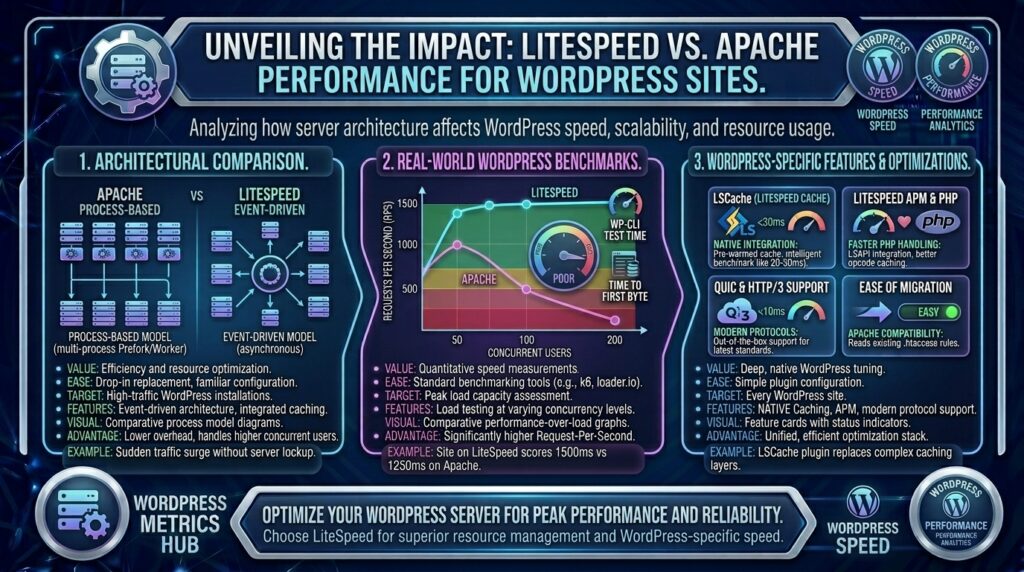
When launching or scaling a website for audiences across high-demand tech markets like Texas, New York, California, Washington, and San Francisco, minimizing infrastructure friction is essential. For the vast majority of web creators, agencies, and small businesses, WordPress is the content management system of choice. However, even the most beautifully designed WordPress site will stumble if the underlying web server architecture is sluggish.
For decades, Apache reigned supreme as the industry standard for web hosting. In recent years, however, LiteSpeed Web Server (LSWS) has emerged as a powerhouse, particularly prized for its blistering speed and native WordPress integration.
This comprehensive guide breaks down the architectural, performance, and SEO differences between LiteSpeed and Apache for WordPress hosting, helping you make an informed choice to dominate search engine results.
Understanding the Contenders: Apache vs. LiteSpeed
Before diving into performance metrics, it is vital to understand how these two web servers handle incoming browser requests.
1. Apache Web Server
Launched in 1995, Apache is the most widely deployed open-source web server in history.
- Architecture: Traditionally uses a process-based or threaded concurrency model (such as
mpm_preforkormpm_worker). Every incoming connection demands a dedicated thread or process slot. - The Catch: Under low-to-moderate traffic, Apache is exceptionally stable and flexible. However, under heavy concurrent traffic or traffic spikes, its process-based design consumes massive amounts of RAM and CPU, leading to server lag or gateway timeouts.
- Key Feature: Relies heavily on
.htaccessfiles for directory-level configuration, making it exceptionally versatile.
2. LiteSpeed Web Server (LSWS)
LiteSpeed is a commercial, high-performance web server designed from the ground up to be a drop-in replacement for Apache.
- Architecture: Utilizes an asynchronous, event-driven architecture (similar to Nginx). It can handle thousands of simultaneous connections concurrently with minimal memory footprints and CPU overhead.
- The Advantage: It reads Apache configuration files natively. This means you keep your familiar
.htaccessrewrite rules, but enjoy Nginx-level speed without the complex manual configuration hurdles.
Head-to-Head Performance Comparison for WordPress
WordPress is a dynamic CMS. Every time a user visits a standard WordPress page, the server executes PHP scripts and queries a MySQL/MariaDB database to assemble the page on the fly. This dynamic generation makes server efficiency paramount.
1. Static and Dynamic Content Delivery
- Apache: Handles static files (images, CSS, JS) reasonably well, but struggles when forced to process thousands of concurrent dynamic PHP execution cycles. Response times lengthen when the server hits memory caps.
- LiteSpeed: Delivers static content up to 6 times faster than Apache. For dynamic WordPress content, its optimized PHP execution engine (LSPHP) processes script calls significantly faster, preventing resource bottlenecks during sudden traffic spikes.
2. Caching Capabilities (The Ultimate Game Changer)
- Apache: Relies on third-party caching plugins (like WP Super Cache or W3 Total Cache) running through PHP. While effective, these plugins still require WordPress to initiate a PHP process before serving a cached file.
- LiteSpeed: Features LiteSpeed Cache (LSCache), a server-level caching engine. Because caching is handled directly at the web server level, cached pages are served instantly—bypassing PHP execution entirely. This drops Time to First Byte (TTFB) to fractions of a second.
3. Handling WooCommerce and E-Commerce Traffic
For online stores running WooCommerce, user sessions, cart items, and checkout pages cannot be globally cached for everyone.
- Apache: Struggles to maintain speed under heavy shopping cart traffic because every logged-in user triggers uncacheable dynamic database queries.
- LiteSpeed: Utilizes ESI (Edge Side Includes), allowing dynamic blocks (like a shopping cart widget or user greeting) to remain dynamic while the rest of the page is served statically from cache. This keeps WooCommerce stores running lightning-fast even during flash sales.
How Server Performance Impacts Google SEO
Website speed is directly tied to search engine optimization. Google’s algorithms prioritize user experience metrics where web server performance plays a starring role:
- Largest Contentful Paint (LCP): LCP measures how fast the main content of a page renders. If your web server has a sluggish TTFB due to Apache resource congestion, your LCP score will suffer, dragging down your search rankings.
- Crawl Budget Optimization: Search engine crawlers have a limited time window to crawl your site. A fast LiteSpeed server responds instantly to Googlebot requests, allowing deeper, faster indexation of new blog posts or e-commerce products.
- Mobile Core Web Vitals: LiteSpeed supports advanced protocols like HTTP/3 over QUIC, which handles packet loss seamlessly on mobile networks—a critical factor for users browsing on smartphones across major metropolitan regions.
Step-by-Step: Optimizing WordPress on a LiteSpeed Server
If your budget hosting provider utilizes LiteSpeed (such as Hostinger or specialized providers), you can unlock maximum performance by configuring these settings:
- Install the Official LiteSpeed Cache (LSCache) Plugin: This free WordPress plugin integrates directly with your server’s LSCache module.
- Enable Page Caching: Turn on public cache and configure object caching via Redis or Memcached to accelerate database query retrieval.
- Optimize Images On-the-Fly: Use built-in WebP/AVIF image generation tools inside the LSCache plugin to compress heavy media assets without losing visual fidelity.
- Configure Browser Caching and Minification: Let LiteSpeed handle CSS/JS minification and gzip/Brotli compression at the server level to minimize payload sizes.
Frequently Asked Questions (FAQ)
1. What is the main difference between Apache and LiteSpeed for WordPress?
Apache is a process-based web server that consumes more RAM under heavy loads, whereas LiteSpeed is an event-driven server built for high concurrency, speed, and native server-level caching.
2. Does LiteSpeed support Apache .htaccess files?
Yes. LiteSpeed is designed as a drop-in Apache replacement and reads .htaccess configuration rules natively, ensuring seamless compatibility with WordPress permalinks and security plugins.
3. Why is LiteSpeed considered faster than Apache for WordPress?
LiteSpeed utilizes a built-in server-level caching engine (LiteSpeed Cache) that serves static and cached dynamic pages directly from memory without invoking heavy PHP processes.
4. Is LiteSpeed free to use?
LiteSpeed offers a free version (OpenLiteSpeed) commonly used on cloud setups, while commercial LiteSpeed versions are integrated directly into paid web hosting control panels by budget providers. Apache is entirely open-source and free.
5. Can I use LiteSpeed Cache on an Apache server?
No. The core server-level caching capabilities of LiteSpeed Cache require the hosting environment to run LiteSpeed web server architecture.
6. How does LiteSpeed improve WooCommerce performance?
LiteSpeed uses Edge Side Includes (ESI), allowing e-commerce sites to cache static page layouts while keeping dynamic elements (like shopping carts and user logins) functional and fast.
7. Does server speed affect Google SEO rankings?
Yes. Faster server response times (TTFB) directly improve Core Web Vitals (like LCP) and help search engine crawlers index your website more efficiently.
8. What is HTTP/3 and does LiteSpeed support it?
HTTP/3 is the latest web protocol built on UDP (QUIC) that dramatically reduces connection setup times and improves mobile browsing speeds. LiteSpeed supports HTTP/3 natively.
9. Is it difficult to migrate a WordPress site from Apache to LiteSpeed?
Not at all. Because LiteSpeed respects existing Apache rewrite rules and structures, migration is typically frictionless, often requiring only the activation of the LSCache plugin post-migration.
10. Which web server should I choose for a new WordPress site?
If given the option between standard Apache and LiteSpeed on a budget hosting plan, always choose LiteSpeed for superior speed, lower resource consumption, and advanced WordPress optimization capabilities.
Conclusion
When evaluating web server performance for WordPress, LiteSpeed decisively outperforms Apache across speed, resource efficiency, concurrency handling, and caching capabilities. While Apache remains a reliable, traditional standard, LiteSpeed’s event-driven architecture and native LSCache integration provide an unmatched performance advantage. By choosing LiteSpeed-powered web hosting for your WordPress site, you slash server response times, optimize your Core Web Vitals, and build a rock-solid foundation for top-tier Google search rankings.