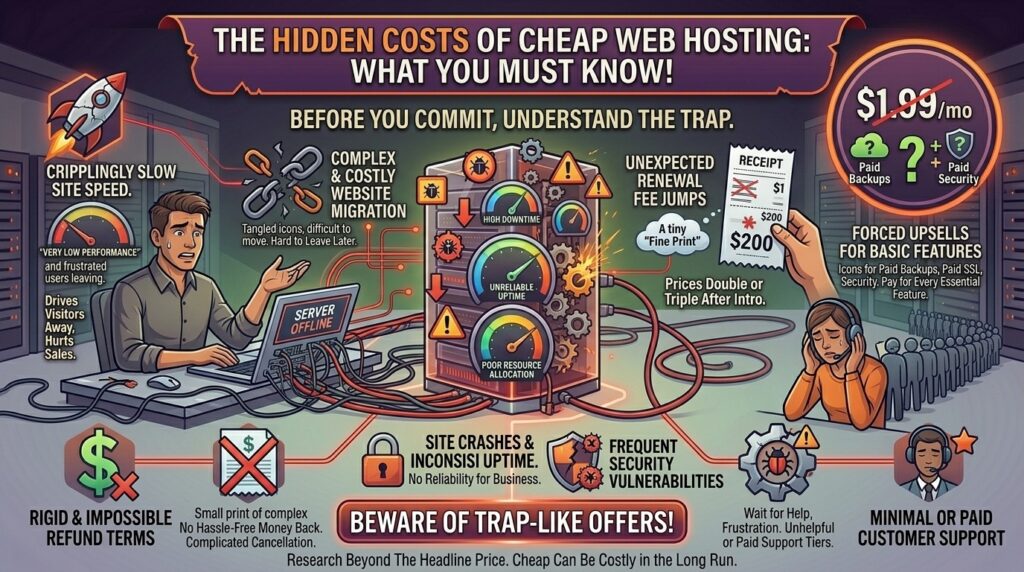
When launching a new digital platform—whether you are setting up an e-commerce storefront in New York, a SaaS tech blog in San Francisco, an agency workspace in Texas, a digital media hub in Washington, or a creative portfolio in California—budgetary efficiency is always a priority. Stumbling across a web hosting advertisement promising enterprise performance for just $1.99 or $2.49 per month feels like hitting the jackpot.
However, the web hosting industry is notorious for aggressive introductory pricing strategies. The low figure advertised on the front page is rarely representative of what you will ultimately pay. Behind the flashy banners lie multi-year lock-in terms, steep renewal hikes, automated upsell checkboxes, and hidden fees for essential features like backups, security, and domain privacy.
In this comprehensive guide, we dissect the true economic reality of cheap web hosting, expose the most common hidden traps, analyze how budget constraints impact your Google SEO performance, and provide a strategic roadmap to protect your long-term investment.
The Illusion of the Introductory Rate: Decoding Renewal Price Hikes
The single most common financial shock web hosting customers face occurs when their initial promotional period expires.
+-------------------------------------------------------------+
|             The Budget Hosting Price Lifecycle              |
+-------------------------------------------------------------+
|  [Initial Sign-Up]  -->  $2.49 / month (3-year commitment)  |
|  [The Reality Check] -->  $11.99 / month upon automatic renewal |
|  [Total Cost Impact] -->  Hundreds of dollars in unexpected variance |
+-------------------------------------------------------------+
1. The Multi-Year Upfront Commitment
To secure that ultra-low monthly rate, budget hosts almost always require you to pre-pay for 12, 36, or even 48 months in advance. While a 3-year commitment at $2.49/mo sounds affordable, you are paying the entire bill upfront. If the service turns out to be slow or unreliable, recovering your money requires navigating rigid refund terms.
2. The Steep Renewal Jump
Once your introductory term concludes, your account automatically renews at standard regular rates. It is common for a plan advertised at $2.99/mo to jump to $12.99 or $15.99/mo upon renewal. Budgeting strictly for the initial teaser rate without preparing for the post-promotion surge can catch business owners entirely off guard.
7 Major Hidden Costs and Add-On Traps to Watch For
Beyond the monthly subscription price, cheap hosting plans frequently strip out vital features, charging separately for tools that should be standard.
1. Domain Privacy Protection (WHOIS Privacy)
When you register a domain name, regulations require your contact information (name, email, phone number, address) to be publicly searchable in the WHOIS database. Many budget hosts charge an extra $5 to $15 per year to mask this data, leaving you vulnerable to spam and marketing solicitations if unchecked at checkout.
2. Automated Backups and Restoration Fees
Many ultra-cheap hosts either omit backups entirely or provide only basic weekly snapshots. If your site breaks due to a bad plugin update and you need to restore a clean version, some budget hosts charge steep manual restoration fees or force you into an expensive premium backup subscription.
3. Domain Name Renewal Hikes
While hosts often advertise a “Free Domain Name for the First Year,” subsequent annual domain renewals frequently cost significantly more than standard domain registrar pricing (often jumping to $20–$25 per year).
4. Site Migration Fees
Moving an existing website from an old host to a new budget provider is sometimes marketed as “free.” However, fine print often restricts free migrations to basic platforms or limits the timeline, forcing you to pay hourly developer fees if complications arise.
5. SSL Certificate Upsells
While modern hosts generally include free Let’s Encrypt SSL certificates, some budget legacy providers still try to upsell expensive Wildcard or Organization-Validated (OV) SSL certificates during checkout unnecessarily.
6. Email Hosting Separations
Many modern ultra-budget containerized hosts do not include standard cPanel email inbox hosting, attempting to redirect you to paid workspace accounts (like Google Workspace or Microsoft 365) for an ongoing monthly fee per email address.
7. Resource Throttling and Forced Upgrades
“Unlimited” bandwidth and storage on shared plans are governed by strict Fair Usage Policies. If your site begins attracting genuine traffic or utilizes too much CPU power, the host will flag your account for resource abuse and force an expensive upgrade to a VPS or cloud plan.
SEO Impact: How Cheap Hosting Subverts Your Google Rankings
Opting for the absolute cheapest hosting provider can quietly sabotage your search engine optimization efforts through technical performance penalties:
- High Time to First Byte (TTFB): Overcrowded shared servers equipped with legacy hardware struggle to process requests quickly. A high TTFB signals poor server response times to Googlebot, lowering your crawl efficiency.
- Core Web Vitals Failures: Slow database read/write cycles and lack of server-level caching lead to poor Largest Contentful Paint (LCP) scores, hurting user experience metrics.
- Frequent Downtime Penalties: Budget hosts cutting corners on infrastructure maintenance often suffer from unexpected downtime. If Googlebot encounters a 503 Service Unavailable error repeatedly while crawling your URLs, your indexation stability drops.
Cost Comparison: Introductory vs. Renewal Realities
Review how headline prices compare against true long-term costs across typical budget hosting models:
| Hosting Plan Type | Advertised Promo Price | Required Upfront Term | Standard Renewal Rate | Common Hidden Add-Ons |
| Ultra-Budget Shared | ~$1.99 – $2.99 / mo | 36 Months | ~$11.99 – $17.99 / mo | WHOIS privacy, backups, email |
| Managed WordPress | ~$3.99 – $6.99 / mo | 12 – 36 Months | ~$19.99 – $29.99 / mo | Premium security, staging fees |
| Cloud / VPS Tiers | ~$4.99 – $9.99 / mo | Monthly / Annual | ~$15.99 – $35.00 / mo | Control panel licenses, backups |
Pros and Cons of Opting for Cheap Web Hosting
The Pros 👍
- Low Barrier to Entry: Perfect for experimental projects, student portfolios, or testing a business idea with minimal upfront capital.
- Sufficient for Low Traffic: Static brochure sites or low-volume blogs operate perfectly fine on basic shared infrastructure.
- All-in-One Dashboards: Many budget hosts bundle simple website builders and 1-click CMS installers to make setup accessible for beginners.
The Cons 👎
- Aggressive Upsells at Checkout: Navigating pre-checked boxes for security add-ons and domain privacy can inflate your cart total unexpectedly.
- Severe Long-Term Cost Inflation: Multi-year renewal spikes mean you often pay more overall than if you had chosen a transparent, flat-rate provider.
- Performance Restrictions: Resource limits can bottle-neck your site just as it begins to gain commercial traction.
Step-by-Step Guide: How to Audit a Budget Host Before Buying
Before entering your credit card details on a cheap hosting platform, follow this auditing checklist:
- Locate the Renewal Terms: Scroll to the absolute bottom of the hosting sales page or check the Terms of Service to identify the regular renewal price.
- Uncheck Pre-Selected Add-Ons: Review your checkout cart carefully to remove bundled SEO tools, premium site builders, and automated backup subscriptions if you do not want them.
- Verify Backup Inclusion: Confirm whether daily automated backups and file restores are included free of charge or locked behind a paywall.
- Test Support Response Times: Open a pre-sales live chat ticket to evaluate how quickly human support agents respond to technical inquiries.
- Check Data Center Locations: Ensure the host maintains data center options close to your target audience (such as New York, Texas, California, Washington, or San Francisco) to keep latency low.
10 Essential Tips to Avoid Hidden Hosting Costs
- Choose Flat-Rate Providers: Look for hosting companies that offer lifetime price locks or transparent renewal pricing to avoid sticker shock.
- Opt for Annual Billing Wisely: Only purchase multi-year terms if you are entirely confident in the host’s long-term performance quality.
- Register Domains Separately: Purchase your domain names through dedicated registrars (like Namecheap or Cloudflare) to prevent inflated domain renewal hikes from your web host.
- Use Free External Security Tools: Utilize free tools like Let’s Encrypt SSL and Cloudflare free tiers rather than paying for expensive host-bundled security suites.
- Monitor Your Inode Usage: Keep track of your file count limits so your account is never abruptly suspended for breaching shared storage guidelines.
- Set Up External Backups: Use free plugins or cloud storage hooks to back up your database and files externally rather than relying on costly host backup tiers.
- Read the Refund Policy Fine Print: Ensure the host’s money-back guarantee period covers your chosen plan without hidden cancellation fees.
- Avoid Unnecessary Dedicated IPs: Unless running specific merchant software requiring strict compliance, skip paid dedicated IPv4 add-ons.
- Upgrade Proactively: Transition from cheap shared hosting to a scalable cloud or VPS plan before traffic surges trigger resource throttling.
- Keep Track of Renewal Dates: Mark your calendar 30 days before your promotional term expires so you can evaluate whether to stay or migrate.
Frequently Asked Questions (FAQ)
1. Why are some web hosting plans advertised as cheap as $1.99 per month?
These headline rates are introductory teaser prices designed to attract new users, and they almost always require a multi-year upfront commitment with steep price increases upon renewal.
2. What are the most common hidden fees in web hosting?
The most common unexpected expenses include domain privacy protection fees, automated backup subscriptions, post-introductory renewal rate spikes, and site restoration or migration costs.
3. Do cheap web hosts charge extra for SSL certificates?
Most modern budget hosts include free Let’s Encrypt SSL certificates, but some legacy providers still attempt to upsell commercial SSL certificates during checkout.
4. What happens when my cheap hosting introductory period ends?
Your billing automatically switches to the standard regular renewal rate, which can be 300% to 500% higher than your initial promotional payment.
5. Are “unlimited” bandwidth and storage plans truly unlimited?
No. All shared hosting plans are governed by Fair Usage Policies that restrict CPU usage, memory allocation, and file counts (inodes) to prevent server destabilization.
6. Can I transfer my domain away if my web host charges high domain renewal fees?
Yes. You retain full ownership of your domain name and can unlock it to transfer to any standard domain registrar at any time.
7. Do hidden hosting costs affect my website’s Google SEO?
Indirectly, yes. Cheap hosts often cut corners on server hardware, leading to high TTFB, frequent downtime, and slow load speeds, all of which harm your technical SEO rankings.
8. How can I avoid unexpected charges during checkout?
Carefully review your shopping cart summary before paying, uncheck pre-selected add-on boxes (like security suites and privacy shields), and read the terms of service regarding renewals.
9. Are there web hosts with transparent, flat-rate pricing?
Yes. Several hosting providers offer lifetime price locks or transparent billing structures designed to eliminate post-introductory price shocks.
10. When should I upgrade from cheap shared hosting to a better plan?
You should upgrade as soon as your website experiences consistent traffic growth, slow database response times, or resource limit warnings from your hosting provider.
Conclusion
Understanding the hidden costs of cheap web hosting ensures you make an informed investment that protects both your budget and your digital platform. While low introductory rates are tempting, factoring in multi-year renewal surges, backup fees, domain privacy costs, and potential performance bottlenecks reveals the true long-term value of your infrastructure.
Whether you are launching a digital venture in Texas, New York, California, Washington, or San Francisco, prioritizing transparent pricing and robust technical performance will protect your operational budget, safeguard your user experience, and secure your long-term Google SEO success.