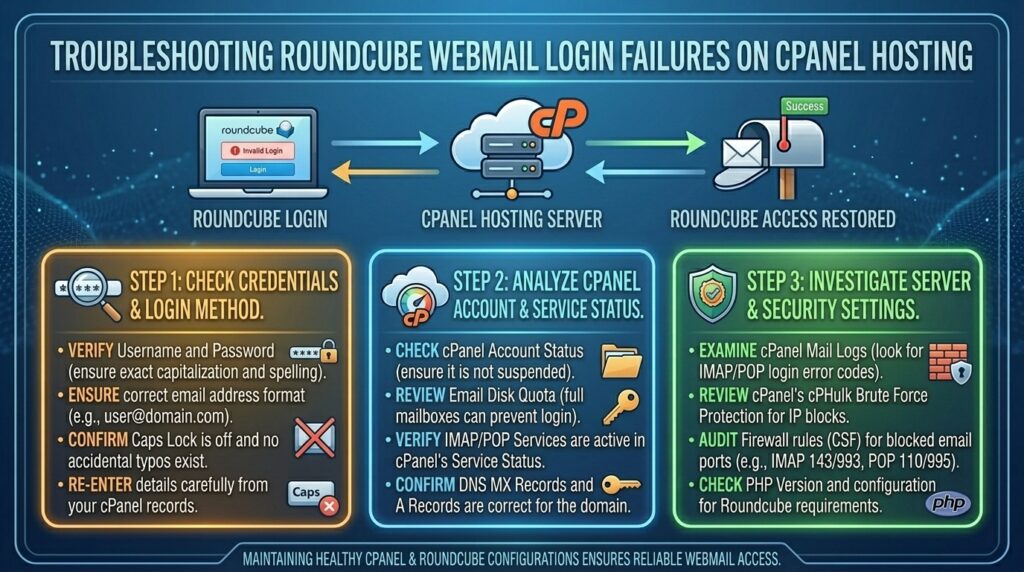
Fixing Roundcube Webmail Login Failure on cPanel Hosting
For digital businesses, marketing agencies, and IT professionals based in dynamic tech hubs like Texas, New York, California, Washington, and San Francisco, uninterrupted access to business communication is non-negotiable. When your team relies on Roundcube—the default, lightweight, and lightning-fast webmail client built into cPanel—getting locked out with a cryptic login failure can bring daily operations to a screeching halt.
Seeing the dreaded “Login failed” or “Connection to storage server failed” error message when trying to access your inbox can induce instant panic. Fortunately, Roundcube login issues are rarely permanent. They are typically rooted in cached browser data, incorrect password synchronization, Dovecot backend service crashes, or corrupted session configurations.
This comprehensive, step-by-step troubleshooting guide will walk you through diagnosing, troubleshooting, and permanently resolving Roundcube webmail login failures on cPanel hosting environments.
Understanding How Roundcube Communicates with cPanel
To effectively fix a login failure, it helps to understand what happens behind the scenes when you type your email credentials into Roundcube and hit Enter:
- Authentication Request: Roundcube passes your username (full email address) and password to cPanel’s internal authentication system.
- Dovecot IMAP/POP3 Daemon: Once authenticated, Roundcube hands your session over to Dovecot, the mail server daemon responsible for fetching your emails from the hard drive and displaying them in your browser.
- Session Tokens: Roundcube stores session cookies in your browser to keep you logged in as you navigate folders.
If any link in this chain breaks—whether a backend service crashes, a password changes without syncing, or a cookie becomes corrupted—the login sequence fails.
Phase 1: Immediate Client-Side Triage (Quick Fixes)
Before assuming your server has suffered a catastrophic failure, rule out simple browser, cookie, and credential mismatches.
1. Verify Complete Email Credentials
It sounds simple, but typing errors are the #1 cause of login failures.
- Username Must Be Full: Ensure you are entering your full email address (e.g.,
info@yourdomain.com), not just the prefix (info). - Password Sync Issues: If you recently updated your password inside cPanel under Email Accounts, but your browser autofill is inserting an old, saved password, Roundcube will immediately reject it. Try typing the new password manually.
2. Clear Browser Cache and Cookies
Roundcube relies heavily on session cookies. If a cookie becomes corrupt or expired data gets stuck in your browser cache, the login page will loop endlessly or throw errors.
- Open an Incognito / Private Browsing window, navigate to
webmail.yourdomain.com, and attempt to log in. If it works seamlessly, clear your standard browser’s cache and cookies to permanently fix the issue.
Phase 2: Diagnosing Server-Side Authentication & Dovecot Failures
If your credentials are correct and browser cookies are clear, the bottleneck is occurring on the server side.
| Error Message in Webmail / Logs | Primary Root Cause | Recommended Action |
| Login Failed | Incorrect password or Dovecot auth sync failure | Reset password via cPanel Email Accounts |
| Connection to storage server failed | Dovecot service is offline or crashed | Restart Dovecot service via WHM / SSH |
| IMAP Error: Authentication failed | Corrupted shadow database or account suspension | Check account status in WHM / cPanel |
| Database Error (Roundcube SQL) | Local SQLite/MySQL roundcube db corruption | Repair roundcube database tables |
1. Reset the Email Account Password via cPanel
Sometimes, the underlying system hash for an email account gets out of sync. Forcing a password reset re-writes the hash correctly.
- Log into your primary cPanel dashboard.
- Navigate to Email Accounts.
- Locate the affected email address, click Manage, and type a brand-new password.
- Click Update Email Settings, wait 1 minute for the system to sync, and try logging into Roundcube again.
2. Check If the cPanel Account Is Suspended
If you are managing client websites or hosting multiple domains, an account suspension (due to resource overages, billing lapses, or security flags) will block all email access instantly.
- Log into WHM (if you have root/reseller access) and check Account Information > List Accounts to ensure the account status is active and green.
Phase 3: Advanced Server-Side Troubleshooting (WHM / SSH Level)
If you have root or reseller server access, you can investigate deeper system logs and restart core mail services.
1. Restart the Dovecot Mail Server Daemon
If multiple users are experiencing “Connection to storage server failed” errors across multiple domains on the server, the Dovecot IMAP daemon has likely frozen or crashed.
- Via WHM:
- Log into WHM.
- Navigate to Server Status > Service Status.
- Locate Dovecot Mail Server and click the restart icon.
- Via SSH (Root Access):Bash
/usr/local/cpanel/scripts/restartsrv_dovecot
2. Inspect Dovecot Error Logs for Clues
When a login fails silently or throws ambiguous errors, the live logs will tell you the exact reason. Tail the Dovecot error log via SSH:
Bash
tail -f /var/log/dovecot-log
Attempt to log into Roundcube while watching this terminal output. Common errors will point directly to authentication socket timeouts, permission denied errors on the mail directory (/home/username/mail/), or disk quota lockouts.
3. Repair File Permissions on Mail Directories
If a user’s mail directory permissions become scrambled, Dovecot cannot read the mailbox files, resulting in an immediate login failure. You can fix home directory and mail folder ownership via SSH:
Bash
/usr/local/cpanel/scripts/chownhomedirs username
Replace username with the actual cPanel account username.
Phase 4: Fixing Roundcube-Specific Database Corruption
Roundcube uses an internal database (either SQLite or MySQL depending on the cPanel version) to store user preferences, contacts, and session states. If this database table becomes corrupted, the interface will crash upon login.
Resetting Roundcube SQLite Database (Advanced)
If a specific user’s Roundcube data is corrupted, you can clear their session and preferences database to force a fresh profile creation:
- Access the server via SSH.
- Navigate to the user’s roundcube directory (usually located in
/home/username/etc/roundcube/or managed globally). - Back up and clear the user’s sqlite db file if required, or run cPanel’s built-in script to reset webmail caches:Bash
/usr/local/cpanel/bin/clear_problem_users_caches
Preventative Best Practices for Stable Webmail Access
To ensure your team and clients never experience sudden webmail lockouts, incorporate these maintenance habits:
- Monitor Service Health: Keep an eye on WHM service monitors to alert you instantly if Dovecot or Exim goes down.
- Enforce Secure Passwords: Prevent brute-force compromises that trigger security blocks on your IP address.
- Regularly Update cPanel: Ensure your server runs the latest stable release of cPanel/WHM to patch known webmail bugs.
- Educate Users on Webmail URLs: Ensure users bookmark the correct secure port URL (
[https://yourdomain.com:2096](https://yourdomain.com:2096)orwebmail.yourdomain.com) to avoid SSL certificate warning interruptions.
Frequently Asked Questions (FAQ)
1. Why does Roundcube say “Connection to storage server failed”?
This error means the Roundcube interface cannot communicate with Dovecot, the backend mail server. It usually indicates that the Dovecot service has crashed or your server is experiencing high resource loads. Restarting Dovecot via WHM fixes this instantly.
2. How do I fix a login loop where Roundcube accepts my password but instantly redirects back to the login screen?
A login loop is almost always caused by browser cookie corruption, outdated session tokens, or a misconfigured server time zone. Try opening an Incognito window or clearing your browser cookies.
3. Can an expired SSL certificate on webmail.yourdomain.com cause login failures?
While an invalid SSL certificate usually triggers a browser security warning rather than an internal login failure, some modern secure browsers block form submissions over untrusted connections. Ensure your SSL certificate is fully active and renewed via AutoSSL in cPanel.
4. Why does my email work on my phone (Apple Mail/Outlook) but fail in Roundcube?
If external mail clients work fine, your email account, password, and Dovecot services are fully operational. The issue is strictly isolated to the Roundcube application files or browser session caching on your machine.
5. Does changing my cPanel password automatically update my Roundcube login?
Yes, changing your password under cPanel > Email Accounts updates the master system authentication hash immediately, meaning your new password will work across webmail and external mail apps.
6. What should I do if my IP address is blocked when trying to log into Roundcube?
If you entered an incorrect password multiple times, cPHulk Brute Force Protection may have temporarily blocked your public IP address. You can log into WHM from an alternative network or mobile data connection and clear the cPHulk blocked IP list.
7. Why are my sent emails missing after logging into Roundcube?
If you successfully logged in but your sent folder is empty, check your Roundcube settings under Settings > Preferences > Mailbox View to ensure “Save sent messages” is explicitly checked and mapped to the correct Sent folder.
8. Is it possible to switch from Roundcube to another webmail client?
Yes, cPanel historically offered clients choices like Horde. However, Roundcube is the modern standard included in current cPanel builds. If Roundcube experiences database errors, clearing user cache files restores functionality.
9. Why does Roundcube throw a “Database Error” upon login?
A database error indicates that Roundcube’s internal SQLite or MySQL tracking tables have encountered a write failure, often caused by the account hitting its maximum disk space quota. Freeing up disk space resolves this.
10. When should I contact my hosting provider about a Roundcube login failure?
If you have verified your password is correct, cleared your browser cache, tested in Incognito mode, and confirmed that other services are working, but you still cannot log in, the issue requires root server intervention. Open a support ticket with your host so they can inspect the Dovecot error logs.
Conclusion
Encountering a Roundcube webmail login failure can disrupt your day, but armed with a systematic troubleshooting approach, you can quickly identify the root cause. Whether it’s a simple browser cache glitch, a mismatched password, or a backend Dovecot service interruption, following these steps will restore smooth, secure access to your inbox and keep your business communications flowing without interruption.