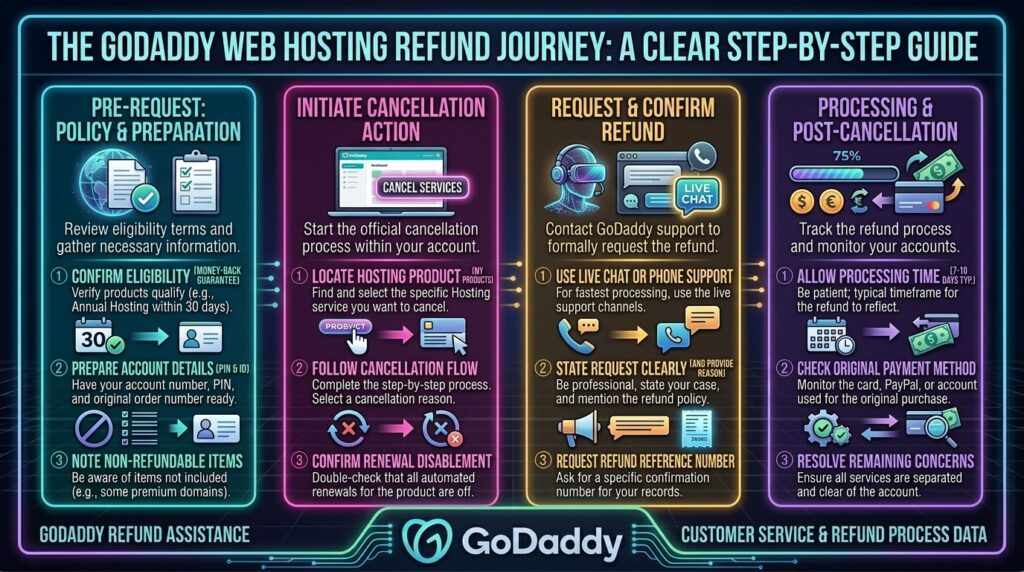
How to Get a Full Refund from GoDaddy Web Hosting: The Definitive Step-by-Step Guide
Welcome to thehostreviews.com—your premier authoritative destination for objective web hosting evaluations, platform refund walkthroughs, and consumer advocacy guides spanning major digital hubs from New York and San Francisco to Texas, California, and Washington.
Introduction: Navigating GoDaddy’s Refund Process
GoDaddy is one of the largest and most recognizable domain registrars and web hosting providers on the planet. Millions of website owners, small business founders, and digital developers have purchased hosting packages through their platform, lured by aggressive introductory pricing and bundled perks.
However, many users eventually decide to transition away from GoDaddy—whether due to unexpected renewal price hikes, performance bottlenecks, or a migration to higher-performance cloud infrastructure. When you decide to cancel, securing your hard-earned money back can feel like navigating a maze.
GoDaddy’s refund process is not always straightforward, and simply canceling a plan or turning off auto-renewal does not automatically trigger a cash refund. To successfully reclaim your money, you must understand their exact eligibility windows, follow a precise multi-step cancellation workflow, and communicate with their support channels correctly.
This comprehensive, expert-level guide breaks down GoDaddy’s official refund policy, details the step-by-step procedure required to secure your money, highlights common traps to avoid, and answers your most pressing billing questions.
Part 1: GoDaddy Hosting Refund Eligibility Windows
Before requesting a refund, you must determine whether your purchase falls within GoDaddy’s official money-back guarantee timeframes. GoDaddy enforces strict cutoff rules based on the billing cycle length of your hosting plan:
1. Annual Plans (1-Year Terms or Longer)
- The Rule: You are eligible for a full refund if you cancel and request your money back within 30 days (720 hours) of the initial transaction date.
- Crucial Caveat: This 30-day window applies strictly to new annual purchases. Renewal fees for multi-year or annual plans operate under completely different guidelines (often restricted to a much shorter 5-day window, or non-refundable depending on the specific service terms).
2. Monthly Plans (Shorter Than 1 Year)
- The Rule: If you purchased a monthly hosting plan (or any subscription term shorter than one year), your refund window is drastically shorter—just 48 hours from the exact time of purchase.
- Once those 48 hours pass, monthly subscriptions are strictly non-refundable for that billing cycle.
3. The “Free Domain Name” Deduction Trap
This is the most common reason users receive less money than expected during a GoDaddy hosting refund:
- If your hosting plan promotion included a “Free Domain Name”, GoDaddy will deduct the standard, non-promotional list price of that domain name from your total refund amount.
- Because custom domain names typically cost $15 to $20+ at standard retail rates, a “free” domain can wipe out a large portion of your shared hosting refund. The domain remains registered in your account, and you retain ownership of it, but you do not get a 100% cash refund for that portion of the bundle.
Part 2: Step-by-Step Guide—How to Get Your Refund from GoDaddy
Securing a refund from GoDaddy requires a mandatory two-step sequence: first, you must manually delete/cancel the product in your dashboard, and second, you must contact customer support to process the refund transaction.
You cannot get a refund simply by emailing them or letting a subscription expire. Follow this precise workflow:
Step 1: Back Up Your Files and Database
Before touching any cancellation buttons, ensure you have downloaded local copies of your website files, media uploads, and MySQL database backups. Once you delete a hosting product inside GoDaddy, all server files and databases are permanently wiped from their servers.
Step 2: Delete the Hosting Product from Your Account
- Log into your GoDaddy Account.
- Navigate to your account profile or click on your name in the top right corner, then select Renewals & Billing.
- Locate the hosting plan you want to cancel and refund under the subscriptions list.
- Check the box next to the hosting product and click Cancel Renewal (or click the trash/delete icon depending on the active dashboard layout).
- Select Delete My Product to confirm your intent.
- Check the verification box acknowledging that deletion is permanent.
- Important Email Verification: GoDaddy will send a confirmation email to your account address. Open your inbox, find the email from GoDaddy, and click “Yes, I Want to Delete!” This redirects you back to your account to finalize the product deletion.
Step 3: Contact GoDaddy Support via Live Chat or Phone
Once the product is successfully deleted from your account, system automation does not automatically issue your refund back to your credit card. You must explicitly request it.
- Go to the GoDaddy official contact or support page and click on the Chat Now live chat box.
- Authenticate your account with your customer PIN or username.
- Once connected to a live support agent, use clear, direct language:“Hello, I have just deleted my annual hosting plan within the 30-day money-back guarantee window. Can you please process my full refund back to my original payment method?”
- Avoid requesting a refund via email ticketing, as GoDaddy’s policy states that email refund requests are generally not processed. Live chat or phone is required.
Step 4: Verify Processing and Timeline
- The support agent will verify your cancellation and confirm whether your account qualifies based on the transaction timestamp.
- Once approved, standard refunds take approximately 5 to 10 business days to clear back to your credit card, debit card, or PayPal account, depending on your financial institution’s processing speeds.
Part 3: What to Do If Your Refund Request Is Denied
If your support agent informs you that your purchase is outside the eligibility window, or if your refund was partially slashed due to the free domain deduction rule, you still have alternative options:
- Request In-Store Credit: If GoDaddy denies a cash refund because you missed the 30-day window by a few days, agents occasionally have the discretion to issue account store credit. While not ideal if you are leaving the platform entirely, store credit can be applied toward domain renewals or other services you may still use.
- File a Bank Chargeback (As a Last Resort): If you canceled within the legal terms of their 30-day guarantee and GoDaddy support wrongfully refuses to issue your money back, you can contact your credit card issuer to file a formal dispute and chargeback. Always keep screenshots of your cancellation confirmation emails and chat transcripts as evidence.
Part 4: Frequently Asked Questions (FAQ)
1. Does GoDaddy offer a money-back guarantee on hosting?
Yes. GoDaddy offers a 30-day money-back guarantee for annual shared hosting plans and a 48-hour money-back guarantee for monthly hosting plans.
2. Can I get a refund if I cancel my hosting plan after 30 days?
No. Standard refund terms state that annual plans are non-refundable after 30 days, and monthly plans are non-refundable after 48 hours.
3. Why is my hosting refund amount lower than what I paid?
If your hosting plan included a free domain name promotion, GoDaddy deducts the standard non-promotional retail list price of the domain name from your total refund. You keep ownership of the domain, but the cash value of the domain is subtracted.
4. How do I request a refund from GoDaddy?
You must first manually delete the product in your GoDaddy renewal dashboard, and then contact GoDaddy customer support via 24/7 live chat or phone to request the payout.
5. Can I request a refund by sending an email?
No. GoDaddy’s official policy explicitly states that refund requests received via email will not be processed; you must use live chat, SMS, or phone support.
6. How long does it take for a GoDaddy refund to appear in my account?
Once processed by customer support, funds typically return to your original payment method within 5 to 10 business days, depending on your bank or credit card provider.
7. What happens to my website files when I delete hosting for a refund?
Deleting your hosting product permanently wipes all files, databases, and emails associated with that hosting server. Always back up your data locally before initiating cancellation.
8. Are domain name registrations refundable?
Domain name registrations have much tighter refund windows—typically just 5 days (120 hours) for new annual registrations, while manual renewals and certain TLD extensions are strictly non-refundable.
9. What if I purchased my GoDaddy hosting through Apple or Google Play?
If you purchased your GoDaddy subscription through a mobile app store, you cannot get a refund directly from GoDaddy; you must request the refund through Apple or Google’s respective app store billing support.
10. Can I get a refund on automated subscription renewals?
Auto-renewals for annual plans generally feature a 45-day refund window from the renewal transaction date, provided you request it promptly after accidental billing.
Conclusion
Securing a full refund from GoDaddy web hosting doesn’t have to be a frustrating ordeal. By understanding their strict 30-day annual and 48-hour monthly cutoff rules, anticipating the free domain name price deduction, following the precise two-step deletion and chat request workflow, and backing up your assets beforehand, you can successfully reclaim your funds and transition to a hosting provider that better fits your needs.