Scaling for Success: How to Load Balance High-Traffic Websites Across Multiple Cloud Servers
Welcome to thehostreviews.com—your premier authoritative destination for infrastructure architecture, cloud scalability tutorials, and enterprise-grade performance engineering strategies spanning major technical hubs from New York and San Francisco to Texas, California, and Washington.
Introduction: The Threshold of Success
When your website gains traction—transitioning from a personal project to a high-traffic platform—you inevitably reach the limits of a single server. Even with a high-performance VPS, you will eventually hit a ceiling where CPU, RAM, or I/O constraints degrade user experience, leading to slow page loads, database timeouts, and server crashes during peak traffic spikes.
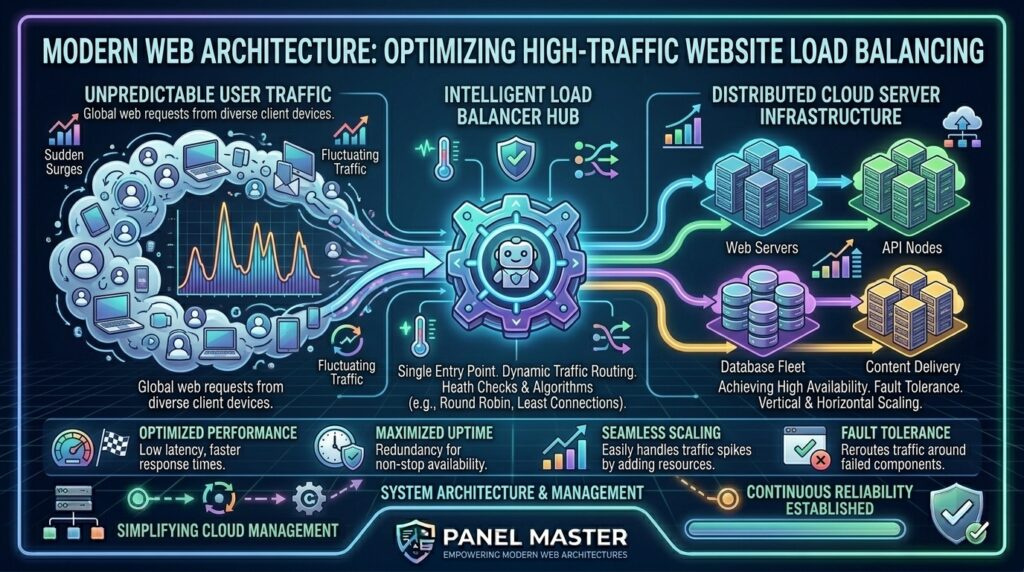
This is the moment your infrastructure must evolve. Load balancing is the architectural backbone of high availability and horizontal scaling. By distributing incoming web traffic across a cluster of multiple cloud servers (nodes), you ensure no single server becomes a bottleneck.
Whether you are scaling e-commerce infrastructure in Texas, managing high-concurrency SaaS applications in San Francisco, or deploying distributed digital media content in New York, this masterclass provides the engineering blueprint for architecting a resilient, load-balanced environment.
Part 1: The Anatomy of a Load-Balanced Architecture
At its core, a load balancer acts as the “traffic cop” of your infrastructure. It sits between the public internet and your backend servers, intelligently directing requests based on predefined rules.
The Standard Tiered Architecture:
- The Entry Point (Load Balancer): The public-facing IP address that accepts incoming HTTP/HTTPS traffic.
- The Backend Tier (Application Nodes): A cluster of identical web servers (e.g., Nginx, Apache, or Docker containers) that process application logic.
- The Data Tier (Database Cluster): A centralized, highly available database system (e.g., Managed MySQL, PostgreSQL, or NoSQL) that all web nodes access.
- The Storage/Cache Tier (Redis/CDN): Shared caching and object storage layers that ensure consistency across all nodes.
Part 2: Load Balancing Algorithms — Choosing the Right Strategy
The load balancer uses specific algorithms to decide which backend server receives the next request. Choosing the correct algorithm is crucial for performance optimization:
- Round Robin: Distributes requests sequentially across the server pool. Best for servers with equal power and homogeneous workloads.
- Least Connections: Directs traffic to the server with the fewest active connections. Ideal for workloads where request times vary significantly.
- IP Hash: Uses the client’s IP address to determine the backend server. This ensures “session persistence,” where a user consistently connects to the same server (vital for older apps that store state in local server memory).
- Weighted Load Balancing: Assigns more traffic to more powerful servers while offloading less capable hardware in the cluster.
Part 3: Step-by-Step Implementation Strategy
Step 1: Provisioning the Backend Nodes
Before deploying the load balancer, you must ensure your backend nodes are identical. Use Infrastructure as Code (IaC) tools like Terraform or Ansible to replicate the exact same server environment across all your cloud instances. Each node must have the same application codebase, same PHP/Node.js runtimes, and identical security configurations.
Step 2: Deploying the Load Balancer (Nginx or HAProxy)
While cloud providers (like DigitalOcean or AWS) offer managed Load Balancer services, managing your own Nginx or HAProxy instance gives you granular control over cost and configuration.
Basic Nginx Configuration Example:
Nginx
upstream my_web_app {
    least_conn;
    server 10.0.0.1; # Node 1 Private IP
    server 10.0.0.2; # Node 2 Private IP
}

server {
    listen 80;
    location / {
        proxy_pass http://my_web_app;
        proxy_set_header Host $host;
        proxy_set_header X-Real-IP $remote_addr;
    }
}
Step 3: Implementing Health Checks
A load balancer is useless if it continues sending traffic to a crashed server. Configure active health checks that ping your backend nodes every 5–10 seconds. If a node fails to respond, the load balancer automatically marks it as “down” and diverts traffic to the remaining healthy servers until the node recovers.
Part 4: Managing Distributed Sessions and Data
The biggest mistake engineers make when transitioning to a multi-server environment is forgetting that the servers are stateless. If a user logs in on Node 1, they might be prompted to log in again if the load balancer sends their next request to Node 2.
Solving the Session State Problem:
- Externalize Sessions: Store user sessions in a shared, lightning-fast memory store like Redis or Memcached. This allows any node in your cluster to verify the user’s session identity instantly.
- Database Centralization: Move your database to a dedicated, high-performance managed database cluster that resides outside your web server nodes. Never run the database on the same node as your web server in a scaled environment.
Part 5: Performance Optimization Tips for High Traffic
- Offload SSL Termination: Perform SSL decryption at the load balancer level rather than the backend nodes. This significantly reduces the CPU load on your application servers.
- Use a Content Delivery Network (CDN): Serve your static assets (images, CSS, JS) from a CDN like Cloudflare or BunnyCDN. This prevents static files from ever hitting your load balancer, freeing up bandwidth for dynamic request processing.
- Automated Auto-Scaling: Integrate your load balancer with your cloud provider’s auto-scaling API. During traffic spikes (e.g., Black Friday or viral launches), the system should automatically spin up new nodes and add them to the load balancer pool, removing them once traffic subsides to save costs.
Part 6: Frequently Asked Questions (FAQ)
1. What is the primary benefit of load balancing?
Load balancing provides horizontal scalability, allowing you to handle exponentially more traffic by adding servers, and increases fault tolerance by ensuring the website stays online even if one or more servers fail.
2. Can I load balance across different data center regions?
Yes, using “Global Server Load Balancing” (GSLB). However, this introduces latency challenges, so it is best to use a CDN or Geo-IP routing to ensure users hit the closest data center to their physical location.
3. What is the difference between a Managed and Self-Managed Load Balancer?
Managed load balancers (provided by cloud vendors) offer “set-and-forget” simplicity and automatic scaling, whereas self-managed instances (using Nginx/HAProxy) offer superior cost efficiency and total configuration control.
4. How do I keep session state synchronized across multiple servers?
Use a centralized, high-speed key-value store like Redis for session management so that no matter which server a user visits, their login status and cart information remain persistent.
5. What happens if the Load Balancer itself fails?
This creates a “single point of failure.” You should use a floating IP address and an active-passive setup (e.g., using Keepalived) to provide failover for the load balancer instance itself.
6. Are there specific hardware requirements for backend nodes?
Backend nodes should ideally be homogeneous (identical) to ensure predictable performance. You can use lighter cloud instances for web processing if you have offloaded database and caching layers.
7. Does load balancing improve SEO?
Indirectly, yes. Load balancing prevents server downtime and significantly improves page load speeds during high traffic, both of which are critical ranking factors for Google.
8. How often should I perform health checks?
For most high-traffic environments, a health check interval of 5 to 10 seconds is standard. Too frequent can overwhelm the server, and too infrequent can lead to users hitting an offline server.
9. What is SSL Termination?
SSL termination means the load balancer handles the encrypted connection from the user, decodes it, and passes unencrypted traffic to the backend servers over a private internal network, reducing the overhead on backend nodes.
10. Can I mix different cloud providers in one load balancing cluster?
Yes, but it is complex. It involves cross-cloud networking and latency issues. It is generally recommended to keep your cluster within a single cloud provider’s network for optimal performance and simplified management.
Conclusion
Load balancing is the graduation step for any successful website. By decoupling your traffic management from your application logic and centralizing your data and session state, you transform a fragile single-server setup into a resilient, enterprise-grade architecture.