In the hyper-competitive digital markets of Texas, New York, California, Washington, and San Francisco, website performance directly dictates revenue, user retention, and search engine rankings. Whether you run a high-traffic e-commerce store on WooCommerce, a scaling digital publication, or an enterprise-grade corporate platform, page speed is your primary differentiator.
While most website owners are familiar with basic browser caching or page caching, a massive architectural bottleneck often hides deep within the database layer: un-cached dynamic queries. Every time a user interacts with a modern dynamic content management system (like WordPress, Drupal, or Magento), the backend executes hundreds of database queries to assemble things like navigation menus, user sessions, custom post metadata, and widget states.
If your database has to fetch this data from an unoptimized hard drive or a congested remote server every single time, your site grinds to a halt. The silver bullet for this bottleneck is Object Cache.
This comprehensive, expert-level guide explores what object caching is, how it works under the hood, and how your web hosting infrastructure directly dictates its efficiency—all optimized to help your site rank at the top of Google search results.
1. Demystifying Object Caching: What Is It?
To understand object caching, you must first understand how a standard dynamic request works without it.
The Problem: The Cost of Database Queries
When a visitor loads a dynamic web page, the application code makes requests (SQL queries) to a database management system like MySQL or MariaDB.
- Even simple queries (e.g., retrieving user profile options, active shopping cart items, or site configuration settings) consume CPU cycles, memory, and time.
- If 500 users visit your site simultaneously, your database may execute thousands of identical queries within seconds, creating heavy disk I/O wait times and catastrophic server lag.
The Solution: In-Memory Object Caching
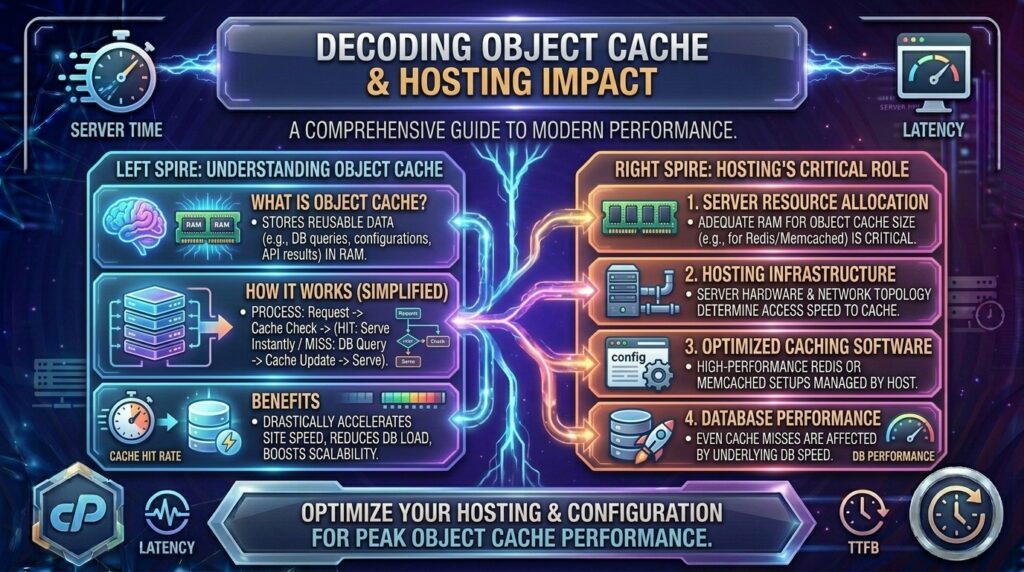
Object Cache is a caching mechanism that stores the results of database queries and computed data objects directly in the server’s Random Access Memory (RAM) rather than querying the physical database every time.
- First Request (Cache Miss): The application queries the database, retrieves the data, and simultaneously saves a copy of that resulting data object into the object cache in RAM.
- Subsequent Requests (Cache Hit): When another user (or the same user) requests that same data, the application bypasses the MySQL database entirely and grabs the pre-computed object instantly from the high-speed RAM layer.
[ User Request ] ---> [ Application / CMS ]
                              |
                    (Is Object in RAM Cache?)
                     /                       \
             [ YES: Cache Hit ]        [ NO: Cache Miss ]
             (Delivered Instantly)     (Queries MySQL Database, then saves to RAM)
2. Default WordPress Transients vs. Advanced Object Caching
By default, popular content management systems like WordPress feature a built-in caching abstraction layer. However, out of the box, they rely on database-backed caching (such as WordPress Transients stored inside the wp_options table).
- The Flaw of Default Caching: Saving transients in the database means your server is still writing to and reading from disk tables. While it reduces complex PHP execution loops, it does nothing to alleviate heavy database I/O overhead.
- The Advanced Upgrade: By deploying dedicated in-memory stores like Redis or Memcached, your application intercepts these requests and diverts them completely away from the disk and into volatile RAM, where data access speeds are measured in microseconds.
3. The Two Titans of In-Memory Object Caching: Redis vs. Memcached
When configuring an object cache on your hosting server, you will typically choose between two leading technologies:
A. Memcached
Memcached is a mature, ultra-fast, distributed memory caching system designed for simplicity and raw speed.
- Architecture: Multi-threaded, pure key-value store. It is lightweight and consumes very few resources.
- Best For: Simple caching of database query results and plain text strings across single or multi-server environments.
B. Redis (Remote Dictionary Server)
Redis is an advanced, data-structure server that has become the gold standard for modern web applications.
- Architecture: Single-threaded event-driven model that supports rich data types (hashes, lists, sets, sorted sets) in addition to simple strings.
- Advanced Feature: Redis supports persistence (saving RAM data to disk optionally) and Redis Object Cache Pro, which allows fine-tuned cache flushing, group-based invalidation, and advanced diagnostics.
4. How Web Hosting Directly Affects Object Cache Performance
Not all web hosting environments are created equal. Your choice of hosting infrastructure dictates whether you can utilize object caching at all, and how effectively it performs.
1. Shared Hosting Limitations
On traditional cheap shared hosting plans, hundreds of customer accounts share a single operating system and hardware node.
- The Restriction: Shared hosting providers rarely enable Redis or Memcached locally because misconfigured cache instances can exhaust server RAM and impact neighboring websites. If object caching is available, it is often restricted or unsupported.
- The Result: Your site is forced to rely on slow disk-based queries, leading to high Time to First Byte (TTFB) during traffic surges.
2. VPS and Cloud Hosting Freedom
Virtual Private Servers (VPS) and dedicated cloud environments give you root access or full control panel management.
- The Advantage: You have the freedom to install, configure, and tune Redis or Memcached directly on your server stack, binding it securely to local UNIX sockets for lightning-fast inter-process communication.
3. Managed WordPress Hosting Integration
Premium managed WordPress hosting providers (such as Kinsta, WP Engine, or specialized LiteSpeed/Nginx hosts) often include pre-configured Redis or Memcached instances built right into their server architecture.
- The Advantage: Zero configuration required. You simply toggle a switch in your hosting dashboard or install a drop-in plugin to activate high-speed object caching instantly.
5. Step-by-Step Implementation: Setting Up Redis Object Cache on WordPress
If your VPS or cloud hosting provider supports Redis, you can implement enterprise-grade object caching on your WordPress site by following these operational steps:
Step 1: Install Redis on Your Server (Linux / Ubuntu)
Connect to your server via SSH and install the Redis server and PHP extension:
Bash
sudo apt update
sudo apt install redis-server php-redis
sudo systemctl enable redis-server
sudo systemctl restart redis-server
Step 2: Configure Redis Security and Local Sockets
Edit your Redis configuration file (/etc/redis/redis.conf) to secure memory limits, or configure it to listen on a local UNIX socket for maximum speed instead of a TCP port:
Plaintext
unixsocket /var/run/redis/redis.sock
unixsocketperm 770
Restart Redis to apply changes:
Bash
sudo systemctl restart redis-server
Step 3: Install the Redis Object Cache Plugin in WordPress
- Log into your WordPress admin dashboard.
- Navigate to Plugins > Add New and search for Redis Object Cache (by Till Krüss).
- Install and activate the plugin.
- Go to Settings > Redis, configure your connection parameters (pointing to your local UNIX socket or
127.0.0.1on port6379), and click Enable Object Cache.
6. How Object Caching Drives Google SEO and Core Web Vitals
Integrating a robust object caching system directly impacts Google’s ranking algorithms through core performance metrics:
- Massive TTFB Reduction: By eliminating redundant MySQL database queries, your server processes dynamic script calls in milliseconds. This drastically lowers your Time to First Byte (TTFB), ensuring you easily pass Google’s 800ms threshold.
- Improved Interaction to Next Paint (INP) & LCP: When the database isn’t bottlenecked by heavy background queries, server CPU resources remain free to render page elements quickly, improving Largest Contentful Paint (LCP) and overall responsiveness.
- Optimized Crawl Budget: Search engine crawlers can index dynamic product catalogs and deep archival pages much faster when the database responds instantly without locking up.
7. Frequently Asked Questions (FAQ)
1. What is an object cache and how does it differ from page caching?
Page caching stores a complete, rendered static HTML snapshot of a web page. Object cache stores smaller, individual data fragments (like database queries and PHP objects) in RAM to accelerate dynamic code execution.
2. Why doesn’t basic shared web hosting support Redis or Memcached?
Shared hosting allocates strict resource boundaries and isolates user processes. Running continuous in-memory cache services requires dedicated RAM allocations that standard shared environments do not provide.
3. Should I use Redis or Memcached for my website?
Redis is generally preferred over Memcached because it supports advanced data structures, persistent storage options, and sophisticated caching plugins like Object Cache Pro.
4. Can I use object caching alongside a page caching plugin?
Yes! In fact, they are designed to work together. Page caching handles static visitors, while object caching accelerates dynamic processes, logged-in user sessions, and e-commerce cart calculations.
5. Does object caching help WooCommerce e-commerce stores?
Massively. E-commerce sites generate heavy un-cacheable dynamic requests (shopping carts, customer accounts, checkouts). Object caching speeds up database queries for these dynamic actions, preventing checkout lag.
6. How do I verify if my object cache is actively working?
You can use testing plugins like Query Monitor in WordPress, or run command-line tools like redis-cli monitor via SSH to watch real-time cache hits and misses stream across your screen.
7. Will enabling object cache break my website?
Rarely, but if your server runs out of RAM or if cache keys collide, it can cause transient errors. Setting a proper maxmemory limit in your Redis configuration prevents RAM overflow.
8. What is the difference between transient caching and Redis object caching?
Transients store data temporarily inside your MySQL database tables (consuming disk I/O), whereas Redis object caching stores data directly in the server’s high-speed RAM.
9. Does object caching improve Google Core Web Vitals?
Yes. By drastically improving server response times (TTFB), object caching removes the foundational bottleneck that holds back Largest Contentful Paint (LCP) scores.
10. When should I upgrade my hosting to support object caching?
If your website runs a dynamic CMS or e-commerce store, receives consistent daily traffic, and your GTmetrix or WebPageTest audits show high backend waiting times, you should immediately migrate to a VPS or managed cloud host that supports Redis.
8. Conclusion
Understanding what object caching is and how your web hosting infrastructure affects it is a crucial step toward building a high-performance online presence. While standard page caching handles surface-level static assets, in-memory object caching powered by Redis or Memcached tackles the deep database bottlenecks that slow down dynamic CMS platforms and e-commerce stores.