When building a website or launching a digital property targeting high-value tech markets like Texas, New York, California, Washington, and San Francisco, minimizing overhead costs is a top priority. Budget-conscious site owners, entrepreneurs, and digital agencies frequently turn to affordable web hosting solutions. However, a silent performance metric often sabotages organic search visibility long before content quality or keyword targeting comes into play: Time to First Byte (TTFB).
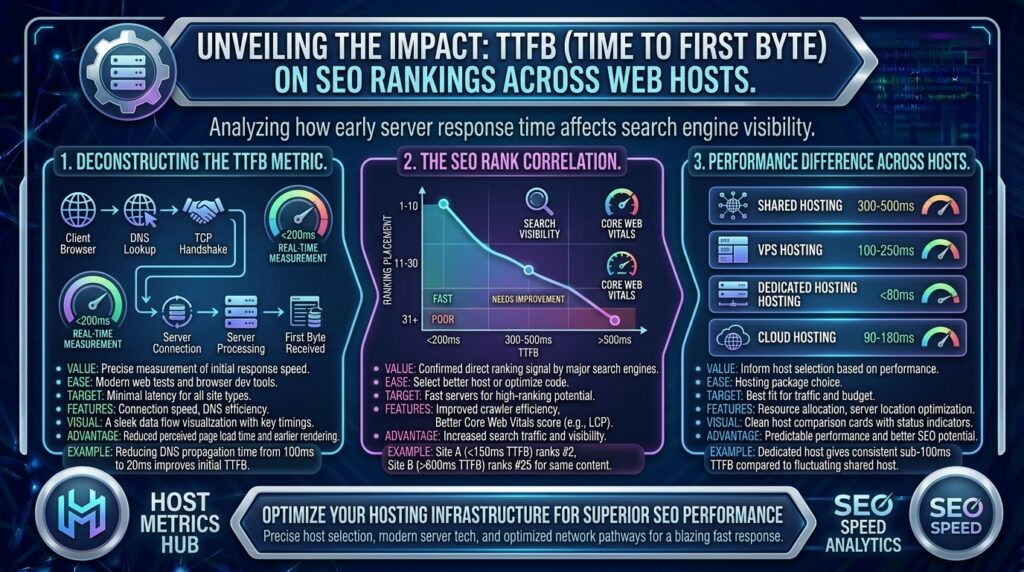
TTFB measures the exact duration elapsed from the moment a user’s browser (or Googlebot) makes an HTTP request to the web server until the first byte of data is received back.
While it is widely debated whether TTFB acts as a direct ranking factor or an indirect downstream catalyst, one reality remains absolute: a slow server response wrecks your Largest Contentful Paint (LCP), drains your search crawl budget, and tanks your Google SEO rankings.
This comprehensive guide explores how TTFB impacts search engine optimization across different classes of web hosts, outlines current performance standards, and provides expert strategies to optimize server speed on a budget.
What Is TTFB and Why Does It Matter for Google SEO?
TTFB is the foundational baseline of web performance. Before a browser can parse a single stylesheet, execute a script, or paint a pixel of text on a user’s screen, it must wait for the server to process the request and deliver that very first byte.
Google’s Official TTFB Benchmarks
According to Google’s web performance guidelines, server response thresholds are categorized as follows:
- Good: 0.8 seconds (800 ms) or less at the 75th percentile of user visits.
- Needs Improvement: Between 0.8 seconds and 1.8 seconds.
- Poor: Above 1.8 seconds.
How TTFB Directly and Indirectly Affects SEO:
- The Downstream Impact on LCP: Largest Contentful Paint (LCP)—a primary Core Web Vital and explicit Google ranking signal—measures how quickly the main content of a page loads. If your server takes 1.5 seconds just to spit out the first byte (high TTFB), your page is mathematically guaranteed to struggle with passing LCP benchmarks.
- Crawl Budget Exhaustion: Googlebot allocates a finite amount of resources (crawl budget) to crawl your website. If a cheap web host suffers from severe database latency or CPU throttling, server response times lag, causing Googlebot to time out or crawl fewer pages per day. Fewer crawled pages mean slower indexation of new content.
- User Engagement & Bounce Rates: Users browsing from competitive regions expect instant web delivery. If a visitor clicks your link from a mobile search in New York or San Francisco and faces a blank white screen for two seconds while the server thinks, they bounce immediately. High bounce rates signal poor user experience to Google’s algorithms.
How Different Web Hosting Tiers Impact TTFB
Not all web hosting environments handle server processing identically. Choosing the wrong tier or a low-quality budget host can destroy your TTFB metrics.
1. Ultra-Cheap Shared Hosting (The High-Risk Zone)
Traditional shared hosting places hundreds of websites on a single physical machine.
- The TTFB Bottleneck: If a neighboring site experiences a traffic surge or runs unoptimized database queries, the shared CPU cores and RAM pool become saturated. Your server response times can spike from 300ms to over 3 seconds instantly.
- The Fix: Opt for shared hosts that use modern software stacks like LiteSpeed Web Server and containerized resource allocation (such as CloudLinux) to isolate your account from noisy neighbors.
2. Cloud Hosting and VPS (The Balanced Alternative)
Virtual Private Servers (VPS) and modern cloud hosting partition hardware resources into dedicated virtual containers.
- The TTFB Advantage: You receive dedicated allocations of RAM and CPU power. Even if other users on the parent node hit traffic spikes, your isolated environment maintains consistent server response times, keeping TTFB safely under the 800ms threshold.
3. Managed WordPress Hosting (The Optimized Choice)
Managed platforms tailor their server architecture specifically for content management frameworks like WordPress.
- The TTFB Advantage: They pre-configure server-side object caching (Redis/Memcached) and aggressive full-page caching at the server level, routinely dropping TTFB below 200ms globally.
Step-by-Step Strategies to Fix Slow TTFB on Budget Hosting
If your hosting provider is delivering a sluggish TTFB, you don’t necessarily have to jump straight to an expensive enterprise server plan. Implement these optimizations first:
1. Enable Full-Page Caching
By default, dynamic sites (like WordPress, Magento, or custom PHP builds) force the server to execute PHP code and query the database from scratch for every single visitor. Full-page caching stores a static HTML snapshot of the page, allowing the server to bypass script processing entirely and serve the first byte almost instantaneously.
- Action: Install a robust caching solution like LiteSpeed Cache, WP Rocket, or server-level Varnish caching.
2. Implement Object Caching (Redis / Memcached)
Database queries are frequent culprits behind sluggish server processing. If your pages pull complex metadata, user sessions, or ecommerce product catalogs, database retrieval adds hundreds of milliseconds to your TTFB.
- Action: Enable Redis or Memcached object caching via your hosting control panel to store frequently accessed database queries directly in server RAM.
3. Upgrade to the Latest PHP Version
Older PHP versions (such as PHP 7.4 or legacy 8.0 builds) process execution loops significantly slower than modern releases.
- Action: Log into your hosting dashboard (cPanel or hPanel) and upgrade your application runtime to PHP 8.2 or 8.3, which feature advanced Just-In-Time (JIT) compilers and native memory efficiency.
4. Deploy a Global Content Delivery Network (CDN)
Physical distance creates unavoidable network latency. If your physical web server is located in Texas, a user requesting your site from San Francisco or London must wait for data packets to traverse thousands of miles of fiber optics.
- Action: Integrate a global CDN like Cloudflare. A CDN caches your static assets and dynamic HTML across hundreds of global edge nodes, terminating the user’s connection locally and slashing global TTFB dramatically.
Frequently Asked Questions (FAQ)
1. Is TTFB a direct Google ranking factor?
Google’s algorithms focus primarily on downstream user-centric metrics like Largest Contentful Paint (LCP) and overall page load speed. However, because a high TTFB directly causes a poor LCP score, fixing TTFB is critical for indirect SEO success.
2. What is an acceptable TTFB target for SEO in 2026?
Google considers a TTFB of 0.8 seconds (800 ms) or less at the 75th percentile of user visits to be “good”. Elite-performing websites often push their TTFB below 200ms using advanced caching.
3. Why does my TTFB spike randomly on cheap shared hosting?
Shared hosting servers split CPU and RAM among multiple users. If a neighboring website experiences a traffic surge or runs unoptimized scripts, it starves your account of processing power, causing temporary TTFB spikes.
4. How can I test my website’s TTFB?
You can measure TTFB using diagnostic tools like Google PageSpeed Insights, GTmetrix, WebPageTest, or browser developer tools (Network tab, inspecting the document request headers).
5. Can a caching plugin completely fix a slow TTFB?
Yes, for repeat visitors and cached pages, full-page caching can drop TTFB from over a second down to under 50 milliseconds. However, first-time visitors hitting un-cached dynamic pages will still rely on raw server processing speed.
6. Does server location impact my TTFB score?
Yes. Physical distance introduces network latency. If your primary audience is in New York, hosting your files on a server located in Europe will dramatically increase your baseline TTFB.
7. What is the difference between TTFB and LCP?
TTFB measures how long it takes the browser to receive the first byte from the server. LCP (Largest Contentful Paint) measures how long it takes for the main visual element of the page to render on the screen.
8. How does database bloat affect server response time?
As a website ages, accumulated post revisions, spam comments, and transient database options bloat database tables. Searching through unindexed tables forces the server CPU to work harder, increasing TTFB.
9. Will switching from Apache to LiteSpeed improve TTFB?
Generally, yes. LiteSpeed Web Server handles concurrent connections more efficiently than traditional Apache setups and integrates natively with high-speed server-level caching plugins.
10. How do I know if my web host is the primary cause of a slow TTFB?
If you have enabled full-page caching, optimized your database, upgraded your PHP version, and still record a high TTFB across multiple global testing locations, the bottleneck lies in underpowered server hardware or poor network routing by your web host.
Conclusion
Time to First Byte (TTFB) is the foundational heartbeat of your website’s performance architecture. While budget-friendly web hosting allows startups and local businesses to minimize overhead costs across major tech markets, ignoring server response latency will actively damage your technical SEO health and suppress your Google search rankings. By choosing a reputable budget host utilizing modern server stacks, activating server-side caching, and leveraging a global CDN, you can secure lightning-fast response times and establish a rock-solid foundation for organic search dominance.