SiteGround Discount Renewal Tricks for Existing Users: The Ultimate Cost-Saving Guide
Introduction: The SiteGround Renewal Price Shock
When launching a high-performance website—whether you are running an e-commerce hub in New York, a SaaS tech blog in San Francisco, an agency workflow in Texas, a digital media publication in Washington, or a creative showcase in California—SiteGround is widely regarded as one of the best managed WordPress hosting platforms on the market. Their speed, custom SuperCacher tools, and responsive customer support are top-tier.
However, many users experience a severe financial wake-up call when their initial promotional term expires. SiteGround—like most major web hosting providers—relies on deep introductory discounts to attract users. Once that initial 12-month or 3-year term concludes, your account automatically rolls over to standard regular retail renewal rates, which can be 300% to 500% higher than your initial startup cost.
Because SiteGround does not publicly hand out coupon codes or traditional promotional discounts for existing account renewals, webmasters must rely on strategic workarounds. In this comprehensive guide, we uncover insider renewal tricks, analyze multi-year commitments, explore migration alternatives, and provide a roadmap to keep your hosting budget under control.
Understanding SiteGround’s Billing and Renewal Architecture
Before trying to cut costs, it helps to understand how SiteGround manages account renewals and why standard coupon hunting fails for existing users.
+-------------------------------------------------------------+
|             SiteGround Pricing Lifecycle                    |
+-------------------------------------------------------------+
|  [Initial Sign-Up]  --> 60% to 75% Off Promo Rate           |
|  [Standard Renewal] --> Full Regular Retail Rate Unlocks    |
|  [The Solution]     --> Multi-year batching & migration hacks|
+-------------------------------------------------------------+
1. The Promotional vs. Regular Rate Divide
When you first sign up for SiteGround (whether on the StartUp, GrowBig, or GoGeek tier), you receive a promotional rate. This rate is strictly locked to your first invoice period. Once that period ends, your billing profile shifts to regular non-discounted pricing.
2. Why Coupon Codes Do Not Work for Renewals
If you search the web for “SiteGround renewal coupon codes,” you will find countless generic sites claiming to offer active codes. None of these work for existing accounts. SiteGround’s billing dashboard does not feature a manual coupon code redemption box for active renewals; prices are hardcoded based on your account status and chosen duration.
7 Proven Tricks to Lower or Bypass SiteGround Renewal Costs
While SiteGround doesn’t mail out discount coupons to loyal clients, savvy webmasters use several clever methods to minimize their renewal exposure.
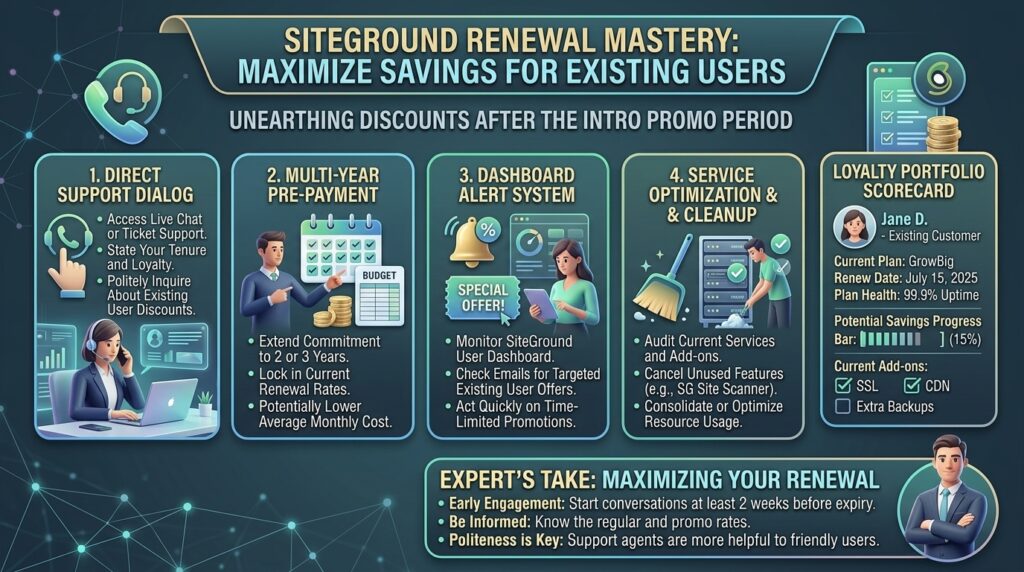
1. Lock in Multi-Year Renewal Blocks Early
By default, many accounts are set up to renew on a month-to-month or annual basis once the intro period expires. However, SiteGround permits users to renew their hosting plans in advance for longer blocks (such as multi-year packages). Choosing a longer renewal commitment block locks in current standard rates and protects you from mid-year price adjustments.
- How to do it: Log into your Client Area, go to Services > Hosting, find your plan, click the kebab (three dots) menu, and select Renew to review extended term options.
2. Downgrade Your Plan Tier Before Renewal
Many users sign up for high-tier plans (like GoGeek or GrowBig) to host multiple sites or take advantage of staging tools during development. If your project has scaled down, or if you are only actively running a single website, downgrade your account to the StartUp plan before your renewal date. This immediately slashes your base renewal invoice total.
3. Negotiate Directly via Support Ticketing
While official policy states renewals are non-discounted, SiteGround is famous for having customer-centric support teams.
- The Strategy: Open a billing ticket or live chat a few weeks before your renewal. Politely explain that your project is a small independent blog or startup operating on a strict budget, and ask if any loyalty discounts, account credits, or promotional retention offers can be applied to your upcoming renewal. While not guaranteed, polite negotiation occasionally yields unadvertised account credits or temporary renewal overrides.
4. Consolidate Multiple Sites to Maximize Resource Value
If you are paying for separate hosting plans across different accounts or higher-tier packages, use SiteGround’s GrowBig or GoGeek plans to consolidate multiple sub-domains and addon sites under a single roof. Maximizing the resource limits of one unified account is cheaper than paying multiple individual renewal invoices.
5. Audit and Strip Out Unnecessary Add-On Services
During checkout or over years of usage, accounts often accumulate recurring paid add-ons that quietly inflate renewal bills:
- Site Scanner Monitoring: Check if you are paying monthly for auxiliary security scans that can be handled by free plugins.
- Premium Email or Backup Extras: Audit whether you are paying for redundant services that duplicate core features.
6. Leverage Black Friday and Cyber Monday Renewal Windows
SiteGround historically runs limited-window promotional campaigns during major holiday sales (like Black Friday and Cyber Monday). Keep an eye on your inbox or client dashboard during late November, as occasional promotional credit windows or special upgrade incentives become available to existing users.
7. Strategic Migration to an Alternative High-Performance Host
If SiteGround’s renewal price simply exceeds your project’s revenue model, the most financially sound move is migrating your website to an alternative performance-driven host. Competitors like Hostinger, HostArmada, or Cloudways offer aggressive new-customer acquisition rates that rival SiteGround’s initial pricing.
SEO Impact: Ensuring Zero Downtime During Migrations or Renewals
If you decide to migrate away from SiteGround rather than pay high renewal rates, managing the transition carefully is vital to protect your Google search rankings:
- Maintain Continuous Uptime: Never cancel your SiteGround hosting account until your new host migration is 100% complete, tested, and verified. Sudden server termination results in 503 errors that harm Googlebot’s crawl budget.
- Transfer SSL Certificates Seamlessly: Ensure your new host provisions a free Let’s Encrypt SSL certificate instantly so your site never serves “Not Secure” warnings to organic search traffic.
- Verify Core Web Vitals Post-Migration: Run speed tests immediately after switching hosts to ensure your Time to First Byte (TTFB) and LCP scores remain optimal.
Cost Comparison: Initial Promo Rates vs. Standard SiteGround Renewals
Review how typical SiteGround plans scale from initial discounted entry points to regular retail renewals:
| Plan Level | Initial Promo Rate (1st Year) | Standard Renewal Rate (Regular Pricing) | Best Suited For |
| StartUp Plan | ~$2.99 – $3.99 / mo | ~$17.99 – $24.99 / mo | Single blogs or portfolio sites |
| GrowBig Plan | ~$4.99 – $6.99 / mo | ~$29.99 – $39.99 / mo | Unlimited sites, staging, caching |
| GoGeek Plan | ~$7.99 – $10.99 / mo | ~$44.99 – $59.99 / mo | Advanced e-commerce, priority support |
Pros and Cons of Staying with SiteGround Upon Renewal
The Pros 👍
- Zero Migration Hassle: Staying put means no moving files, updating DNS records, or risking broken permalinks.
- Uninterrupted Elite Support: SiteGround’s technical support team resolves server issues quickly, which is valuable for growing businesses.
- Stable Infrastructure: You avoid the risk of landing on a noisy, low-quality shared server with a new budget host.
The Cons 👎
- Substantial Price Inflation: Jumping from $3.99/mo to $24.99/mo represents a major budget increase for small project owners.
- No Automatic Discounts: Unlike software subscriptions that offer loyalty coupons, hosting renewals require active manual intervention to optimize costs.
Step-by-Step Guide: How to Migrate from SiteGround to Save Money
If renewal prices force your hand, follow this clean migration blueprint to transition to a budget-friendly host like Hostinger or HostArmada:
- Purchase Your New Hosting Plan: Lock in a discounted introductory multi-year plan with your new provider.
- Generate a Migration Token: Log into your new host’s dashboard and use their automated migration plugin or request free professional migration assistance.
- Migrate Files and Databases: Transfer your WordPress files, uploads, and MySQL database seamlessly without manual FTP friction.
- Test the Staging URL: Review your site thoroughly on the temporary preview domain provided by your new host to ensure images, forms, and permalinks work correctly.
- Update DNS Records: Point your domain’s name servers or A records from SiteGround to your new provider, then cancel your SiteGround account once propagation is verified.
10 Essential Tips for Managing SiteGround Account Renewals
- Mark Your Calendar 45 Days Out: Track your expiration date well in advance so you aren’t forced into an automatic emergency renewal.
- Review Traffic vs. Revenue: Calculate whether your website generates enough income to justify SiteGround’s higher renewal rates.
- Contact Support Politely: Always test a billing chat to ask if a loyalty credit can be applied to your account.
- Downgrade Unused Tiers: Move from GoGeek down to GrowBig or StartUp if you don’t need advanced developer tools.
- Clean Up Database Bloat: Delete old post revisions and spam comments before migrating or renewing to keep account file sizes lean.
- Watch Out for Auto-Renewals: Keep auto-renew settings toggled to manual if you want time to evaluate your options before your card gets billed.
- Shop Around Competitor Deals: Check active promotional rates at alternative hosts as benchmarks before accepting a high renewal invoice.
- Consolidate Cluttered Sites: Merge multiple small hobby blogs into a single multi-site plan to reduce overall hosting overhead.
- Backup Locally: Always download a full archive backup of your site via Site Tools before making major account or billing changes.
- Explore Cloud Scaling Only When Needed: If your site is outgrowing shared hosting, transition to optimized cloud tiers strategically rather than paying excessive retail renewal bumps on shared limits.
Frequently Asked Questions (FAQ)
1. Does SiteGround offer discount coupon codes for renewals?
No. SiteGround does not issue renewal coupon codes or promotional discount links for existing account extensions. All renewals process at standard retail rates.
2. Can I get a discount if I contact SiteGround support?
While not guaranteed, polite negotiation with billing support prior to your expiration date can occasionally yield unadvertised loyalty credits or retention offers.
3. How much do SiteGround plans increase upon renewal?
Renewal rates typically jump significantly, ranging from $17.99/mo for the StartUp plan up to $44.99+/mo for higher tiers, representing a 3x to 5x increase over introductory promotional prices.
4. Can I prepay for multiple years at the discounted rate?
No. Introductory promotional discounts are strictly limited to your very first billing term (typically 1, 12, or 36 months). Subsequent renewals bill at standard retail rates.
5. What is the best way to avoid high SiteGround renewal bills?
The most effective strategies include downgrading to a lower plan tier, consolidating multiple sites into a single account, or migrating your website to a competitive new-customer host.
6. Will my website experience downtime if I migrate away from SiteGround?
Not if you perform the migration correctly. By keeping your SiteGround account active until your new host setup is fully tested and your DNS records propagate, you ensure zero downtime.
7. How do I turn off auto-renewal on SiteGround?
Log into your Client Area, go to Services > Hosting, find your plan, click settings, open the kebab menu, and select Renewal Settings to disable automatic billing.
8. Do I lose my domain name if I leave SiteGround?
If your domain name is registered through SiteGround, you can easily unlock it, retrieve your EPP transfer authorization code, and move it to an independent registrar like Namecheap or Cloudflare.
9. Are there alternative hosts that offer lifetime price locks?
Yes. Certain budget-focused providers offer lifetime price-lock guarantees or flat-rate renewals that protect you from aggressive post-introductory price spikes.
10. Which SiteGround plan is most cost-effective for long-term renewals?
The StartUp plan offers the lowest baseline renewal cost if you only manage a single website and do not require advanced staging or collaborative tools.
Conclusion
Navigating SiteGround discount renewal tricks for existing users requires a blend of proactive timing, strategic account downsizing, polite support negotiation, and—when necessary—knowing when to migrate. While SiteGround maintains strict regular pricing after your initial promotional window closes, understanding how to manage your billing terms ensures you never face unexpected financial surprises.