Squarespace vs bluehost for small business web design: Establishing a powerful online presence is non-negotiable for modern businesses. Whether you are launching a boutique consultancy in New York, a tech-forward startup in San Francisco, a retail brand in Los Angeles (California), a media company in Seattle (Washington), or a corporate service provider in Austin (Texas), your website functions as your primary 24/7 storefront.
When beginning the web design journey, business owners almost invariably face a fork in the road: Do you choose an all-in-one, closed-ecosystem website builder like Squarespace, or do you opt for an open-source content management system (CMS) powered by a web host like Bluehost?
This exhaustive, in-depth guide compares Squarespace and Bluehost across web design capabilities, customization freedom, e-commerce tools, Google SEO optimization, pricing, and long-term value.
1. Introduction: Two Fundamentally Different Philosophies
Before diving into features, it is vital to understand the structural difference between these two platforms.
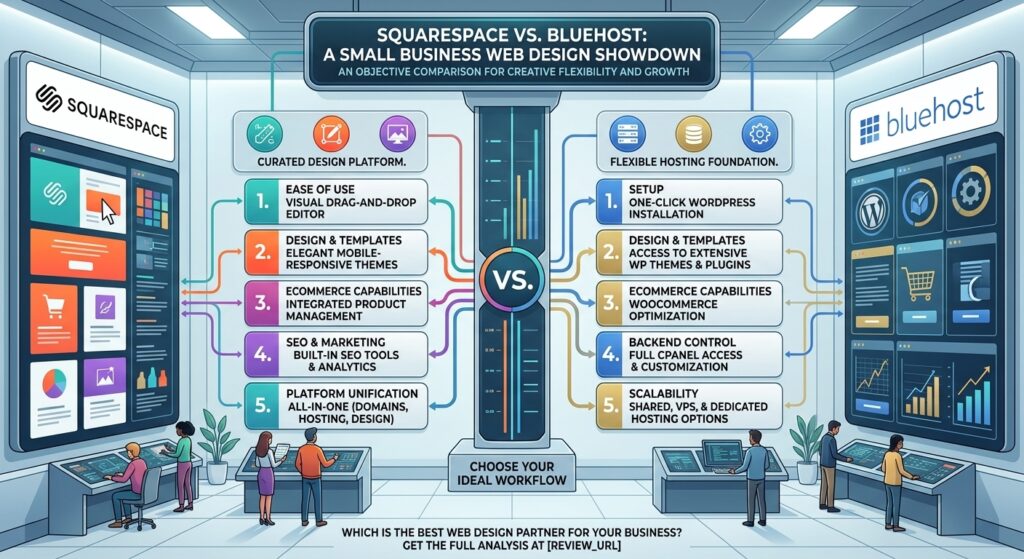
- Squarespace: A fully hosted, all-in-one website builder. Everything from the drag-and-drop editor and security certificates to the hosting servers and template frameworks is managed under one roof. You pay a single subscription fee, log in, and design without ever thinking about back-end server configurations.
- Bluehost: An officially recommended WordPress hosting provider. Bluehost provides the server infrastructure, domain management, and a streamlined one-click WordPress installer. WordPress itself acts as your design engine, granting you access to thousands of themes, plugins, and raw code customization.
2. Web Design and User Experience (UX)
The aesthetic presentation of your brand determines how prospective customers perceive your professionalism within seconds of landing on your page.
+-----------------------------------+-----------------------------------+
|            SQUARESPACE            |             BLUEHOST              |
+-----------------------------------+-----------------------------------+
| • Polished, Design-Forward Layouts| • Infinite Flexibility via Themes |
| • Fluid Engine Drag-and-Drop Grid | • Gutenberg or Page Builders (e.g.,|
| • Locked-in Responsive Scaling    |   Elementor, Divi)                |
| • Minimalist Learning Curve       | • Steeper Learning Curve          |
+-----------------------------------+-----------------------------------+
Squarespace: Effortless, High-End Aesthetics
Squarespace is celebrated for its award-winning, visually striking templates. It targets small business owners who want a gorgeous, modern website without writing a single line of code.
- Fluid Engine: Squarespace’s layout engine uses a flexible grid system, allowing you to drag text, images, and buttons anywhere on the page while automatically maintaining mobile responsiveness.
- Design Consistency: Because templates are strictly curated by Squarespace, elements never look disjointed or “broken.” Typography, color palettes, and spacing rules stay uniform across your entire site.
Bluehost & WordPress: Infinite Customization
Bluehost provides the hosting foundation for WordPress, which powers over 40% of the entire web. Design flexibility here is virtually limitless, but it requires a more hands-on approach.
- Theme & Builder Ecosystem: You can choose from thousands of free and premium WordPress themes. By pairing Bluehost with intuitive page builders like Elementor or the native block editor (Gutenberg), you can construct completely bespoke layouts.
- Design Control: If you want a hyper-specific layout, unique user portals, or complex multi-tier menus, WordPress accommodates it—though managing mobile responsiveness across various third-party plugins requires more oversight.
3. E-Commerce and Small Business Functionality
If your small business sells physical goods, digital downloads, services, or bookings, you need robust transaction infrastructure.
- Squarespace Commerce: Fully integrated out of the box. You do not need to install plugins or manage updates. Inventory tracking, customer accounts, flexible shipping rules, automated tax calculations, and point-of-sale integrations are built directly into the dashboard. For appointment-based businesses, Squarespace integrates seamlessly with Acuity Scheduling.
- Bluehost & WooCommerce: Relies on WooCommerce, the world’s leading open-source e-commerce platform. Bluehost offers specialized WooCommerce hosting plans that pre-install the software. WooCommerce handles complex product catalogs, variable attributes (sizes, colors), custom checkout workflows, and limitless payment gateway extensions with zero platform transaction fees beyond standard payment processor rates.
4. Google SEO and Performance Optimization
To rank at the top of Google search results across competitive regional markets like New York, San Francisco, or Austin, your website must feature clean code, fast load times, and robust on-page metadata optimization.
+-----------------------------------+-----------------------------------+
|            SQUARESPACE            |             BLUEHOST              |
+-----------------------------------+-----------------------------------+
| • Clean, Semantic HTML Structure  | • Advanced Plugins (RankMath/Yoast)|
| • Automatic SSL & XML Sitemaps    | • Granular Speed/Caching Control  |
| • Simplified Meta & Alt Tag Edits | • Deep Schema & Structured Data   |
+-----------------------------------+-----------------------------------+
Squarespace SEO
Squarespace handles the technical SEO fundamentals automatically. Clean HTML5 markup, automatic XML sitemaps, SSL certificates, clean URL structures, and mobile optimization come standard. Editing meta titles, descriptions, and alt tags for images is straightforward, making it ideal for local service businesses and standard portfolios.
Bluehost SEO
WordPress is widely considered the gold standard for advanced SEO customization. Hosted on Bluehost, you can install industry-leading plugins like Rank Math or Yoast SEO. These plugins provide deep content analysis, XML sitemap customization, advanced schema markup integration, and granular control over canonical tags and redirects—giving SEO professionals maximum leverage.
5. Pricing Structures and Total Cost of Ownership
Budget transparency is critical when calculating your operational overhead.
- Squarespace Pricing: Operates on predictable, bundled tier subscription models ranging from roughly $19 to $99 per month when billed annually. This price covers hosting, security, templates, and core software updates. Transaction fees are 2% on the lowest Basic plan and 0% on higher tiers.
- Bluehost Pricing: Entry-level shared and WordPress hosting plans start aggressively low (often under $4 to $6 per month for initial promotional terms). However, you must factor in potential secondary costs: premium themes, paid plugins, professional email configurations, and standard renewal rate increases after your introductory term expires.
6. Pros and Cons Summary
Squarespace
- Pros:
- Stunning, modern templates with intuitive drag-and-drop design.
- All-in-one management eliminates plugin updates and security vulnerability patching.
- Reliable 24/7 customer support covering the entire platform.
- Built-in e-commerce, blogging, and scheduling tools.
- Cons:
- Limited design flexibility outside template structural constraints.
- Cannot access raw server files or deeply customize backend code.
- Higher monthly baseline cost compared to entry-level shared hosting.
Bluehost (WordPress)
- Pros:
- Incomparable design and functional flexibility via thousands of themes and plugins.
- Low initial startup cost with scalable hosting tiers (Shared, VPS, Dedicated).
- Unmatched SEO plugin ecosystem.
- Full ownership of your data and site files.
- Cons:
- Steeper learning curve for beginners.
- You are responsible for managing security updates, plugin conflicts, and backups.
- Support is focused strictly on server-side hosting issues rather than third-party plugin design.
7. Strategic Web Design Tips for US Small Businesses
If your small business targets localized consumer bases across major economic centers like New York, San Francisco, or Texas, apply these expert design tips:
- Prioritize Mobile-First Loading: Over 60% of local search traffic originates on smartphones. Ensure your chosen layout minimizes large media files to achieve sub-2-second mobile load times.
- Implement Local Business Schema: If you use WordPress/Bluehost, integrate local schema markup via an SEO plugin. If you use Squarespace, meticulously fill out your Business Information in the commerce settings to capture “near me” map pack rankings.
- Streamline Conversion Paths: Place clear call-to-action (CTA) buttons (“Book a Consultation,” “Get a Quote,” “Shop Now”) above the fold on your homepage.
- Secure Professional Domain Email: Establish trust by pairing your website domain with a professional business email address (e.g., info@yourbrand.com).
8. Frequently Asked Questions (FAQ)
1. Which platform is easier to use for a complete beginner?
Squarespace is significantly easier for beginners. Its visual drag-and-drop editor and all-in-one setup mean you can launch a professional website in an afternoon without technical training.
2. Is Bluehost cheaper than Squarespace in the long run?
Bluehost typically offers lower introductory hosting costs. However, once you factor in domain renewals, premium plugins, paid themes, and developer hours, the total cost of ownership can equal or exceed Squarespace’s predictable monthly subscription.
3. Which platform is better for local SEO?
Both platforms can rank well on Google. Bluehost (via WordPress) offers greater depth through advanced SEO plugins, while Squarespace handles technical fundamentals cleanly out of the box.
4. Can I migrate my website from Squarespace to Bluehost later?
Yes, but it is not an automated one-click process. Because Squarespace is a closed ecosystem, migrating requires manually exporting blog content and rebuilding your pages, design assets, and structure on WordPress.
5. Do I need to know how to code to use these platforms?
No coding is required for either platform to build a standard website. However, WordPress (via Bluehost) allows you to edit raw CSS and PHP code if you desire advanced custom modifications.
6. How do their security measures compare?
Squarespace manages all platform security, SSL certificates, and threat mitigation automatically. Bluehost provides free SSL certificates and server-level firewalls, but maintaining application-level security (updating WordPress core, themes, and plugins) is your responsibility.
7. Which platform is better for large e-commerce stores?
Bluehost paired with WooCommerce is vastly superior for large, complex e-commerce inventories, custom product attributes, and multi-vendor setups. Squarespace suits small-to-medium shops exceptionally well.
8. Does Bluehost provide website design services?
Bluehost offers professional design and marketing services through partner programs for an additional fee if you prefer not to build the site yourself. Squarespace relies on an official marketplace of independent professional designers.
9. What kind of customer support do they offer?
Squarespace provides 24/7 email support and weekday live chat covering the entire website building experience. Bluehost provides 24/7 chat and phone support focused primarily on server uptime and hosting architecture.
10. Which platform should I choose for my small business?
Choose Squarespace if you want a stunning, maintenance-free website with simple e-commerce and zero technical hassle. Choose Bluehost if you want long-term design control, advanced SEO capabilities, and a scalable WordPress foundation.
9. Conclusion
The decision between Squarespace vs. Bluehost for small business web design ultimately boils down to how much time you want to spend managing your technology versus running your business.
Choose Squarespace if your priority is a polished, design-forward aesthetic, an intuitive drag-and-drop editor, and an all-in-one platform where security and hosting are handled entirely behind the scenes.
Choose Bluehost if your enterprise demands deep customization freedom, advanced WordPress plugins, robust e-commerce scaling through WooCommerce, and complete ownership over your digital infrastructure.
Evaluate your technical comfort level, define your long-term business goals, and build your digital presence on the platform engineered to drive success across competitive search markets.