
Top web hosting platforms with multi-site management dashboard features. As digital agencies, freelance web developers, and serial entrepreneurs scale their operations, managing a single website efficiently is no longer enough. Whether you are maintaining a cluster of e-commerce storefronts, managing localized landing pages for businesses across Texas, New York, California, Washington, and San Francisco, or handling dozens of client portfolios, logging into separate hosting accounts, unique control panels, and distinct WordPress logins wastes invaluable hours.
The solution lies in multi-site management dashboard features. Instead of fragmented administration, these centralized control hubs allow you to oversee software updates, deploy backups, monitor server health, manage staging environments, and control multiple domains from a single unified interface.
This comprehensive masterclass review guide analyzes the top-rated web hosting platforms featuring robust multi-site management dashboard tools, breaking down their control architectures, administrative capabilities, performance specs, and overall value.
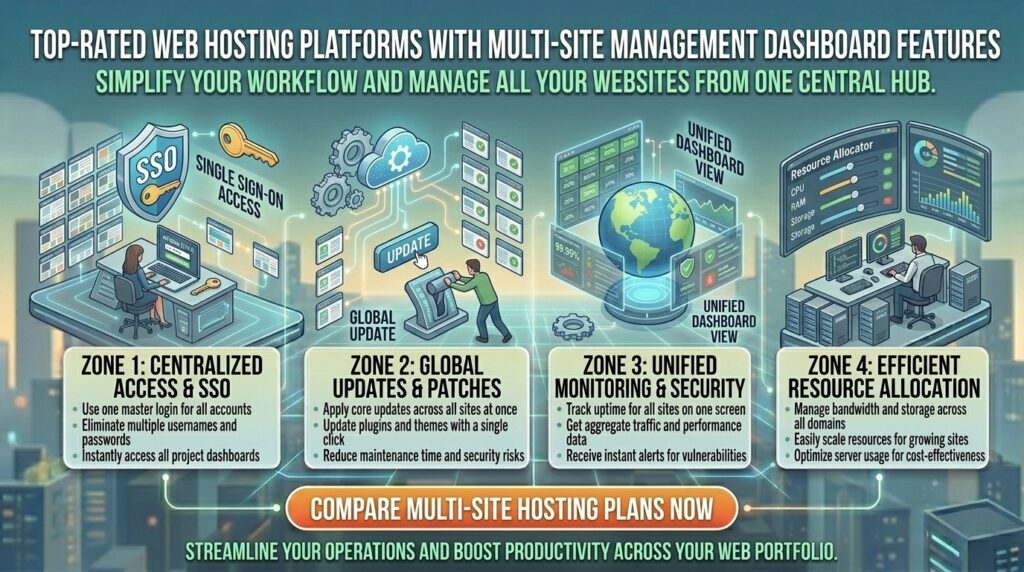
Why Multi-Site Management Dashboards Transform Workflows
Before examining specific hosting providers, let’s explore why centralized dashboard architecture is critical for modern multi-site management:
- Elimination of Fragmented Logins: Multi-site dashboards bypass the need to remember dozens of different passwords or navigate individual cPanel logins, aggregating all website touchpoints into a single master view.
- Bulk Updates and Security Patching: When a critical security patch drops for WordPress core or popular plugins, a multi-site management tool lets you update 10, 20, or 50 websites simultaneously with a single click.
- Centralized Resource Monitoring: Keep track of CPU usage, storage capacity, and bandwidth thresholds across your entire portfolio to prevent unexpected overages or server crashes.
Top 5 Web Hosting Platforms with Multi-Site Management Dashboards
1. Hostinger — Modern hPanel with Agency Account Sharing and Multi-Site Management
Hostinger has transformed the web hosting landscape by pairing blazing-fast LiteSpeed infrastructure with an intuitive proprietary dashboard known as hPanel.
- Multi-Site Dashboard Features: Features robust Account Sharing and delegation tools that allow agencies and developers to invite team members or clients to manage specific sites without handing over master account credentials.
- Centralized Controls: Manage domains, subdomains, DNS records, SSL certificates, and automated backups across multiple hosting slots from a unified screen.
- Key Features: Custom LiteSpeed server acceleration, NVMe storage pools, automated staging tools, and global CDN integration.
- Pros: Exceptionally clean, modern interface; straightforward multi-account delegation; incredible speed-to-price ratio.
- Cons: Advanced multi-site container tools require higher-tier cloud or VPS plans.
2. SiteGround — Advanced Agency Tools, Collaborators, and Site Tools
SiteGround is globally celebrated by digital agencies and professional developers for its high-performance Google Cloud infrastructure and sophisticated collaboration framework.
- Multi-Site Dashboard Features: Every hosting plan allows you to add Collaborators and Clients with custom access permissions, letting team members manage specific sites without accessing billing or master account settings.
- Centralized Controls: Integrated WHMCS billing automation support, white-label client management options, and bulk site staging deployment.
- Key Features: Custom
Site Toolscontrol panel, automated daily backups, SuperCacher optimization, and Ultrafast PHP. - Pros: World-class Google Cloud reliability; granular client collaboration controls; elite customer support.
- Cons: Higher renewal rates following the initial introductory term.
3. ScalaHosting — Custom SPanel Cloud VPS with Centralized Multi-Account Isolation
For growing agencies and businesses managing high-traffic web portfolios, ScalaHosting delivers powerful cloud infrastructure managed through their proprietary control panel, SPanel.
- Multi-Site Dashboard Features: Designed with a built-in Reseller and Multi-Account Management architecture that isolates each client website into its own secure container while managing them from a master dashboard.
- Centralized Controls: Integrated
SShieldcybersecurity, real-time resource allocation adjustments, and centralized backup management. - Key Features: Fully managed cloud VPS, dedicated IP addresses, free website migrations, and complete root access flexibility.
- Pros: Incredible resource isolation and security; no licensing fee penalties like traditional cPanel; highly scalable.
- Cons: Custom control panel layout has a slight learning curve for users accustomed strictly to legacy cPanel interfaces.
4. Liquid Web (Nexcess) — Enterprise Managed WordPress and Multi-Site Hubs
Nexcess (by Liquid Web) provides elite, fully managed hosting environments engineered specifically for multi-site managers, enterprise brands, and high-volume digital agencies.
- Multi-Site Dashboard Features: Features a centralized Nexcess Client Portal equipped with visual site grouping, bulk plugin management, automated visual regression testing, and instant staging creation.
- Centralized Controls: Unified billing, multi-site network synchronization, and automated performance tracking across all hosted properties.
- Key Features: Built-in server-level caching, automated image compression, 99.99% uptime SLAs, and 24/7 expert sysadmin support.
- Pros: Zero resource throttling; enterprise-grade multi-site performance; white-glove migration and support.
- Cons: Premium pricing tailored specifically for commercial enterprises and high-revenue portfolios.
5. Bluehost — Veteran WHM/cPanel Ecosystem for Multi-Domain Resellers
Bluehost remains a trusted industry staple, offering traditional WHM (Web Host Manager) and cPanel environments designed for managing multiple separate hosting accounts.
- Multi-Site Dashboard Features: Powered by WHM (WebHost Manager), enabling administrators to create individual cPanel sub-accounts, allocate specific disk quotas, and manage dozens of distinct websites independently.
- Centralized Controls: Master server configuration, individual account resource throttling, and custom package creation.
- Key Features: Oracle Cloud infrastructure integration, free domain for the first year, free SSL certificates, and automated backups.
- Pros: Familiar WHM/cPanel environment for traditional developers; stable Oracle Cloud backing; reliable uptime.
- Cons: Legacy cPanel multi-account management can feel clunky compared to modern, streamlined cloud dashboards.
Comparative Matrix: Multi-Site Management Hosting Platforms
| Hosting Provider | Master Dashboard Interface | Client / Collaborator Access? | Best Suited For | Starting Price |
| Hostinger | Custom hPanel | Yes (Account Sharing) | Freelancers & Small Agencies | $2.49 / mo |
| SiteGround | Custom Site Tools | Yes (Collaborator Roles) | Growing Web Agencies | $2.99 / mo |
| ScalaHosting | SPanel Cloud VPS | Yes (Reseller / Isolated) | High-Volume Portfolios | $14.95 / mo |
| Liquid Web | Nexcess Enterprise Hub | Yes (Visual Grouping) | Enterprise & WooCommerce | $19.00 / mo |
| Bluehost | WHM / cPanel | Yes (Sub-Accounts) | Traditional Resellers | $2.95 / mo |
Best Practices for Managing Multiple Websites Efficiently
When administering a large portfolio of websites across a single hosting dashboard, follow these professional strategies to maintain security and peak performance:
- Enforce Strict Two-Factor Authentication (2FA): Because a multi-site dashboard controls access to all your web properties simultaneously, securing your master login with 2FA or hardware security keys is non-negotiable.
- Utilize Staging Environments Before Bulk Updates: Never push plugin or theme updates to 20 live client sites at once without testing them in a cloned staging environment first to prevent catastrophic site crashes.
- Automate Off-Site Backups: Configure your multi-site dashboard to push daily or weekly backups to an independent cloud repository (such as Amazon S3 or Google Drive) rather than storing them solely on the local server.
- Isolate Client Accounts for Security: If you host websites for multiple distinct clients, ensure each site operates in its own isolated container or sub-account. If one client site gets compromised by malware, isolation prevents lateral infection across your portfolio.
Frequently Asked Questions (FAQ)
1. What is a multi-site management dashboard in web hosting?
A multi-site management dashboard is a centralized control interface provided by a web host or control panel (such as Hostinger’s hPanel, Plesk, or WHM) that allows you to monitor, update, and manage multiple distinct websites from a single login.
2. Is a multi-site dashboard the same thing as WordPress Multisite?
No. WordPress Multisite runs multiple websites on a single WordPress installation sharing a single database and core file set. A multi-site hosting dashboard allows you to manage dozens of completely independent, separate WordPress or custom websites from one master screen.
3. Can I give clients access to manage only their specific website?
Yes. Leading hosts like Hostinger and SiteGround feature collaborator and account-sharing tools that let you grant clients access strictly to their designated website without exposing master billing or other client files.
4. How do web hosts handle resource allocation across multiple websites?
On shared hosting, all your sites share a single pool of server resources. On cloud VPS or reseller platforms (like ScalaHosting’s SPanel or WHM), you can assign specific CPU, RAM, and storage limits to each individual site.
5. What is WHM (WebHost Manager)?
WHM is the master administrative backend for cPanel servers. It allows you to create, delete, and manage multiple cPanel sub-accounts, making it a traditional favorite for web hosting resellers.
6. Do multi-site dashboards allow bulk plugin and theme updates?
Yes. Advanced management tools let you select multiple WordPress websites across your portfolio and execute core, theme, and plugin updates simultaneously with a single click.
7. Will managing multiple websites on one hosting plan slow down my sites?
If your hosting plan has sufficient CPU and RAM resources (such as a cloud VPS or high-tier business plan), managing multiple sites will not impact speed. However, overcrowding a basic shared plan can cause slowdowns.
8. Are automated backups available for all sites in a multi-site dashboard?
Most professional hosts include automated backup tools that apply snapshots across all connected websites and databases within your account dashboard.
9. Can I migrate multiple websites to a new multi-site host for free?
Yes. Many top-rated hosting providers offer professional, free website migration services to transfer your entire portfolio over without downtime.
10. Which web host offers the best overall multi-site management experience?
For an exceptional balance of modern design, account sharing, and ease of use, Hostinger is the top overall recommendation—while SiteGround and ScalaHosting lead the market for professional agency and cloud VPS management.
Conclusion
Managing a growing portfolio of websites no longer requires juggling dozens of disparate login screens and chaotic administrative workflows. By partnering with a top-rated web hosting provider featuring robust multi-site management dashboard capabilities—such as Hostinger, SiteGround, ScalaHosting, Liquid Web, or Bluehost—freelancers, digital agencies, and enterprise managers operating across major commercial centers like Texas, New York, California, Washington, and San Francisco can streamline their operations, automate security patching, and scale their digital portfolios with absolute efficiency and confidence.