Testing Actual Storage Read/Write Speed on Your VPS Hosting Plan
For system architects, enterprise DevOps engineers, web developers, and digital agency owners scaling high-performance applications across primary tech hubs like Texas, New York, California, Washington, and San Francisco, marketing claims from web hosting companies can often mask underlying performance bottlenecks.
Open almost any Virtual Private Server (VPS) hosting provider’s pricing page, and you will see glossy promises: “Blazing-fast NVMe storage,” “Enterprise-grade high-IOPS arrays,” or “Guaranteed lightning-fast disk speeds.”
However, shared hypervisor nodes, over-provisioned storage pools, strict hardware throttling, and legacy RAID controllers can severely degrade real-world disk input/output (I/O) performance. Because storage speed directly dictates how fast your databases execute queries, compile code, generate page caches, and pass Core Web Vitals assessments, relying on marketing claims is a recipe for slow application performance.
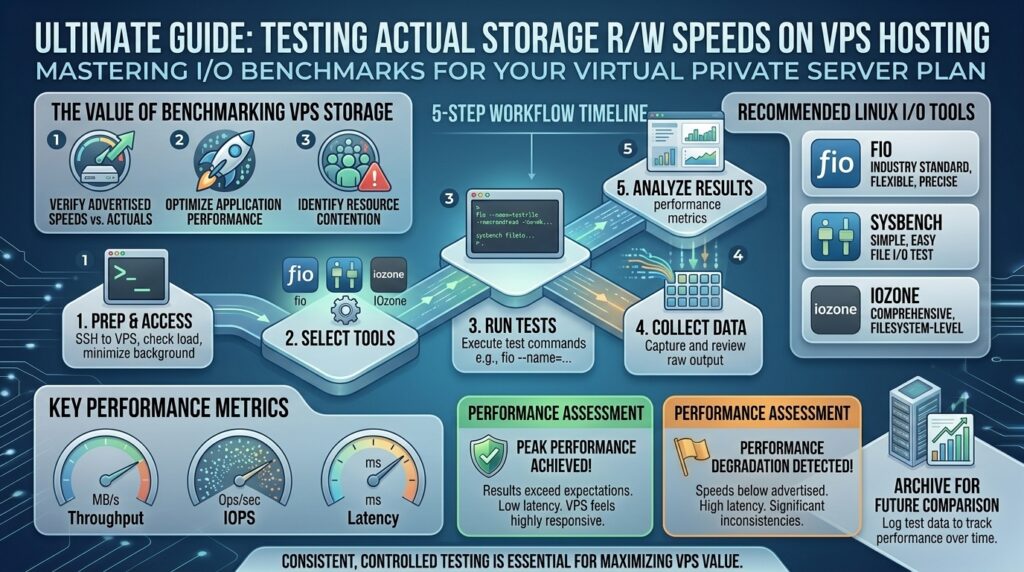
This comprehensive, step-by-step masterclass guide will teach you how to independently test, benchmark, and audit the actual storage read and write speeds of your VPS hosting plan using professional Linux utilities.
Understanding Why VPS Storage Speed Matters
Before diving into commands and benchmarks, it is essential to understand how storage latency impacts your web stack.
1. The Bottleneck of Database Transactions
Modern web applications—whether running WordPress with WooCommerce, Magento, Node.js e-commerce stacks, or custom SaaS architectures—rely heavily on relational databases (MySQL, MariaDB, PostgreSQL).
- Every single user interaction triggers dozens of database read and write operations.
- If your VPS storage subsystem suffers from high latency or low IOPS (Input/Output Operations Per Second), your CPU sits idle waiting for data to fetch from the disk, spiking your Time to First Byte (TTFB) and tanking user experience.
2. Physical vs. Virtualized Storage Layers
On a dedicated bare-metal server, you access the raw physical drive directly. On a VPS, your operating system sits inside a virtual machine managed by a hypervisor (like KVM, VMware, or Proxmox).
- Your virtual disk is typically a software-defined block device drawn from a massive shared Storage Area Network (SAN) or network-attached NVMe pool.
- Testing your storage speed reveals whether your host is enforcing strict throttling limits or delivering the performance you pay for.
Phase 1: Preparation and Safety Best Practices
Before executing heavy read/write benchmark tests on a live production server, you must take proper precautions to avoid disrupting active users or crashing your disk array.
1. Notify Clients and Schedule Maintenance
Intensive storage benchmarks consume disk bandwidth and can temporarily spike CPU load or disk latency. If you must benchmark a production VPS, schedule it during low-traffic windows (e.g., late at night).
2. Log into Your VPS via SSH
You will need root-level shell access via SSH to run low-level disk diagnostic tools:
Bash
ssh root@your_vps_ip_address
Phase 2: Quick Initial Disk Checks (dd and hdparm)
For a rapid baseline check without installing third-party utilities, you can use built-in Linux commands.
Method 1: Testing Write Speed with dd
The dd command is a classic Unix utility used to copy and convert files. We can use it to write a temporary test file directly to your disk and measure write speed.
Bash
sudo dd if=/dev/zero of=testfile bs=64k count=16000 conv=fdatasync status=progress
- Decoding the Command:
if=/dev/zero: Uses a stream of zeros as the input file.of=testfile: Writes a temporary file (64k * 16000bytes).conv=fdatasync: Ensures the system flushes data all the way down to the physical disk platter or flash cells rather than just returning cached RAM speeds.
- What to look for: Look at the final megabytes-per-second (
MB/s) output. A healthy enterprise NVMe VPS should write well over 1,000 MB/s, while standard SATA SSDs usually plateau between 300 to 500 MB/s.
Clean up your temporary test file immediately after testing:
Bash
rm -f testfile
Method 2: Testing Buffered Read Speed with hdparm
To test how fast your Linux kernel can read data directly from your storage device cache and controller:
Bash
sudo hdparm -tT /dev/vda
(Note: Replace /dev/vda with your actual block device name, such as /dev/sda or /dev/nvme0n1, which you can verify using lsblk).
Phase 3: Professional Benchmarking with fio (Flexible I/O Tester)
While dd gives a rough sequential write baseline, real-world web applications rarely execute clean, single-threaded sequential writes. They perform random read/write operations scattered across multiple database files simultaneously.
The industry standard for professional storage benchmarking is fio (Flexible I/O Tester).
1. Installing fio on Your VPS
Depending on your Linux distribution, install fio via your package manager:
Bash
# For Ubuntu / Debian
sudo apt update && sudo apt install fio -y

# For CentOS / Rocky Linux / RHEL
sudo dnf install fio -y
2. Running a Comprehensive Random Read/Write Test
To simulate heavy database workloads (mixed 70% read / 30% write with 4k block sizes and deep queue depths), execute the following enterprise test command:
Bash
sudo fio --name=db_benchmark --filename=/tmp/fio_test_file --size=2G --rw=randrw --rwmixread=70 --direct=1 --bs=4k --ioengine=libaio --iodepth=32 --numjobs=4 --runtime=60 --group_reporting
3. Interpreting fio Results Like an Expert
When the test completes, focus on three primary metrics:
- IOPS (Input/Output Operations Per Second): This measures how many distinct read/write transactions your drive handles per second. High IOPS is crucial for fast MySQL/MariaDB performance.
- Bandwidth (
BW): The total throughput speed achieved during the mixed workload. - Latency (
lat): Measured in milliseconds (ms) or microseconds ($\mu s$). This is the most critical metric. On high-end NVMe VPS plans, average latency should remain well below 1 millisecond (<1ms). If latency spikes above 10ms to 50ms, your VPS storage is severely constrained or suffering from noisy-neighbor throttling on the hypervisor node.
Clean up the fio test file:
Bash
rm -f /tmp/fio_test_file
Phase 4: Benchmarking Disk Speed Using Sysbench
Another stellar utility favored by database administrators and hosting reviewers is Sysbench, which tests both CPU and file I/O performance under concurrent multi-threaded loads.
1. Installing Sysbench
Bash
# Ubuntu/Debian
sudo apt install sysbench -y
2. Preparing, Running, and Cleaning the Sysbench File Test
Bash
# Step 1: Prepare the test files (creates 2GB of data files)
sysbench fileio --file-test-mode=rndrw --file-total-size=2G prepare

# Step 2: Run the 60-second random read/write test
sysbench fileio --file-test-mode=rndrw --file-total-size=2G --time=60 --max-requests=0 run

# Step 3: Cleanup test files
sysbench fileio --file-test-mode=rndrw --file-total-size=2G cleanup
Review the output for Requests/sec, Throughput, and 95th percentile latency. Consistent, low-latency performance indicates true enterprise hardware allocation.
Phase 5: Comparing Your Results Against Industry Standards
How do you know if your VPS storage speed is exceptional, average, or subpar? Use this benchmark reference matrix:
| Storage Tier / Hardware Type | Sequential Write (dd) | Random IOPS (fio 4k) | Average Latency |
| Budget SATA SSD VPS | 250 – 450 MB/s | 15,000 – 35,000 IOPS | 2.5ms – 8.0ms |
| Standard Enterprise NVMe VPS | 1,200 – 2,500 MB/s | 80,000 – 150,000 IOPS | 0.5ms – 1.5ms |
| High-End Dedicated NVMe / Bare Metal | 3,500 – 7,000+ MB/s | 300,000 – 800,000+ IOPS | < 0.2ms |
If your expensive “Enterprise NVMe VPS” scores within the budget SATA SSD range, your host is likely over-provisioning their hypervisor storage pool or enforcing rigid I/O throttling limits.
Frequently Asked Questions (FAQ)
1. Can running disk benchmarks damage my VPS hard drive?
No. Standard benchmarking tools like fio and sysbench write and read standard data blocks. They do not wear out enterprise-grade SSDs or NVMe drives, though running heavy tests on tiny cloud plans can temporarily consume available disk bandwidth.
2. Why do my dd write speeds look abnormally high (e.g., 5,000 MB/s)?
If your write speeds look impossibly fast, it means your Linux kernel cached the write operation in RAM rather than flushing it to the physical disk. Always include the conv=fdatasync flag in your dd command to force actual disk writes.
3. What is the difference between sequential and random I/O testing?
Sequential testing measures how fast large, continuous files (like videos or large archives) transfer. Random testing measures how fast the drive handles scattered, fragmented requests (like database queries and CMS file lookups), which is far more representative of real-world web hosting performance.
4. Why is disk latency more important than raw throughput?
For web applications, low latency ensures that database queries resolve instantly. High throughput matters when moving massive files, but low latency dictates how snappy your website feels to visitors.
5. Can I test disk speed on shared web hosting (cPanel/Plesk)?
Generally, no. Shared hosting accounts do not grant terminal root access (SSH), preventing you from running low-level block storage benchmarks like fio or sysbench. These tests are designed for VPS and dedicated server plans.
6. What should I do if my VPS storage speed fails industry benchmarks?
First, check your cloud provider’s resource utilization dashboard to ensure background backups or snapshots aren’t running. If performance remains poor, open a support ticket asking if your container is being throttled, or consider migrating to a higher-tier provider.
7. Does high storage speed improve Google SEO rankings?
Yes. Faster disk I/O reduces server response times (TTFB) and accelerates database query execution, directly improving your Core Web Vitals scores—a crucial factor in Google search rankings.
8. What is an IOPS limit on cloud VPS plans?
Many cloud providers enforce IOPS (Input/Output Operations Per Second) caps on entry-level VPS instances. Even if the underlying hardware is fast NVMe, your specific virtual machine may be artificially throttled to 5,000 or 10,000 IOPS until you upgrade your plan.
9. Should I run disk benchmarks on a live production website?
It is heavily discouraged. Running intensive multi-threaded I/O tests on a live production server can increase disk wait times (iowait) and slow down active user sessions. Always test on a staging clone or maintenance window.
10. How often should I test my VPS storage performance?
You should run storage benchmarks immediately after provisioning a new VPS plan to verify that you received the performance you paid for, and periodically if you experience unexplained website slowdowns.
Conclusion
Testing and verifying the actual storage read and write speeds of your VPS hosting plan empowers you to cut through marketing hype and ensure your technical infrastructure can handle demanding web applications. By utilizing professional Linux benchmarking tools like fio and sysbench, analyzing IOPS and latency metrics, and comparing results against industry standards, you can guarantee lightning-fast database performance, robust Core Web Vitals, and superior search engine visibility.