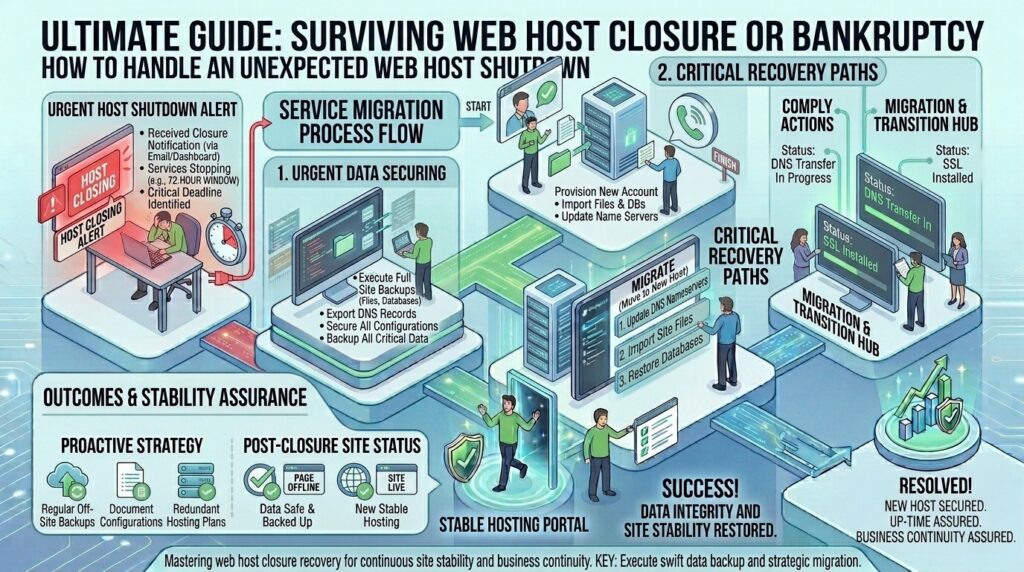
What to Do If Your Web Hosting Company Goes Out of Business
For digital agency operators, web developers, ecommerce founders, and systems administrators managing web infrastructure across major technological and commercial hubs like Texas, New York, California, Washington, and San Francisco, waking up to find that your web hosting provider has abruptly gone out of business, declared bankruptcy, or shut down its servers overnight is an absolute worst-case scenario.
When a hosting company collapses without warning, your websites go offline, client portals break, automated data workflows freeze, and company email communications stall instantly.
If your domain name registration, DNS configuration, website files, and business emails were all tightly bundled under that single defunct host, the panic can be overwhelming. However, a structured, calm, and decisive emergency response can salvage your digital assets, rescue your data, and get your web properties back online with minimal revenue loss.
This comprehensive, highly detailed masterclass guide will walk you through a step-by-step framework on what to do immediately if your web hosting company goes out of business.
Understanding the Anatomy of a Host Shutdown
When a web host closes its doors, it typically happens in one of two ways:
- The Orderly Wind-Down: The provider gives clients a 30-to-60-day notice, migrates accounts to an acquiring parent company, or keeps servers running long enough for users to extract data. (This is rare).
- The Sudden Collapse: Servers are abruptly powered down by data center operators due to unpaid upstream bills, or the company enters sudden liquidation, locking users out of control panels instantly with zero warning.
Before taking action, you must deconstruct your digital footprint into four independent systems: Domain Registration, DNS Routing, Website Hosting, and Email Hosting. Knowing which system is severed determines your recovery path.
Phase 1: Emergency Triage — Assessing What Is Actually Down
When your site stops loading, do not panic and assume your data is permanently deleted. Log into external diagnostic tools to find the exact point of failure.
1. Check Domain and DNS Resolution
- Run a global DNS check using tools like
dnschecker.orgor open your terminal and query your domain:Bashdig +trace yourdomain.com - What this tells you: If your domain name is still resolving to your old host’s IP address, but the server is returning timeout errors or
502 Bad Gateway, your domain and DNS are alive, but the server running your website files is dead. If your domain registrar login is locked because your registrar was your web host, you face a more serious domain ownership crisis.
2. Check the Status of Your Email Systems
If your business emails are hosted on the same cPanel server as your website, a host shutdown takes down your email communications simultaneously. Check if you can access webmail or ping your mail server records.
Phase 2: Securing and Recovering Your Domain Name (The Top Priority)
Your website files can be rebuilt, and your database can be restored from local copies, but if you do not control your domain name registration, you do not control your business online.
1. Determine Who Registrar of Record Is
Many web hosting resellers bundle domain registration into your hosting billing dashboard. If the host goes bankrupt, you might lose access to your domain control panel.
- Use an independent public WHOIS lookup tool (like
whois.domaintools.comor ICANN Lookup) to check who your official registrar is (e.g., Tucows, Enom, Namecheap, GoDaddy, Cloudflare). - If the registrar is an independent third party, you are safe: you can log into that separate registrar account directly using your own credentials, change your nameservers, and point your domain to a new host.
2. Initiating an Emergency Registrar Transfer
If your domain was registered directly through the defunct host and you cannot access your billing control panel:
- Contact the third-party upstream registrar listed on the WHOIS data record immediately.
- Provide legal proof of business identity, trademark ownership, or company incorporation documents to prove you own the brand.
- Request an administrative unlock and an EPP Authorization Code (Transfer Code) so you can transfer your domain management away from the defunct entity to a reliable independent registrar.
Phase 3: Retrieving Website Files and Database Backups
If your servers are still online temporarily during an orderly wind-down, or if data center trustees allow brief access windows, you must extract your data immediately.
| Data Component | Where to Look / How to Download | Priority Level |
| Website Files (PHP, JS, Media) | cPanel File Manager, FTP/SFTP client (FileZilla) | Critical |
Database Archives (.sql) | phpMyAdmin Export tab or automated backup zips | Critical |
| Email Archives (IMAP/PST) | Local email client sync (Outlook/Apple Mail export) | High |
| SSL Certificates | Re-issue new ones on your new host via Let’s Encrypt | Medium |
1. Grab Everything via FTP/SFTP or Control Panels
If you still have active credentials, log in via your FTP client immediately and download a complete copy of your public_html directory. Log into phpMyAdmin and export a fresh .sql database dump file. Save these archives onto an independent local hard drive or cloud storage account (Google Drive, Dropbox, AWS S3).
2. What to Do If You Have No Recent Backups
If the server is completely shut down and you have no local copy of your website files:
- Check Local Archives: Search your local developer machine, old migration zips, or email attachments for past backup files.
- Use the Wayback Machine: If your site was publicly indexed, use the Internet Archive (Wayback Machine) to scrape and recover your core text content, static HTML structures, and media assets to rebuild your layout.
Phase 4: Migrating to a New, Reliable Web Host
Once you secure your domain name and recover your database and files, you must deploy your web assets to a new, stable hosting environment.
1. Selecting a Resilient Hosting Architecture
When choosing your new provider, evaluate companies that offer proven financial stability, enterprise NVMe hardware, and strong uptime guarantees:
- For WordPress & CMS Sites: Choose managed WordPress hosts with automated daily backups and staging tools.
- For Scale and Custom Apps: Deploy an unmanaged or managed cloud VPS (DigitalOcean, AWS, Linode/Akamai, Vultr) or dedicated server.
2. Deploying Your Backup to the New Server
- Create a new hosting account and configure your domain document root.
- Upload your website files via SFTP or file manager.
- Create a new MySQL database on the new server, import your
.sqlbackup file via phpMyAdmin, and update your application configuration file (e.g.,wp-config.php) with the new database name, username, and password. - Test your site locally using your host’s temporary preview URL before updating live DNS settings.
3. Updating Nameservers and DNS Records
Log into your independent domain registrar (or Cloudflare DNS) and update your nameservers or A records to point to your new hosting server’s IP address. Global DNS propagation typically takes between 15 minutes to 4 hours.
Phase 5: Future-Proofing Your Infrastructure Against Host Collapse
To ensure a hosting company bankruptcy never paralyzes your business again, implement these structural best practices:
- Never Bundle Domain and Hosting Together: Always register your domain name with an independent, dedicated domain registrar (such as Cloudflare Registrar, Porkbun, or Namecheap) rather than your web hosting company.
- Separate Business Email from Web Hosting: Never host mission-critical business email accounts on the same cPanel web server hosting your marketing website. Use enterprise email suites like Google Workspace or Microsoft 365 so your email communications remain fully functional even if your website host goes offline.
- Maintain Automated Independent Off-Site Backups: Never rely solely on your host’s internal backup system. Use automated plugins or server scripts to push full compressed backups to an independent cloud bucket (like AWS S3 or Backblaze B2) weekly.
- Use Independent DNS Providers: Manage your DNS records through a robust, standalone DNS provider like Cloudflare DNS, allowing you to point your domain to a new server instantly without waiting for registrar delays.
Frequently Asked Questions (FAQ)
1. How do I know if my web hosting company has gone out of business?
Signs include sudden server shutdowns, continuous 503 Service Unavailable errors, unanswered support tickets, dead phone lines, billing portals returning error codes, or official announcements posted on industry forums like Reddit r/webhosting.
2. Can I lose my domain name permanently if my host goes bankrupt?
If your domain was registered under your own name and account with an independent registrar (even if purchased through the host), you will not lose it. However, if the host registered the domain under their corporate account as the legal registrant, you may have to fight to recover your property.
3. What should I do first if my host shuts down without warning?
Check your domain registration status via a WHOIS lookup to verify who controls the domain registrar login, and immediately search your local computer or email history for your most recent website backups.
4. Will my emails still work if my web hosting company closes?
If your email accounts were hosted on the same server as your website, they will go down. If you used an independent email provider like Google Workspace or Microsoft 365, your email will remain completely unaffected.
5. Can I recover my website files if the servers are already powered down?
If the data center has completely powered down and seized equipment due to bankruptcy litigation, data recovery directly from those servers is nearly impossible. You will need to rely on local backups or rebuild using cached content.
6. How do I change my nameservers if my host controls my domain?
You must contact the underlying upstream registry or accredited registrar (found via a WHOIS search) and submit identity verification documents to regain administrative control of your domain account.
7. How long does DNS propagation take after moving to a new host?
Once you update your nameservers or IP A records to point to your new web host, global DNS propagation typically takes anywhere from 15 minutes to a few hours, depending on TTL (Time To Live) settings.
8. Is it legal for a web host to shut down without notifying clients?
While it breaches terms of service contracts, bankrupt companies often shut down abruptly when they run out of operating cash or when data center operators cut power due to unpaid utility bills. Legal recourse is often impractical for small businesses.
9. How often should I download manual backups of my website?
You should download a full manual archive of your website files and database at least once a month—or immediately after making major e-commerce product updates or code changes—and store it on independent cloud storage.
10. How can I protect my digital agency clients from host bankruptcies?
Never host client domains under your personal agency master hosting account without separation. Use white-label agency reseller accounts, ensure clients hold direct ownership of their domain registrars, and establish automated off-site backups for every client property.
Conclusion
Discovering that your web hosting company has gone out of business is a high-stress crisis, but maintaining a structured, methodical response ensures you can regain control. By prioritizing your domain name registration, extracting website files and database backups immediately, migrating to a stable new hosting provider, and implementing independent infrastructure separation (decoupling domain, email, DNS, and hosting), you can bulletproof your digital assets and ensure long-term business resilience.