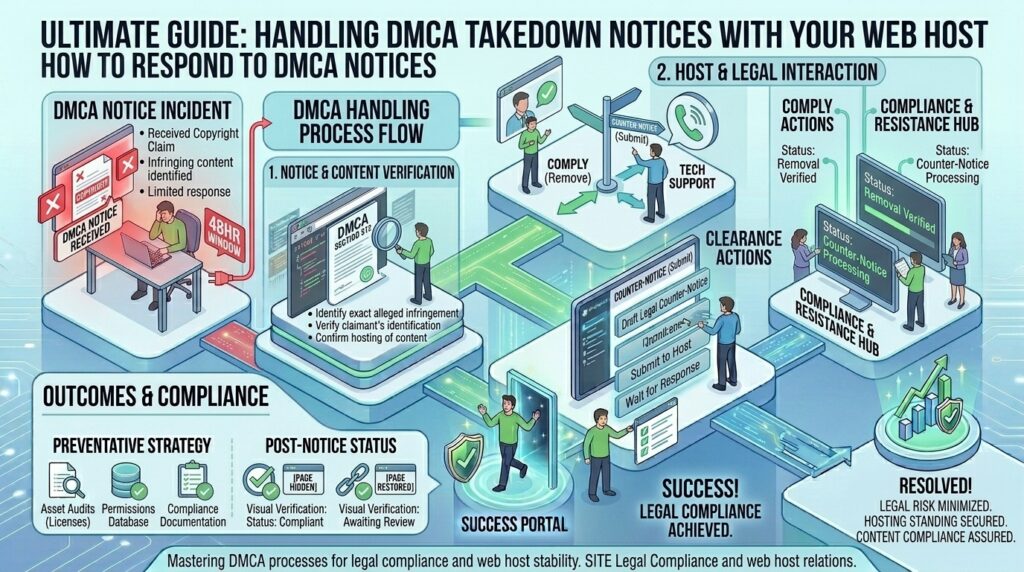
How to handle copyright DMCA takedown notices with web host? For digital entrepreneurs, web developers, content creators, and enterprise agency owners operating online ventures across major tech hubs like Texas, New York, California, Washington, and San Francisco, receiving an official Digital Millennium Copyright Act (DMCA) takedown notice is a stressful experience.
Whether your website hosts user-generated content, client blogs, media galleries, custom code snippets, or product images, getting an email from your web hosting provider stating that your site has been flagged for copyright infringement can trigger instant anxiety. Will your host shut down your server immediately? Will your domain be suspended? How do you respond legally and safely without harming your search engine optimization (SEO) rankings or business operations?
Navigating DMCA notices requires a calm, structured, and legally compliant approach. Understanding how US copyright law protects web hosts, how host abuse departments process complaints, and how to properly remove infringing material or file a counter-notice is essential for keeping your digital assets online.
This comprehensive, highly detailed masterclass guide will walk you through everything you need to know about handling copyright DMCA takedown notices with your web hosting provider.
Understanding the Digital Millennium Copyright Act (DMCA)
To handle a takedown notice effectively, you first need to understand the legal framework governing online copyright infringement in the United States.
1. What is the DMCA Safe Harbor Provision?
Passed in 1998, the Digital Millennium Copyright Act includes a crucial provision known as Section 512 (Safe Harbor). This provision protects web hosting providers, cloud platforms, and internet service providers from being held legally liable for copyright infringement committed by their users, provided the host meets two strict conditions:
- The host does not have actual knowledge that the material is infringing.
- Upon receiving a valid, legally compliant takedown notice from a copyright holder, the host expeditiously removes or disables access to the flagged content.
2. Why Your Web Host Acts Quickly
When a copyright holder sends a DMCA notice to your web host (sent to their designated DMCA agent), the host is placed on legal notice. If the host ignores the complaint or delays action, they lose their Safe Harbor protection and can be held contributorily liable for copyright infringement.
As a result, most web hosting companies (whether you use shared hosting, cPanel VPS, or managed cloud servers) operate under an automated or semi-automated protocol: they will temporarily suspend the specific URL, restrict file access, or disable your entire account until you address the complaint.
Phase 1: Triage — Evaluating the Takedown Notice
When an abuse notification lands in your inbox from your hosting provider’s legal or trust-and-safety department, do not panic and do not delete files blindly. Take a systematic approach to evaluate the notice.
1. Verify the Authenticity of the Notice
Unfortunately, online scammers and malicious competitors sometimes send fake DMCA notices to hosting providers to trick them into taking down competitor websites.
- Check the Sender: A legitimate DMCA notice will come directly from your web host’s official abuse or legal department (e.g.,
abuse@yourhost.com), forwarding the original complaint text. - Inspect Required Elements: Under US law (17 U.S.C. § 512(c)(3)), a valid DMCA takedown notice must include:
- A physical or electronic signature of the copyright owner (or authorized agent).
- Identification of the copyrighted work claimed to have been infringed.
- Identification of the specific material on your site that is claimed to be infringing, including the exact URL.
- Contact information for the complaining party (name, address, telephone number, email).
- A statement that the complaining party has a good faith belief that use of the material is not authorized by the copyright owner, its agent, or the law.
- A statement that the information in the notification is accurate, made under penalty of perjury.
If a notice lacks these elements or is overly vague (e.g., claiming “your whole website steals my content” without listing specific URLs), it is legally defective. You or your host can challenge its validity.
Phase 2: Immediate Action Steps Based on Your Situation
Once you have verified the notice, you must decide how to respond based on whether the copyright claim is valid or mistaken.
| Scenario | Recommended Action | Risk Level if Ignored |
| You genuinely used unauthorized content | Immediately remove/disable the file and reply to your host | High: Permanent account termination |
| It is a false positive / Fair Use / Authorized | Prepare a formal legal counter-notice | Medium: Content remains offline during review |
| The notice is automated spam / fraudulent | Notify your host’s legal team with evidence of authorization | Low: Usually dismissed after review |
1. Scenario A: The Content is Infringing (Take Down & Comply)
If a client, a freelance writer, or an automated scraper posted copyrighted text, images, software, or media on your website without permission:
- Action: Immediately delete or disable public access to the specific URL or file cited in the notice.
- Communication: Reply directly to your hosting provider’s abuse ticket confirming that the offending material has been permanently removed from your server. This satisfies the host’s legal requirements and usually results in the immediate restoration of your account or blocked URL.
2. Scenario B: You Hold the Rights, License, or it is Fair Use (Counter-Notice)
If you created the content yourself, purchased a valid commercial license, or believe your usage falls strictly under Fair Use (such as news reporting, criticism, commentary, or educational review):
- Action: You have the legal right under DMCA Section 512(g) to file a formal DMCA Counter-Notice.
Phase 3: Filing a DMCA Counter-Notice
Filing a counter-notice tells your web host that the material was removed or disabled as a result of mistake or misidentification, and requests that the host restore the content.
What Must Be Included in a Counter-Notice?
Your counter-notice must be sent in writing to your hosting provider’s designated DMCA agent and must contain:
- Your physical or electronic signature.
- Identification of the material that has been removed and the location where it appeared before it was removed (the exact URL).
- A statement under penalty of perjury that you have a good faith belief that the material was removed or disabled as a result of mistake or misidentification.
- Your name, address, telephone number, and a statement that you consent to the jurisdiction of the Federal District Court for the judicial district in which your address is located (or if you are outside the US, the judicial district where your host is located), and that you will accept service of process from the person who provided the original takedown notification.
What Happens After You File a Counter-Notice?
Once your host receives a valid counter-notice, they are legally required to forward it to the original complaining party.
- If the copyright owner does not file a lawsuit against you in federal court within 10 to 14 business days of receiving the counter-notice, your web host is legally permitted to restore your content without liability.
Phase 4: Proactive Best Practices to Prevent DMCA Disputes
Managing copyright complaints reactively is stressful. Implementing proactive safeguards protects your web hosting account from recurring strikes:
- Implement Strict User-Generated Content (UGC) Policies: If your website allows user registrations, forum posts, or media uploads, publish clear Terms of Service (ToS) and establish an internal DMCA Designated Agent email address so copyright owners contact you directly rather than shutting down your server through your host.
- Use Royality-Free or Licensed Media Assets: Never pull random images directly from Google Image search for your blog posts or client sites. Use licensed stock photography platforms (Shutterstock, Unsplash, Adobe Stock) and keep purchase receipts on file.
- Deploy Automated Content Audits: Regularly audit your website databases and media uploads for unverified assets, abandoned client projects, or scraped data feeds that could attract copyright complaints.
Frequently Asked Questions (FAQ)
1. Will my web host delete my entire website over a single DMCA notice?
Usually, no. Reputable hosts will isolate and suspend only the specific file or URL cited in the DMCA complaint. However, if you ignore multiple notices, host repeat copyright infringers, or fail to respond, the host has the right to suspend or terminate your entire hosting account.
2. What is a DMCA counter-notice and when should I use it?
A DMCA counter-notice is a legal document sent to your web host stating that your content was removed by mistake or misidentification. You should only use it if you own the copyright, have a valid commercial license, or are certain your use qualifies as legal Fair Use.
3. Can I be sued for filing a false DMCA counter-notice?
Yes. Under 17 U.S.C. § 512(f), anyone who knowingly material misrepresents that material was removed by mistake can be held liable for damages, including attorney’s fees and court costs incurred by the copyright holder or web host. Never file a false counter-notice.
4. How long does it take for a web host to restore content after a counter-notice?
If you file a valid counter-notice, your host forwards it to the complainant. If the complainant does not file a federal lawsuit against you within 10 to 14 business days, your host is legally allowed to restore the content.
5. Are web hosting companies legally liable for copyright infringement on user sites?
Under the DMCA Safe Harbor provisions, web hosts are generally not liable for user-generated copyright infringement, provided they act expeditiously to remove or disable access to the flagged material upon receiving a valid notice.
6. What should I do if I receive a fake or scam DMCA notice?
Verify the sender’s email address and cross-reference the alleged infringement URL. If the notice does not cite specific URLs or lacks required legal elements, reply to your host’s abuse team pointing out the legal defects in the notice.
7. Does receiving a DMCA notice hurt my Google SEO rankings?
A single isolated DMCA notice that is resolved quickly will not tank your SEO. However, if Google receives formal DMCA delisting notices sent directly to their search index under the DMCA, individual URLs may be removed from Google Search results.
8. What is the difference between a DMCA takedown and a trademark complaint?
A DMCA takedown specifically applies to copyrighted works (text, photos, code, video, music). Trademark complaints deal with brand names, logos, or commercial identifiers used in a way that causes consumer confusion, and they follow different legal dispute resolution procedures.
9. Can I ignore a DMCA notice if my website is hosted outside the United States?
While foreign hosting providers operate under different local laws, most international hosts still comply with standard international copyright treaties and DMCA-style takedown frameworks to avoid cross-border legal complications or losing datacenter peering agreements.
10. When should I hire an intellectual property (IP) attorney?
If you operate a major e-commerce store, high-volume media platform, or SaaS company, and you receive complex, recurring, or high-stakes copyright lawsuits or counter-notice disputes, consult an intellectual property attorney immediately to protect your business.
Conclusion
Receiving a copyright DMCA takedown notice from your web host can feel alarming, but treating it as a structured administrative and legal process ensures you can resolve it safely. By verifying notice authenticity, complying immediately with legitimate claims by removing infringing assets, or filing formal counter-notices when dealing with false positives, you can protect your web infrastructure, maintain compliance, and keep your digital ventures running smoothly.