How to Check If Your Web Hosting Server Is Running the Latest PHP Security Patches: The Ultimate Enterprise Security Masterclass
Welcome to thehostreviews.com—your premier authoritative destination for server security hardening, PHP version lifecycle audits, and web hosting infrastructure evaluations spanning major technology hubs from New York and San Francisco to Texas, California, and Washington.
Introduction: The Hidden Threat of Outdated PHP Binaries
Every website owner, developer, and digital agency understands the importance of updating their Content Management System (CMS), plugins, and themes. When a new vulnerability patch drops for WordPress, Drupal, or Magento, updating is treated as an urgent priority.
However, a massive security blind spot exists beneath the application layer: the underlying PHP runtime environment.
Your website’s PHP version dictates how your server processes code, handles memory, and interacts with databases. When security researchers discover a critical Remote Code Execution (RCE), SQL injection, or buffer overflow vulnerability in the PHP source code, the PHP Group and operating system maintainers (like Ubuntu, AlmaLinux, or CloudLinux) release immediate PHP security patches.
If your web hosting provider fails to apply these patches promptly, your server remains exposed to automated exploit scripts—even if every single plugin and theme on your website is fully up to date.
For businesses operating across competitive tech markets from New York to San Francisco, running an unpatched PHP environment is an open invitation for malicious actors. This comprehensive, step-by-step masterclass dives deep into the PHP release lifecycle, provides concrete methods to audit your server’s security status, and outlines a rigorous playbook to ensure your web host keeps your infrastructure protected.
Part 1: The Anatomy of PHP Security Releases and Lifecycles
Before auditing your server, it is critical to understand how PHP versioning and security patches operate.
1. The PHP Support Lifecycle
The PHP Development Team maintains a strict support model for every major and minor version release (such as PHP 8.1, 8.2, or 8.3):
- Active Support (2 Years): The version receives full bug fixes, feature improvements, and security patches.
- Security-Only Support (1 Year): After active support ends, the version enters a 12-month window where only critical security vulnerabilities are patched.
- End of Life (EOL): Once a PHP version reaches its EOL date, it receives zero further updates or security patches. Continuing to run an EOL PHP version means any newly discovered vulnerability will remain permanently unpatched by the developers.
2. Minor Version Releases vs. Security Backports
When a security flaw is found in an active PHP branch (e.g., PHP 8.2.7), the PHP group releases a patched minor version (e.g., PHP 8.2.8).
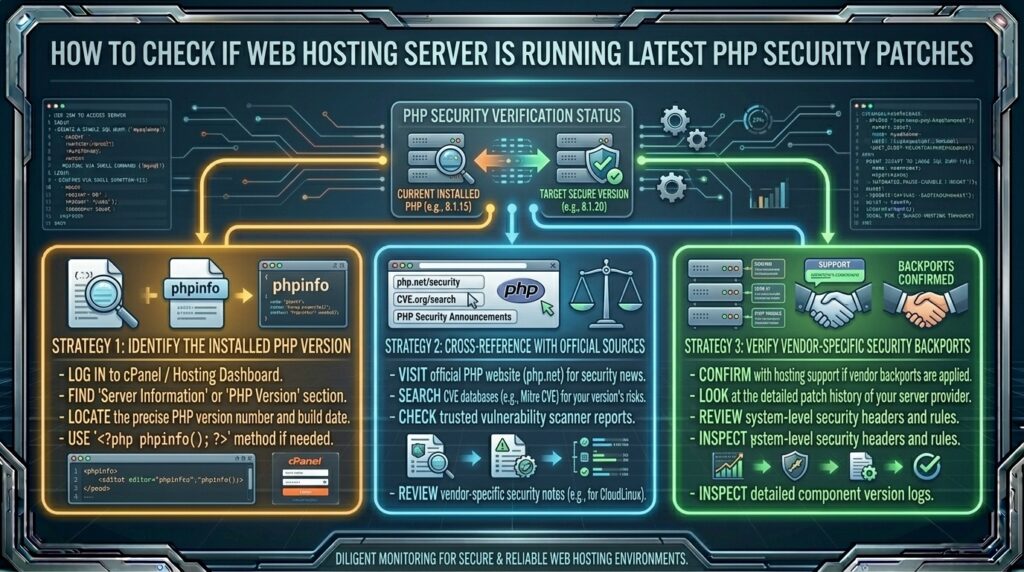
- Enterprise Linux Distributions (RHEL, AlmaLinux, CloudLinux): High-end hosting providers often utilize security backporting. Instead of upgrading the entire PHP package version number, their system administrators patch the specific security vulnerability directly into the existing stable package provided by the operating system vendor.
- The Challenge: This means a quick version number check might show an older string, but the underlying security patches may have been successfully applied by the host. Knowing how to look deeper than just the headline version number is essential.
Part 2: Step-by-Step Audit Protocol—Checking Your Server’s PHP Status
Never assume your web host is keeping your PHP environment secure. Execute this structured multi-step auditing protocol to verify your server’s exact security posture.
Step 1: Check Active PHP Versions via cPanel
The first step is identifying which PHP version your website is currently executing.
- Log into your cPanel Account Dashboard.
- Scroll down to the Software section and click on MultiPHP Manager.
- Review your domain list and check the PHP Version column.
- The Audit: Ensure your domain is running a modern, actively supported PHP version (such as PHP 8.2 or 8.3). If your site is still running PHP 7.4 or 8.0, your environment is severely EOL and vulnerable.
Step 2: Create a Detailed phpinfo() Security Audit Script
To verify the exact compilation flags, operating system kernel, and patch levels applied to your PHP environment, generate an inspection script:
- Open cPanel File Manager and navigate to your
public_html/document root. - Create a secure temporary file named
php_audit.php. - Add the following code block:PHP
<?php // Restrict access for safety during audit if ($_GET['token'] !== 'secure_audit_2026') { header('HTTP/1.0 403 Forbidden'); exit('Access Denied'); } phpinfo(); - Save the file and visit
[https://thehostreviews.com/php_audit.php?token=secure_audit_2026](https://thehostreviews.com/php_audit.php?token=secure_audit_2026)in your browser. - Review the resulting system report for key indicators:
- PHP Version String: Look at the exact minor release and build date.
- System / Server OS: Check whether your host is running a secure enterprise OS (like AlmaLinux 9 or CloudLinux) or an outdated legacy distribution.
- Disabled Functions: Check the
disable_functionsdirective. Secure hosts disable dangerous execution functions likeexec,shell_exec,passthru, andsystemglobally to prevent remote code execution exploits.
- CRITICAL SECURITY WARNING: Delete
php_audit.phpimmediately after completing your inspection.
Step 3: Run Automated Security Vulnerability Scanners
You can audit your PHP environment externally using professional security scanners:
- WPScan (or Wordfence for WordPress): Security plugins often include server environment checkers that flag outdated PHP versions and missing security extensions.
- Qualys SSL Labs / SecurityHeaders: While these focus primarily on transport layer security and HTTP headers, they provide holistic web posture insights.
Part 3: Evaluating Your Web Host’s Security Commitment
Not all web hosts handle PHP security patches with equal diligence. When auditing your hosting provider (whether based in New York, Texas, or California), evaluate how they manage server security updates:
- Do They Offer End-of-Life (EOL) PHP Extensions? Budget hosts often allow users to select ancient PHP versions (like PHP 5.6 or 7.0) via drop-down menus to maintain backwards compatibility for old client sites. If a host makes it easy to run unpatched software without issuing stern security warnings, their overall security culture is weak.
- How Fast Do They Patch Zero-Day Vulnerabilities? When a major zero-day PHP vulnerability makes global news, elite hosting providers deploy emergency server patches within 24 to 48 hours. Poor hosts wait for scheduled monthly maintenance windows, leaving your site exposed for weeks.
- Do They Use CloudLinux OS? Professional cPanel web hosts running CloudLinux isolate each hosting account into its own lightweight virtualized environment (LVE). Even if a shared server neighbour has an unpatched PHP script exploited, CloudLinux prevents attackers from pivoting to compromise your account.
Part 4: Advanced Server-Level Security Hardening
If you own a Virtual Private Server (VPS) or Cloud cPanel instance with root administrative access, you are directly responsible for ensuring your PHP security patches are applied. Execute these hardening steps:
Step 1: Enable Automatic Security Updates on Linux
Configure your operating system to automatically download and apply routine security patches for system packages, including PHP:
- For Ubuntu / Debian Servers:Bash
sudo apt update sudo apt install unattended-upgrades sudo dpkg-reconfigure -plow unattended-upgrades - For AlmaLinux / RHEL / CloudLinux Servers:Bash
sudo dnf install dnf-automatic sudo systemctl enable --now dnf-automatic.timer
Step 2: Utilize Enterprise PHP Repository Channels (Remi / EasyApache 4)
Never compile PHP manually from source code unless strictly necessary, as doing so makes tracking and applying security patches a manual nightmare.
- On cPanel servers, rely exclusively on EasyApache 4, which automatically pushes tested, patched RPM updates straight from cPanel’s centralized security pipeline.
- On standalone Linux servers, use official repository channels like the Remi Repository, which provides immediate, backported security updates for active PHP branches as soon as vulnerabilities are disclosed.
Step 3: Harden PHP Configuration Settings (php.ini)
Lock down your PHP environment to neutralize potential code execution exploits:
- Open your global
php.iniconfiguration file. - Enforce these security directives:Ini, TOML
expose_php = Off allow_url_fopen = Off allow_url_include = Off display_errors = Off log_errors = On disable_functions = exec, passthru, shell_exec, system, proc_open, popen, curl_multi_exec, parse_ini_file, show_source - Restart your web server (Apache, Nginx, or LiteSpeed-PHP) to apply the changes.
Part 5: Frequently Asked Questions (FAQ)
1. Why are PHP security patches just as important as CMS updates?
PHP security patches protect the core programming language interpreter that processes all website code. If PHP has an unpatched vulnerability, attackers can bypass your CMS authentication entirely.
2. How do I check what PHP version my hosting server is running?
You can check your PHP version by logging into cPanel, opening MultiPHP Manager, or by creating a temporary script running phpinfo();.
3. What does “End of Life (EOL)” mean for a PHP version?
An EOL PHP version has reached the end of its official support lifecycle and will receive zero further security patches or bug fixes from developers.
4. How do enterprise Linux distributions handle security patches?
Enterprise distributions often backport security patches into existing stable package versions rather than changing the primary version number.
5. What are PHP “backported” security patches?
Backporting involves taking a security fix from a newer PHP version and applying it directly to an older stable version maintained by enterprise Linux vendors.
6. Why do some web hosts allow customers to select outdated PHP versions?
Hosts sometimes provide legacy PHP versions for backwards compatibility with old client scripts, but running them creates a severe security risk.
7. How fast should a reliable web host apply emergency PHP patches?
A reputable web hosting provider should deploy emergency security patches for critical zero-day vulnerabilities within 24 to 48 hours of public disclosure.
8. What is CloudLinux and how does it protect PHP environments?
CloudLinux isolates cPanel accounts into separate virtualized environments (LVE), preventing security breaches or unpatched script exploits from spreading across shared servers.
9. How do I disable dangerous PHP functions on my server?
You can disable high-risk functions like exec, shell_exec, and system by listing them under the disable_functions directive in your server’s php.ini file.
10. When should I contact my web host regarding PHP security updates?
If your cPanel dashboard shows that your server is running an EOL PHP version and your host refuses or fails to provide modern PHP options, you should immediately migrate to a more secure hosting provider.
Conclusion
Checking whether your web hosting server is running the latest PHP security patches is a vital component of holistic digital asset management. By auditing your PHP versions through cPanel, inspecting system configuration reports, hardening php.ini directives, and choosing reputable hosting providers that prioritize rapid security patching, you safeguard your business against automated server exploits.