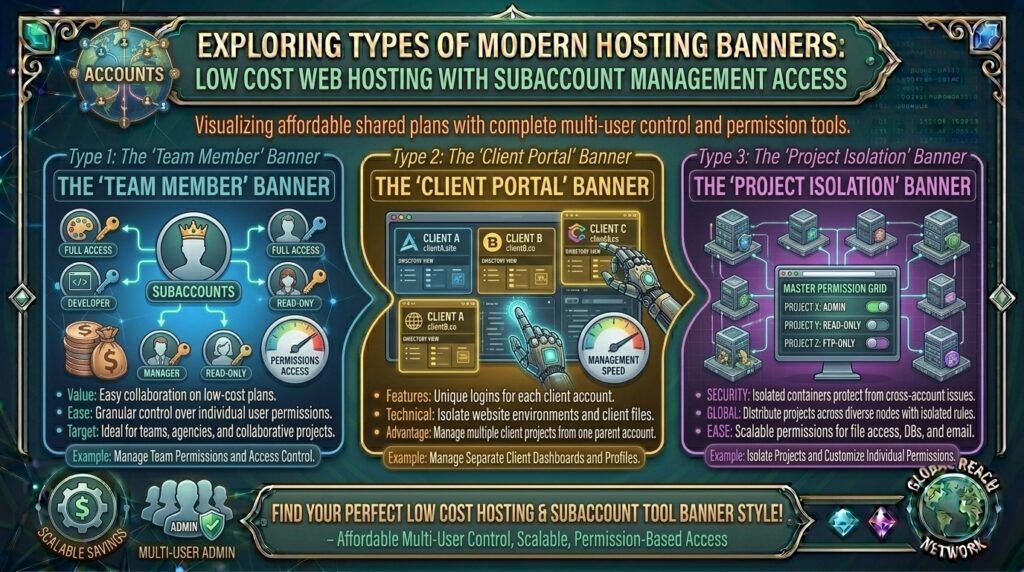
Whether you are managing digital agencies in Texas, developing web apps in San Francisco, coordinating multi-author marketing blogs in New York, running client portals in Washington, or testing software systems in California, scaling a web project rarely remains a one-person job. As your digital footprint expands, you inevitably need to grant specialized access: hiring a freelance developer to fix database queries, assigning a content manager to publish blog posts, or provisioning client-specific logins without handing over master administrative keys.
Historically, delegating access meant sharing your master control panel credentials—a security nightmare that exposed your entire server configuration, billing information, and primary domain root files to external contractors.
Today, the web hosting ecosystem offers a smarter alternative. Low-cost web hosting providers now bundle robust subaccount management access (powered by cPanel/WHM reseller features, custom user-role builders, or Plesk delegation tools) starting at just a few dollars a month.
In this comprehensive guide, we explore how budget subaccount hosting works, evaluate the top cost-effective providers, review permission-scoping strategies, and explain how multi-user delegation safeguards your long-term Google SEO performance and data security.
Understanding Subaccount Management: Master vs. Delegated Access
Before selecting a budget hosting plan, it helps to understand how multi-user privilege structures isolate workflows across shared server nodes.
+-------------------------------------------------------------+
|              The Subaccount Delegation Pipeline             |
+-------------------------------------------------------------+
|  [Master Administrator Account (You)]                       |
|    ├── Master Billing, Root Configuration & Global SSL      |
|    ├── Full Server Resource Quota (Disk, RAM, CPU)          |
|    │                                                        |
|    ├──> [Delegated Subaccount A: Developer Role]            |
|    │      └── Restricted to File Manager & phpMyAdmin       |
|    │                                                        |
|    └──> [Delegated Subaccount B: Content Editor Role]       |
|           └── Restricted to WordPress Dashboard / FTP Only  |
+-------------------------------------------------------------+
- The Security Flaw of Shared Logins: Giving a freelance designer your primary control panel password allows them unrestricted access to delete databases, modify DNS records, or view sensitive billing profiles.
- Granular Role-Based Access Control (RBAC): Modern subaccount frameworks allow you to provision isolated login credentials tailored precisely to an individual’s job description. A writer gets media upload access; a developer gets SFTP and database privileges; neither touches your master account profile.
- Resource Partitioning: Subaccount tools ensure that individual operators work within designated directories (
/public_html/subfolder/), preventing accidental modifications to core root system files.
Top Budget Web Hosts Offering Subaccount Management Features
Review how leading cost-effective hosting platforms compare when delivering multi-user delegation tools, granular permission controls, and budget-friendly pricing structures:
| Hosting Provider | Starting Promo Price | Subaccount / Delegation Tool | Control Panel | Best Suited For |
| InterServer | ~$6.00 / mo | WHM Reseller & cPanel Sub-Users | cPanel / WHM | Small agencies & multi-client management |
| Hostinger | ~$2.69 / mo | hPanel User Access Invitations | Custom hPanel | Team collaboration & client handoffs |
| ScalaHosting | ~$2.95 / mo | SPanel User Management Suite | SPanel / cPanel | Secure multi-user WordPress hosting |
| A2 Hosting | ~$2.99 / mo | cPanel Email & FTP Sub-Accounts | cPanel | Developer and freelancer handoffs |
In-Depth Analysis: Best Low-Cost Hosts for Multi-User Control
1. InterServer: Best Traditional WHM/cPanel Reseller Architecture
InterServer provides rock-solid shared and reseller hosting plans backed by a strict price-lock guarantee that prevents sudden renewal price spikes.
- The Delegation Mechanism: By leveraging entry-level reseller packages or cPanel’s native User Manager feature, you can create isolated subaccounts. This allows you to provision unique usernames and passwords that restrict users to specific FTP folders, email boxes, or databases.
- Performance: Powered by RAID-protected storage and reliable routing, InterServer ensures that multi-user workflows execute smoothly without resource contention.
2. Hostinger: Best Modern Interface with hPanel User Invitations
Hostinger redefines budget collaboration through its custom-built hPanel, which features an intuitive invitation-based user management system.
- The Delegation Mechanism: Instead of sharing passwords, you simply enter your colleague’s or developer’s email address into the Sharing menu. You can selectively grant access to specific websites, billing profiles, or domain controls while retaining master revocation power at any moment.
SEO Impact: How Secure Delegation Protects Google Search Rankings
While subaccount management is primarily an administrative tool, it plays an indispensable role in maintaining your technical search engine optimization metrics:
- Preventing Accidental Configuration Errors: Allowing untrained freelancers or clients loose administrative access often leads to broken
.htaccessfiles, deleted sitemaps, or corrupted robots.txt configurations. Restricting users to isolated subaccounts prevents catastrophic root-level mistakes that cause indexing drops. - Mitigating Malware and Code Injection: If a third-party developer uses an insecure local machine to access your server via shared master credentials, hackers can intercept those credentials and inject malicious SEO spam links into your database. Granular subaccount isolation limits the blast radius of compromised endpoints.
- Maintaining High Uptime Metrics: Structured user permissions reduce the likelihood of accidental server downtime, ensuring Googlebot crawlers never encounter persistent
500 Server Errorsthat could harm your keyword positions.
Pros and Cons of Budget Subaccount Hosting
The Pros 👍
- Enhanced Security Posture: Eliminates the risky practice of sharing master passwords among team members, contractors, and clients.
- Precise Permission Scoping: Restricts users strictly to the tools they need (e.g., file managers, database tables, or email routing).
- Professional Handoffs: Allows digital agencies to hand completed websites over to clients under their own isolated login credentials.
The Cons 👎
- Learning Curve for Advanced Roles: Configuring granular WHM reseller privileges or custom FTP jails requires a basic understanding of server user management.
- Resource Constraints on Shared Tiers: Multiple users executing heavy database queries simultaneously on an ultra-cheap shared plan can occasionally trigger CPU throttling limits.
Step-by-Step Guide: Creating Subaccounts in cPanel/WHM
Provisioning a secure, isolated subaccount using standard cPanel control panel tools follows a structured, foolproof workflow:
- Log Into Your Control Panel: Access your cPanel or WHM master management interface using your administrator credentials.
- Navigate to User Management: Search for the Preferences or Security section and click on User Manager.
- Add a New User: Click the Add User button. Input the user’s full name, email address, and desired username.
- Assign Domain and Email Access: Associate the new user with a specific domain name hosted on your account and set up their corresponding email address bindings.
- Configure Service Permissions: Check or uncheck permissions for FTP Access, Disk Quota, and Email Access. Ensure administrative privileges are disabled if the user only requires file editing.
- Save and Send Credentials: Click Save. The system will generate a secure setup link or password notification, allowing your team member to log into their isolated workspace safely.
10 Essential Tips to Optimize Cheap Subaccount Management Hosting
- Enforce Strong Passwords: Require all subaccount users to use complex passphrases combined with uppercase letters, numbers, and symbols.
- Enable Two-Factor Authentication (2FA): Turn on mandatory 2FA for all master and subaccount users to block unauthorized credential harvesting attempts.
- Audit User Access Regularly: Conduct a monthly review of active subaccounts and immediately delete user profiles for freelancers or contractors whose projects have concluded.
- Limit File Manager Scope: When granting file access, restrict users strictly to their designated subdirectory (
/public_html/client-folder/) rather than the root directory. - Back Up Before Granting Access: Always take a fresh manual backup of your website files and databases before handing over write access to a new developer.
- Monitor Resource Usage Logs: Keep an eye on your hosting control panel’s resource metrics to ensure subaccount scripts are not overconsuming CPU or RAM.
- Use SFTP Instead of Plain FTP: Ensure all file transfers executed by subaccount users utilize secure encrypted SFTP protocols over port 22.
- Restrict Database Privileges: If a developer only needs to modify a specific MySQL database, ensure their database user profile lacks permissions to drop or alter other tables.
- Educate Your Team on Security: Brief your subaccount users on phishing awareness and secure local machine practices to prevent credential leaks.
- Plan for Future Scalability: If your multi-user collaboration demands expand beyond shared server limits, seamlessly upgrade to a cheap VPS plan that supports full WHM root partitioning.
Frequently Asked Questions (FAQ)
1. What is subaccount management access in web hosting?
Subaccount management access is a hosting feature that allows a master administrator to create secondary, restricted user accounts with specific permissions for developers, writers, or clients without sharing master login credentials.
2. Is subaccount management included for free with cheap web hosting?
Many budget hosts include basic email and FTP sub-accounts free of charge, while advanced multi-user isolation (like WHM reseller access or panel-level delegation) typically requires a standard shared or reseller tier.
3. Why shouldn’t I just share my master control panel password?
Sharing master passwords exposes your entire hosting ecosystem—including billing details, root file directories, and other hosted websites—to accidental errors or malicious security breaches.
4. Can I limit a subaccount user to a specific folder?
Yes. Modern cPanel User Manager and FTP tools allow you to jail subaccount users to specific directories (e.g., /public_html/blog/), preventing them from accessing root system files.
5. Do subaccount users need technical expertise?
It depends on their assigned role. Content editors interacting only with WordPress dashboards require no technical skills, while developers using SFTP or phpMyAdmin need basic technical knowledge.
6. Can I revoke a subaccount’s access at any time?
Yes. Master administrators can suspend, edit, or permanently delete any subaccount instantly via their control panel dashboard with a single click.
7. Does subaccount management affect website loading speed?
No. Creating secondary user profiles does not impact server performance; however, heavy concurrent resource usage by multiple users can affect performance on overcrowded shared tiers.
8. What is the difference between an FTP subaccount and a control panel subaccount?
An FTP subaccount restricts the user strictly to file uploads and downloads via an FTP client, whereas a control panel subaccount can grant access to webmail, databases, or file managers.
9. How does subaccount management protect against malware?
By isolating user access and enforcing individual credentials, you minimize the risk of broad system infection and can easily trace which user account introduced a compromised file.
10. Which budget host offers the best subaccount management tools overall?
InterServer (via cPanel/WHM reseller features) and Hostinger (via intuitive hPanel user sharing) stand out as exceptional choices for low-cost, secure multi-user delegation.
Conclusion
Securing low-cost web hosting with subaccount management access allows growing businesses, agencies, and developers to scale team collaboration securely without inflating operational overhead. By leveraging cost-effective providers like InterServer and Hostinger, you gain access to powerful delegation tools that protect your master infrastructure while empowering external contributors.