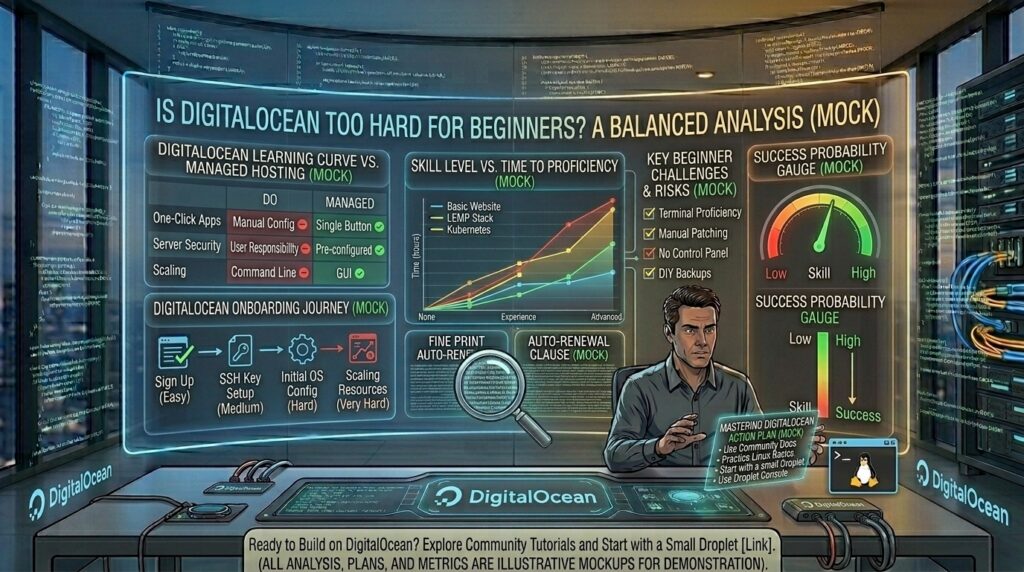
Is digitalocean too hard for beginners to learn? For web developers, digital entrepreneurs, and tech-savvy business owners expanding across dynamic digital markets—from New York and San Francisco to Los Angeles (California), Seattle (Washington), and Austin (Texas)—moving away from traditional shared hosting is an inevitable milestone. When websites grow past the constraints of basic entry-level plans, performance demands raw power, root access, and unthrottled resources.
Enter DigitalOcean. Renowned for popularizing cloud infrastructure via developer-friendly virtual private servers known as Droplets, DigitalOcean is celebrated for its clean user interface, transparent hourly pricing, and world-class documentation.
However, a recurring question stops aspiring webmasters in their tracks: Is DigitalOcean too hard for beginners to learn?
This exhaustive, in-depth guide breaks down the learning curve, compares managed versus unmanaged environments, explores essential tips, answers common FAQs, and reveals how mastering cloud computing impacts your Google SEO trajectory.
1. Understanding DigitalOcean: What Makes It Different?
To evaluate whether DigitalOcean is too difficult, you must first understand how it differs from traditional web hosts like Bluehost, HostGator, or SiteGround.
+-----------------------------------+-----------------------------------+
|      TRADITIONAL SHARED HOSTING   |       DIGITALOCEAN CLOUD VPS      |
+-----------------------------------+-----------------------------------+
| • Pre-installed cPanel dashboard  | • Bare Linux virtual machine      |
| • Automated software maintenance  | • Full root access & command line |
| • Restricted backend access       | • Complete server configuration   |
| • Fixed resource boundaries       | • Infinitely scalable on demand   |
+-----------------------------------+-----------------------------------+
- The Blank Canvas Approach: When you spin up a DigitalOcean Droplet, you are essentially renting a raw virtual server running a Linux distribution (such as Ubuntu, Debian, or CentOS) with a command-line interface (CLI). There is no pre-configured cPanel, automated file manager, or visual one-click installer waiting for you out of the box unless you use specific marketplace apps.
- Shared vs. Cloud Philosophy: Traditional hosts manage server security, firewall rules, PHP updates, and database optimization for you. On DigitalOcean, you are the system administrator. You dictate security protocols, configure firewalls, and handle software patching.
2. The Beginner’s Learning Curve: What Can You Expect?
Is the learning curve insurmountable for someone who has never touched a command line? Not necessarily, but it requires patience, resourcefulness, and a willingness to learn basic Linux administration.
Phase 1: The Initial Culture Shock (Days 1–3)
Logging into a terminal via Secure Shell (SSH) and staring at a blank blinking cursor can intimidate absolute beginners. Concepts like setting up SSH keys, updating packages via sudo apt update, and configuring basic firewall rules (UFW) represent a steep initial hurdle compared to clicking visual buttons on a managed dashboard.
Phase 2: Utilizing DigitalOcean’s World-Class Documentation (Days 4–7)
Where DigitalOcean shines—and why it is much friendlier to beginners than raw competitors like AWS or Google Cloud—is its Community Tutorials library. DigitalOcean publishes thousands of step-by-step guides covering everything from securing a fresh Linux server to installing WordPress or Node.js environments. Following these tutorials bridges the knowledge gap quickly.
Phase 3: Leveraging Control Panels and App Marketplaces
Beginners do not necessarily have to live entirely in the command line. You can bridge the gap using two beginner-friendly strategies:
- DigitalOcean Marketplace Apps: When creating a Droplet, you can select pre-built application images (like WordPress on LiteSpeed or Docker) that deploy with automated base configurations.
- Third-Party Control Panels: Installing free or paid open-source control panels like CyberPanel, HestiaCP, or CloudPanel onto your Droplet transforms your raw server into an environment that mimics a traditional shared hosting experience complete with a graphical interface.
3. Pros and Cons of DigitalOcean for Beginners
+-----------------------------------+-----------------------------------+
|              PROS                 |               CONS                |
+-----------------------------------+-----------------------------------+
| • Incredible performance-to-price | • Zero built-in customer support  |
|   ratio (Droplets start very low) |   for application-level bugs      |
| • Complete root access and server | • Steeper learning curve requiring|
|   customization                   |   basic terminal knowledge        |
| • Unmatched educational blog and  | • Manual configuration of backups,|
|   community documentation         |   security, and email servers     |
| • Predictable hourly billing model| • Risk of misconfiguration leading|
|                                   |   to security vulnerabilities     |
+-----------------------------------+-----------------------------------+
4. Impact on Google SEO and Core Web Vitals
When evaluating cloud infrastructure for an SEO-focused digital asset targeting competitive metropolitan hubs in New York, San Francisco, Texas, Washington, or California, performance dictates search success.
+-----------------------------------------------------------------------+
|                     SEO ADVANTAGES OF DIGITALOCEAN                    |
+-----------------------------------------------------------------------+
| 1. Blazing Fast TTFB: Dedicated CPU and NVMe storage deliver rapid    |
|    server response times, optimizing Core Web Vitals (LCP).           |
| 2. Zero Neighborhood Noise: Unlike shared hosting, your site's speed  |
|    is never throttled by neighboring websites.                        |
| 3. High Uptime Stability: Robust cloud nodes prevent 5xx crawl errors |
|    that damage search indexing.                                       |
+-----------------------------------------------------------------------+
Because DigitalOcean allows you to configure caching layers (like Redis or Varnish) and scale resources instantly with a single reboot, webmasters have absolute control over technical performance indicators that Google rewards with top-tier search visibility.
5. Strategic Tips for Beginners Learning DigitalOcean
If you are eager to master cloud hosting without risking your live website, follow these expert implementation tips:
- Start on a Staging Droplet: Do not test your first server configuration on a live business domain. Spin up a low-cost $4 or $6 test Droplet to experiment safely.
- Prioritize Security First: Before deploying any web files, secure your server. Disable root password logins, enforce SSH key authentication, configure a firewall (
UFW), and install fail2ban to block brute-force attacks. - Avoid Managing Your Own Email Server: Setting up a mail server on a raw VPS is notoriously difficult and prone to spam blacklisting. Use third-party transactional email providers (like Mailgun or Google Workspace) for reliable delivery.
- Enable Automated Backups: Always toggle DigitalOcean’s automated weekly backup option or take manual snapshots before running major software updates.
6. Frequently Asked Questions (FAQ)
1. Is DigitalOcean too hard for a complete beginner?
It has a steeper learning curve than traditional shared hosting because there is no built-in cPanel or customer service agent to fix code errors. However, with the help of DigitalOcean’s community tutorials and control panel integrations, motivated beginners can master it within a week.
2. Does DigitalOcean offer live customer support?
DigitalOcean provides support tickets for infrastructure, billing, and hardware-level issues, but they do not troubleshoot application code, fix WordPress bugs, or manage your server configuration for you.
3. Can I run WordPress on DigitalOcean?
Yes. You can install WordPress via DigitalOcean’s marketplace one-click apps, or install a free control panel like CyberPanel or CloudPanel to manage multiple WordPress websites easily.
4. What is a Droplet?
A “Droplet” is DigitalOcean’s term for a scalable virtual private server (VPS). Each Droplet runs on virtualized hardware with dedicated RAM, SSD/NVMe storage, and CPU allocations.
5. How much does DigitalOcean cost?
DigitalOcean operates on a predictable hourly and monthly billing model, with basic Droplet tiers starting at very affordable entry points, allowing you to scale up resources dynamically as your website grows.
6. Do I need to know how to use the command line?
While basic terminal commands (SSH, updating packages, editing text files) are helpful, beginners can bypass heavy command-line use by installing open-source graphical control panels onto their Droplets.
7. How do I secure my DigitalOcean server from hackers?
You should disable password-based SSH logins in favor of SSH keys, configure a strict firewall (UFW), install brute-force protection tools like fail2ban, and keep your operating system packages updated regularly.
8. Can I scale my server resources if my website traffic spikes?
Yes. DigitalOcean allows you to resize your Droplet’s CPU and RAM allocation. While scaling up disk space requires a permanent adjustment, it ensures your site handles sudden traffic surges effortlessly.
9. Does DigitalOcean include automated backups?
DigitalOcean offers automated weekly backups for a small percentage surcharge (roughly 20% of your Droplet cost), alongside free manual snapshots that you can capture anytime.
10. Is DigitalOcean good for SEO performance?
Yes. Because DigitalOcean provides clean, isolated server resources with fast NVMe storage and flexible configuration options, it delivers superior speed and Core Web Vitals performance that supports strong Google search rankings.
7. Conclusion
DigitalOcean is not inherently “too hard” to learn, but it requires a shift in mindset. If you expect a hand-holding, fully managed environment where every technical hiccup is resolved by support staff, DigitalOcean will feel challenging.